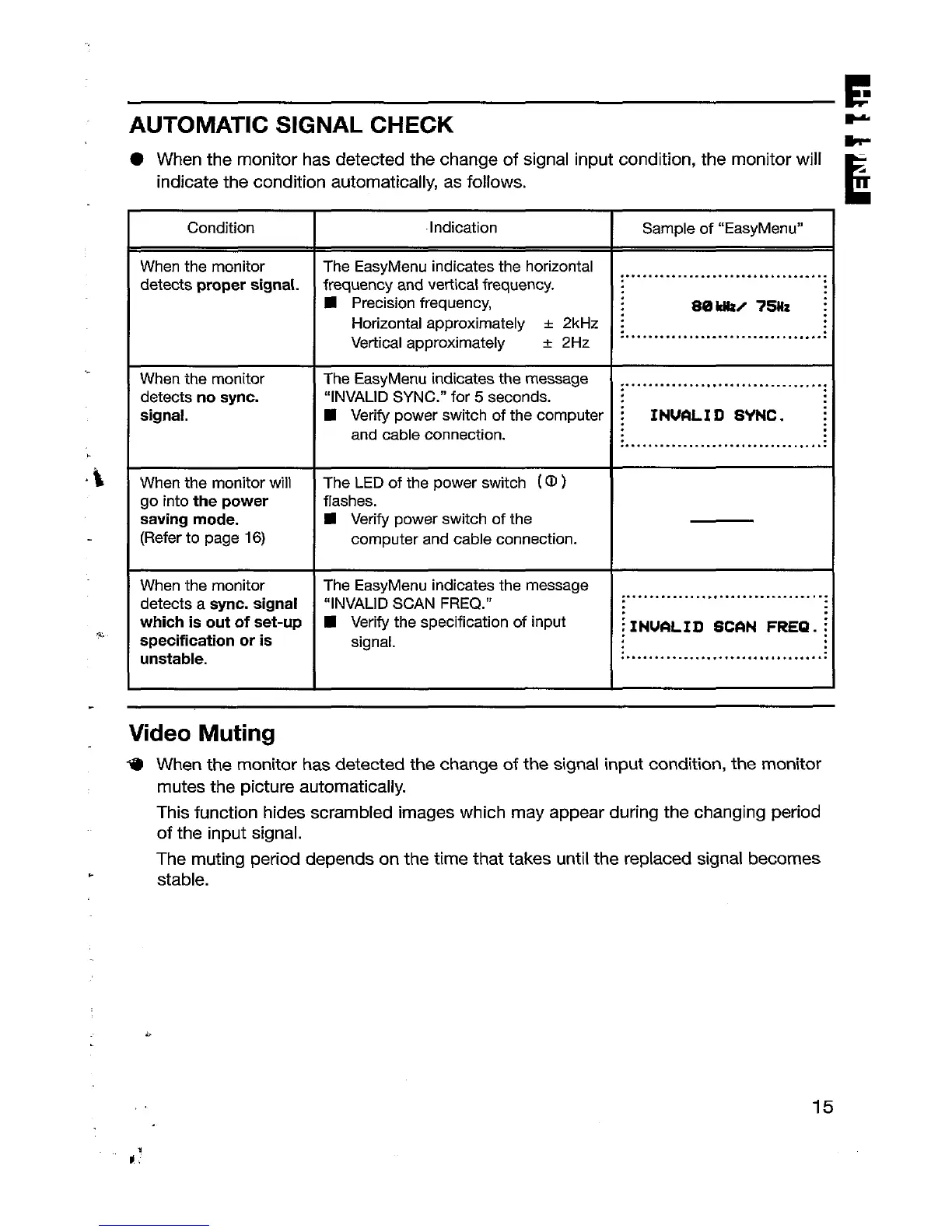
AUTOMATIC SIGNAL CHECK
● When the monitor has detected the change of signal input condition, the monitor will
indicate the condition automatically, as follows.
Condition
Indication
Sample of “EasyMenu”
When the monitor
The EasyMenu indicates the horizontal
detects proper signal.
frequency and vetilcal frequency.
..... ... .. .... .. .. . .... ..... ..... . ..
■ Precision frequency,
80 Htzz 7511z :
Horizontal approximately * 2kHz :
Vertical approximately
........ .. .. ..... .. . ....... . .... . ..;
& 2Hz
When the monitor
The EasyMenu indicates the message ~.... . ... . .. .. ... ... .. ....... ... . ...
detects no sync.
“INVALID SYNC.” for 5 seconds.
signal.
■ Verify power switch of the computer ; INWLI D SYNC . :
and cable connection.
... ...... ... .. ... . ... ... ...... ... . ..
When the monitor will
The LED of the power switch ( @ )
go into the power flashes.
saving mode. 9 Verify power switch of the
(Refer to page 16)
computer and cable connection.
When the monitor The EasyMenu indicates the message
detects a sync. signal “INVALID SCAN FREQ.”
.. ....... . .. .. ... ... .. ....... ... . ...
which is out of set-up E Verify the specification of input
; INUALI D SC6N FRER . ;
specification or is
signal.
unstable.
..... ... .. ... ... .. .. .... .... ..... . ..
Video Muting
*
When the monitor has detected the change of the signal input condition, the monitor
mutes the picture automatically.
This function hides scrambled images which may appear during the changing period
of the input signal.
The muting period depends on the time that takes until the replaced signal becomes
stable.
15






 To Next Page