EasyManua.ls Logo

Hitachi CP-EX5001WN - User Manual

Hitachi CP-EX5001WN
22 pages
Print Icon
To Next Page IconTo Next Page
Loading...
1
ENGLISH
WARNING Ź%HIRUHXVLQJWKLVSURGXFWEHVXUHWRUHDGDOOPDQXDOVIRUWKLV
SURGXFW$IWHUUHDGLQJWKHPVWRUHWKHPLQDVDIHSODFHIRUIXWXUHUHIHUHQFH
Ź+HHGDOOWKHZDUQLQJVDQGFDXWLRQVLQWKHPDQXDOVRURQWKHSURGXFW
Ź)ROORZDOOWKHLQVWUXFWLRQVLQWKHPDQXDOVRURQWKHSURGXFW
)LUVWRIDOO 2
(QWULHVDQGJUDSKLFDOV\PEROVH[SODQDWLRQ2
,PSRUWDQWVDIHW\LQVWUXFWLRQ2
5HJXODWRU\QRWLFHV 3
$ERXW(OHFWUR0DJQHWLF,QWHUIHUHQFH
3
'LVSRVDORI2OG(TXLSPHQWDQG%DWWHULHV
2QO\IRU(XURSHDQ8QLRQDQGFRXQWULHVZLWK
UHF\FOLQJV\VWHPV
4
&RQWHQWVRISDFNDJH 4
3UHSDULQJIRUWKHUHPRWHFRQWURO 5
$UUDQJHPHQW 6
&RQQHFWLQJZLWK\RXUGHYLFHV 7
)DVWHQLQJWKHDGDSWHUFRYHU 8
&RQQHFWLQJSRZHUVXSSO\ 9
)DVWHQLQJWKHFDEOH 9
7XUQLQJRQWKHSRZHU 10
$GMXVWLQJWKHSURMHFWRUVHOHYDWRU 11
'LVSOD\LQJWKHSLFWXUH 12
7XUQLQJRIIWKHSRZHU 13
5HSODFLQJWKHODPS 14
&OHDQLQJDQGUHSODFLQJWKHDLU¿OWHU
 16
5HSODFLQJWKHLQWHUQDOFORFNEDWWHU\ 18
8VLQJWKH&'PDQXDO 19
6SHFL¿FDWLRQV 20
7URXEOHVKRRWLQJ
:DUUDQW\DQGDIWHUVHUYLFH 21
Contents
NOTE,QWKLVPDQXDOXQOHVVDQ\FRPPHQWVDUHDFFRPSDQLHG³WKH
PDQXDOV´PHDQVDOOWKHGRFXPHQWVSURYLGHGZLWKWKLVSURGXFWDQG³WKHSURGXFW´
PHDQVWKLVSURMHFWRUDQGDOOWKHDFFHVVRULHVFDPHZLWKWKHSURMHFWRU
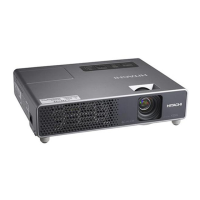
LCD Projector
CP-EX5001WN/CP-EW5001WN/CP-EU4501WN/
CP-EU5001WN
User's Manual (concise)
7KDQN\RXIRUSXUFKDVLQJWKLVSURMHFWRU
3OHDVHUHDGWKURXJKWKLVPDQXDOEHIRUHXVLQJWKLVSURGXFWLQRUGHUWRXVHVDIHO\
DQGXWLOL]HZHOOWKHSURGXFW

Questions and Answers

  • R
    Robert ThompsonAug 10, 2025
    How to increase brightness on Hitachi CP-EX5001WN?
    • J
      johnandersonAug 11, 2025
      If the brightness and/or contrast on your Hitachi Projector are set too low, use the menu functions to adjust the BRIGHTNESS and/or CONTRAST settings to a higher level.
  • A
    alexanderwrightAug 15, 2025
    What to do if Hitachi CP-EX5001WN overheats?
    • R
      robertschroederAug 16, 2025
      If there is a possibility that the interior portion of your Hitachi Projector has become overheated, turn the power off and allow it to cool down for at least 15 minutes. After it has sufficiently cooled down, check the unit, and then turn the power back on.
  • Z
    zimmermanjoshuaAug 20, 2025
    What to do if Hitachi Projector is overcooled?
    • M
      mariatapiaAug 20, 2025
      If there is a possibility that the interior portion of your Hitachi Projector has become overcooled, use the unit within the recommended usage temperature parameters.
  • J
    Joseph CarterAug 26, 2025
    How to fix no input signal on Hitachi CP-EX5001WN Projector?
    • M
      melissa77Aug 26, 2025
      If your Hitachi Projector displays 'no input signal', confirm the signal input connection and the status of the signal source.
  • C
    Christopher PatelAug 31, 2025
    What to do if the frequency of the input signal is not within the specified range on Hitachi CP-EX5001WN?
    • C
      Christopher AlvarezAug 31, 2025
      If the horizontal or vertical frequency of the input signal is not within the specified range for your Hitachi Projector, confirm the specs for your projector or the signal source specs.
  • B
    Brittany BoydSep 4, 2025
    What to do if Hitachi Projector input signal is improper?
    • M
      Margaret PerezSep 4, 2025
      If an improper signal is input to your Hitachi Projector, confirm the specs for your projector or the signal source specs.

Hitachi CP-EX5001WN Specifications

General IconGeneral
ResolutionXGA (1024 x 768)
Throw Ratio1.5 - 1.8:1
Display Technology3LCD
Projection Size30 - 300 inches
Zoom Ratio1.2x
Brightness5000 ANSI Lumens
Contrast Ratio20000:1
Weight3.5 kg
ConnectivityHDMI, VGA, USB, RS-232
Noise Level29 dB (Eco mode)
Keystone CorrectionVertical ±30°
Speakers10 W
Aspect Ratio4:3

Related product manuals