English
37
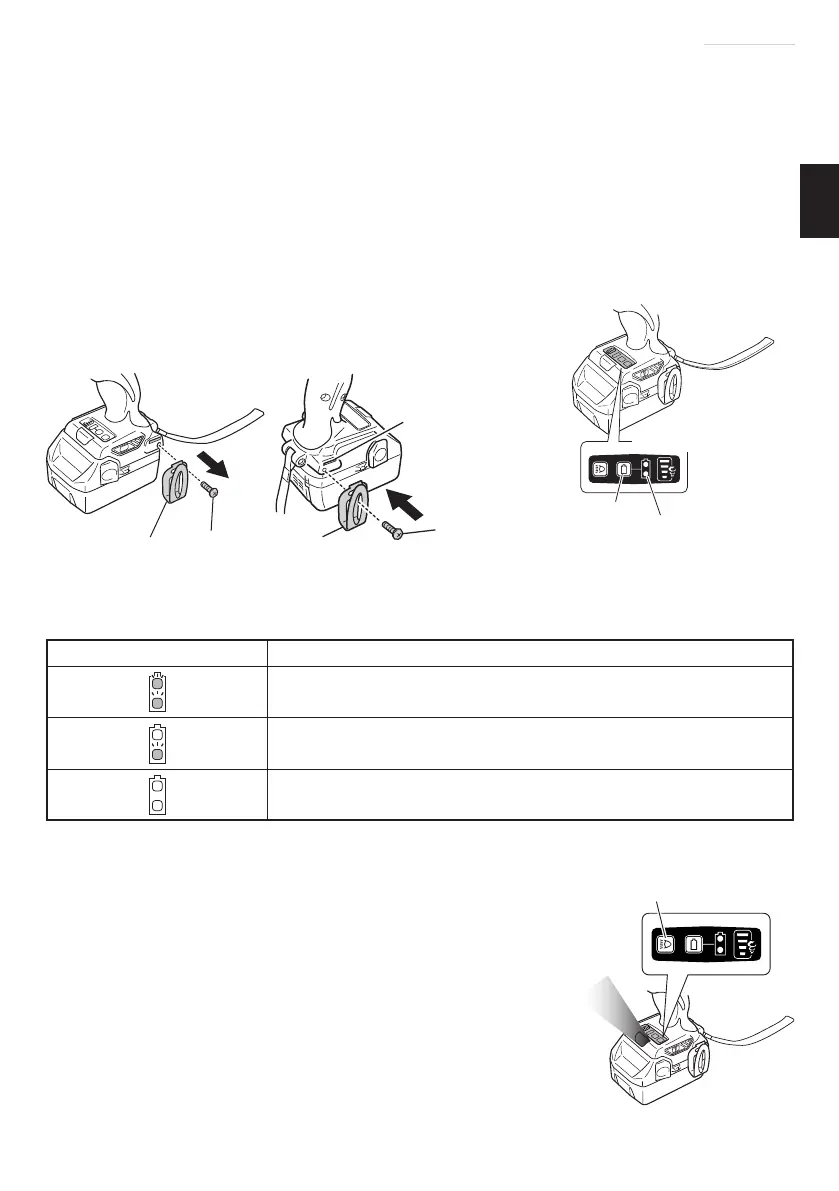
(1) Removing the hook.
Remove the screws fi xing the hook with screw driver. (Fig. 10)
(2) Replacing the hook and tightening the screws.
Install securely the hook in the groove of power tool and tighten the screws to fi x the hook
fi rmly. (Fig. 11)
9. About Remaining Battery Indicator
When pressing the remaining battery indicator switch, the remaining battery indicator lamp
lights and the battery remaining power can be checked. (Fig. 12)
When releasing your fi nger from the remaining battery indicator switch, the remaining
battery indicator lamp goes off . The Table 7 shows the state of remaining battery indicator
lamp and the battery remaining power.
Table 7
State of lamp Battery Remaining Power
The battery remaining power is enough.
The battery remaining power is a half.
The battery remaining power is nearly empty.
Re-charge the battery soonest possible.
As the remaining battery indicator shows somewhat diff erently depending on ambient
temperature and battery characteristics, read it as a reference.
NOTE
○
Do not give a strong shock to the switch panel or break it. It
may lead to a trouble.
○
To save the battery power consumption, the remaining battery
indicator lamp lights while pressing the remaining battery
indicator switch.
10. How to use the LED light
Every time you press the light switch on the switch panel, the
LED light lights or goes off . (Fig. 13)
To prevent the battery power consumption, turn off the LED
light frequently.
Switch panel
Remaining battery
indicator switch
Remaining battery
indicator lamp
Fig. 12
Light switch
Fig. 13
Screw
Hook
Fig. 10
Screw
Groove
Hook
Fig. 11
000Book_DV14DBL_ChS.indb 37000Book_DV14DBL_ChS.indb 37 2015/4/28 16:10:192015/4/28 16:10:19


 To Next Page