English
38
CAUTION
Do not expose directly your eye to the light by looking into the light.
If your eye is continuously exposed to the light, your eye will be hurt.
NOTE
To prevent the battery power consumption caused by forgetting to turn off the LED light, the
light goes off automatically in about 15 minutes.
11. Mounting and dismounting of the bit
(1) Mounting the bit
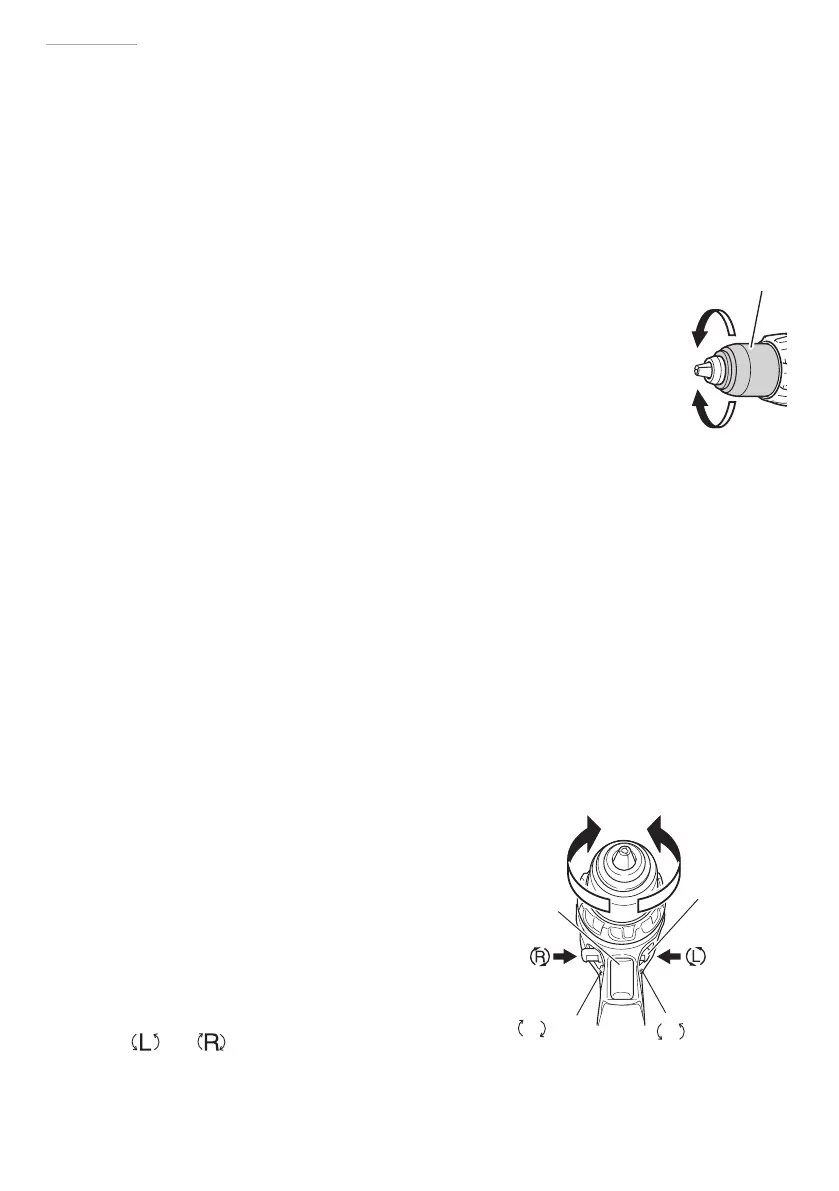
Loosen the sleeve by turning it toward the left (in the counterclockwise
direction as viewed from the front) to open the clip on the keyless chuck.
After inserting a driver bit, etc., into the keyless drill chuck, and tighten the
sleeve by turning it toward the right (in the clockwise direction as viewed
from the front). (See Fig. 14)
○
If the sleeve becomes loose during operation, tighten it further.
The tightening force becomes stronger when the sleeve is tightened
additionally.
(2) Dismounting the bit
Loosen the sleeve by turning it toward the left (in the counterclockwise
direction as viewed from the front), and then take out the bit etc. (See Fig. 14)
NOTE
If the sleeve is tightened in a state where the clip of the keyless chuck is opened to a
maximum limit, a click noise may occur. This is the noise that occurs when the loosening of
the keyless chuck is prevented and is not a malfunction.
CAUTION
When it is no longer possible to loosen the sleeve, use a vise or similar instrument
to secure the bit. Set the clutch mode between 1 and 11 and then turn the sleeve
to the loose side (left side) while operating the clutch. It should be easy now to
loosen the sleeve.
12. Automatic spindle-lock mechanism
This unit has automatic spindle-lock
mechanism for quick bit changes.
13. Confi rm that the battery is mounted correctly
14. Check the rotational direction
The bit rotates clockwise (viewed from
the rear side) by pushing the R-side of the
selector button.
The L-side of the selector button is pushed to
turn the bit counterclockwise. (See Fig. 15)
(The
and marks are provided on the
push button.)
Fig. 14
Sleeve
Tighten
Loosen
Push button
Trigger switch
mark
mark
Fig. 15
000Book_DV14DBL_ChS.indb 38000Book_DV14DBL_ChS.indb 38 2015/4/28 16:10:192015/4/28 16:10:19


 To Next Page