12
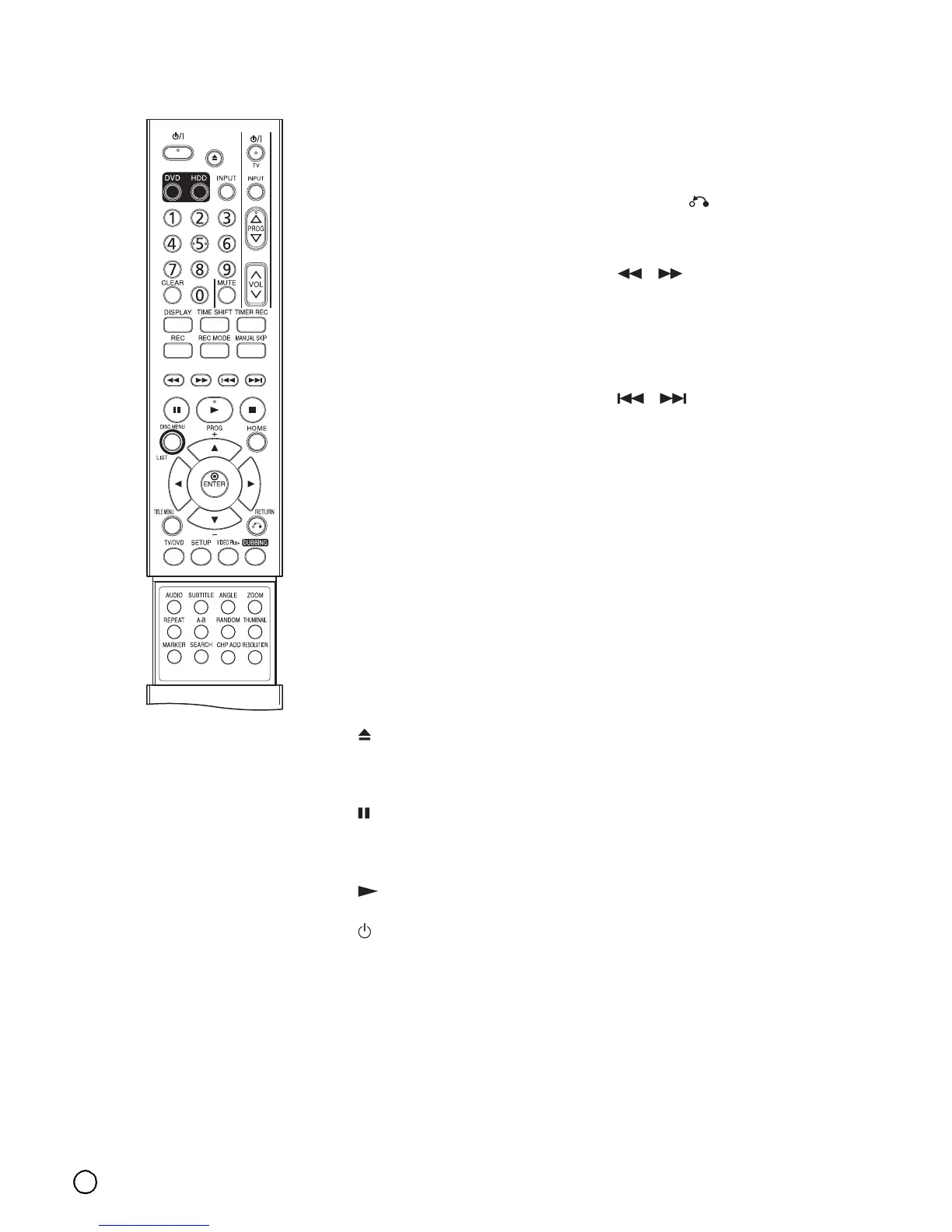
Remote Control
0-9 numerical buttons: (page 28,
53) Selects numbered options in a
menu.
(left/right/up/down):
Selects an option in the menu.
(up/down): Scans up or
down through memorized channels.
A-B: (page 29) Repeat sequence.
ANGLE: (page 30) Selects a DVD
camera angle, if available.
AUDIO: (page 29) Selects an
audio language (DVD) or TV audio
channel (CD).
CHP ADD: (page 50) Inserts a
chapter marker when playing/
recording.
CLEAR: (page 30, 37) Removes a
track number on the Program List
or a mark on the Marker Search
menu.
DISC MENU/LIST: (page 29, 48)
Accesses menu on a DVD disc.
Switches between Title List-Original
and Title List-Playlist menu.
DISPLAY: (page 27, 48) Accesses
On-Screen Display.
DUBBING: (page 59) Copies DVD
to HDD (or HDD to DVD).
DVD: (page 19) Select the
Recorder’s function mode to DVD.
ENTER
• Acknowledges menu selection.
• Displays information while
viewing a TV program.
HDD: (page 19) Select the
Recorder’s function mode to HDD.
HOME: (page 19) Accesses or
removes the HOME menu.
INPUT: (page 20, 46) Changes the
input to use for recording (Tuner,
AV1-4 or DV IN).
MANUAL SKIP: (page 29)
Pressing this button during
playback will skip to a scene 15
seconds forward.
MARKER: (page 30, 40) Marks
any point during playback.
(OPEN/CLOSE): (page 28)
Opens and closes the disc tray.
Operate this button only after
turning the recorder on.
(PAUSE/STEP): (page 28)
Pause playback or recording
temporarily, press again to exit
pause mode.
(PLAY): (page 28) Starts
playback.
/I POWER: (page 28) Switches
the recorder ON or OFF.
RANDOM: (page 33) Plays tracks
in random order.
(REC): (page 39, 40, 41) Starts
recording. Press repeatedly to set
the recording time.
REC MODE: (page 39, 41) Selects
the recording mode (XP, SP, LP or
EP).
REPEAT: (page 29) Repeat
chapter, track, title, all.
RESOLUTION: (page 15) Sets the
output resolution for HDMI.
RETURN ( ) (page 20, 30)
• Removes the menu.
• Display the menu of a video CD
with PBC.
/ (SCAN): (page 28, 40)
Search backward or forward.
SEARCH: (page 30, 40) Displays
Marker Search menu.
SETUP: (page 19, 21) Accesses or
removes the Setup menu.
/ (SKIP): (page 28, 36)
Go to next chapter or track. Returns
to beginning of current chapter or
track or go to previous chapter or
track.
(STOP): (page 28) Stops
playback or recording.
SUBTITLE: (page 29) Selects a
subtitle language.
THUMBNAIL: (page 50) Selects a
thumbnail picture for the current
title and chapter for use in the
Original and Playlist menu.
TIMER REC: (page 42, 45)
Displays Timer Record menu.
TIMESHIFT: (page 40) Activates
pause live TV/playback (timeshift)
for a live TV program.
TITLE MENU: (page 29, 30)
Displays the disc’s Title menu, if
available.
TV/DVD: (page 41) To view
channels selected by the recorder
tuner or by the TV tuner.
TV Control Buttons (page 62)
• POWER: Turns the TV on or off.
• INPUT: Selects the TV’s source.
• PROG +/–: Selects TV’s channel.
• VOL +/–: Adjusts TV’s volume.
• MUTE: Temporarily turns TV
sound OFF, press again to
restore.
VIDEO Plus+: (page 44) To
display the program menu for
VIDEO Plus+ System
programming.
ZOOM: (page 28) Enlarges DVD
video image.



 To Next Page