18
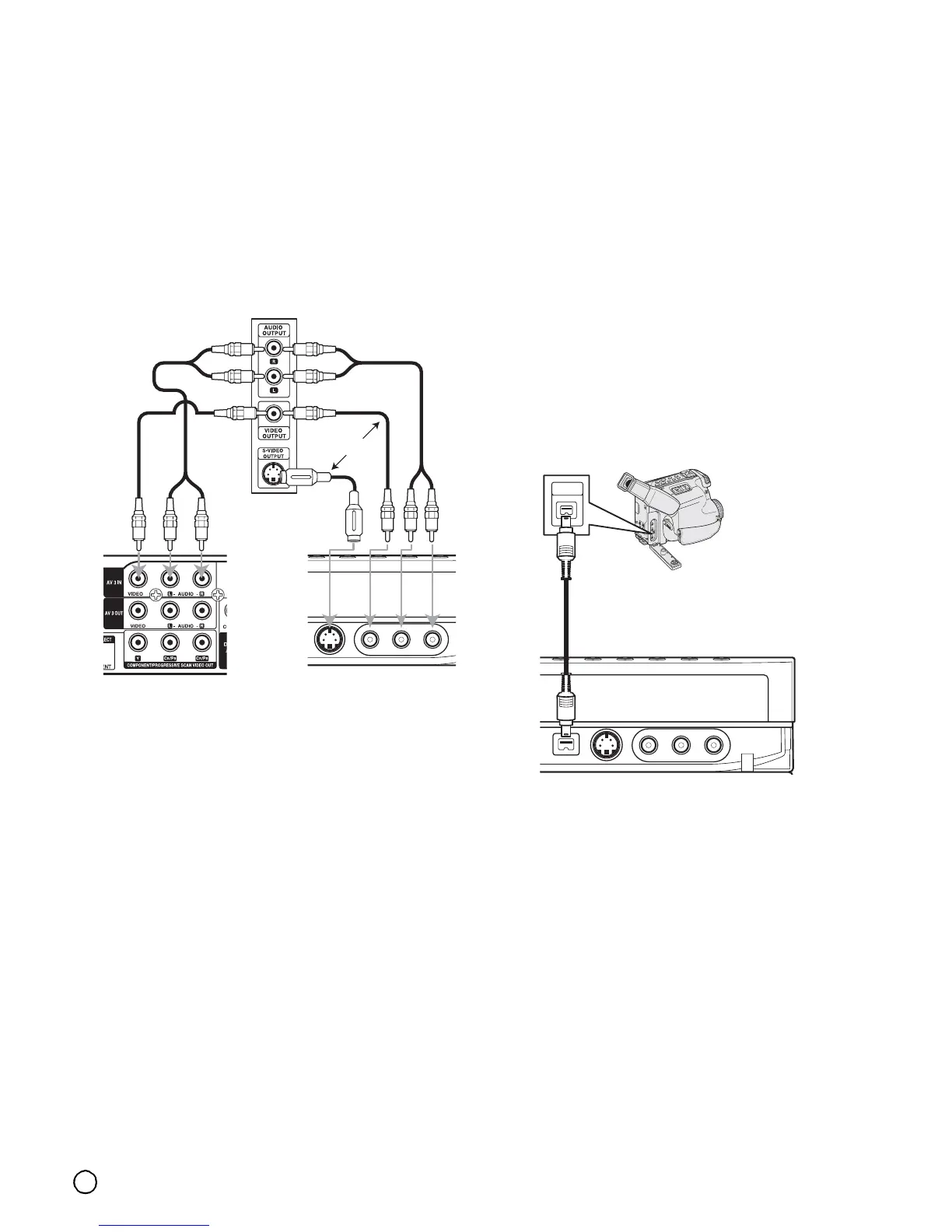
Connecting to the INPUT 3 or INPUT 4
Jacks
Connect the input jacks (AV3, AV4) on the recorder to
the audio/video out jacks on your accessory
component, using audio/video cables.
Note:
If you use the S-VIDEO IN jack on the front panel, the
VIDEO IN jack on the front panel is not available.
Connecting a Digital Camcorder
Using the front panel DV IN jack, it is possible to
connect a DV digital camcorder and digitally transfer
DV tapes to DVD.
Use a DV cable (not supplied) to connect the DV in/out
jack of your DV camcorder to the front panel DV IN jack
of this recorder.
(See page 46 for operating input switch.)
Notes:
• This jack is for connection to DV digital camcorder
only. It is not compatible with digital satellite tuners or
D-VHS video decks.
• The DV IN jack cannot be used to connect some
devices.
• No copy-guarded signal can be recorded.
• When you turn the recorder on after connecting the
DV cable, the recorder may not recognize the DV
digital camcorder.
Jack panel of Accessory Component
(VCR, Camcorder, etc.)
OR
Rear of
the recorder
Front of
the recorder
DV
IN/OUT
DV Digital Camcorder
Front of the recorder



 To Next Page