Ä19
CONNECTION OF YOUR AV
RECEIVERS AM/FM ANTENNAS
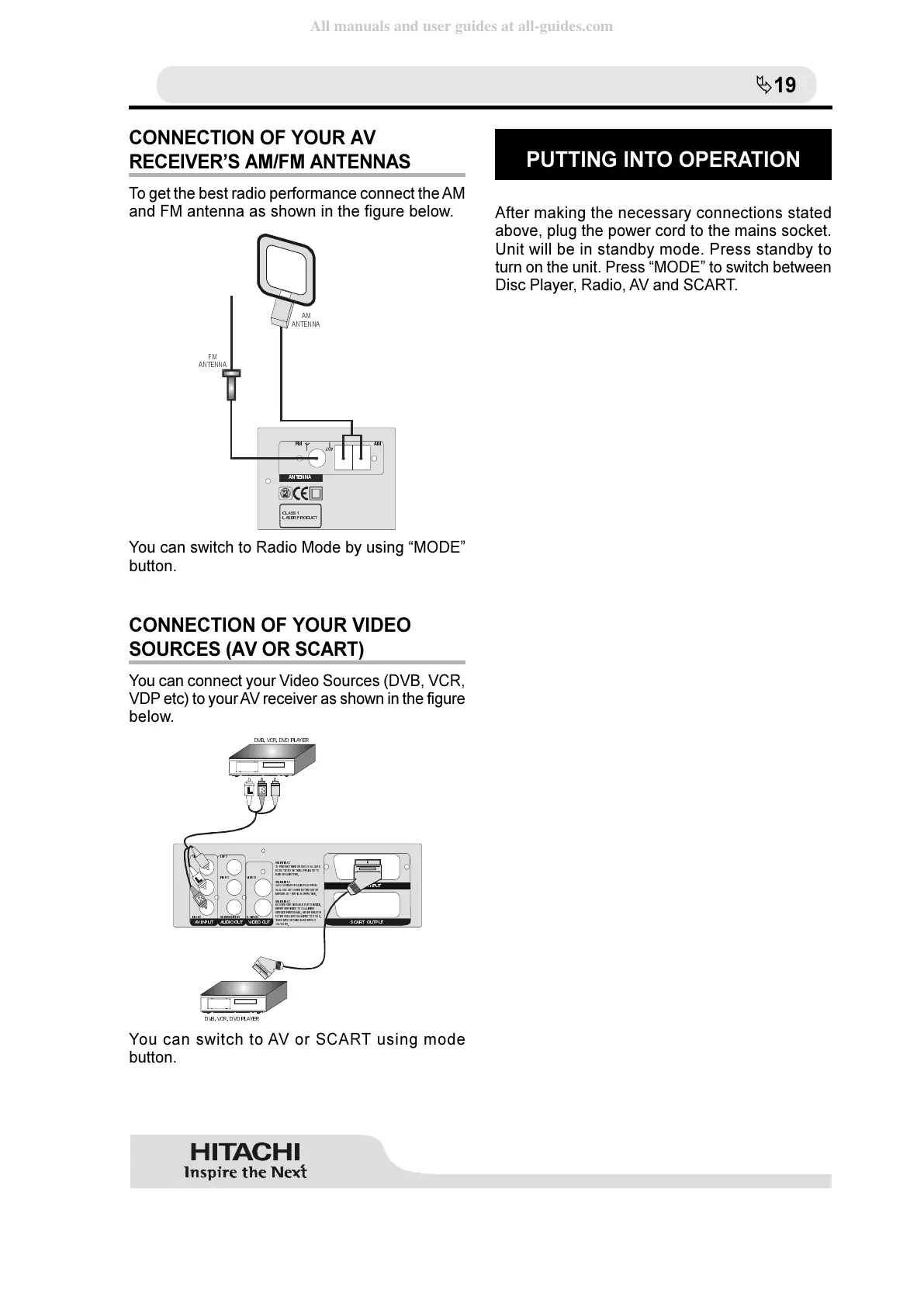
To get the best radio performance connect the AM
and FM antenna as shown in the figure below.
&/$66
/$6(5352'8&7
)0 $0
$17(11$
)0
$17 (11$
$0
$17(11$
You can switch to Radio Mode by using MODE
button.
CONNECTION OF YOUR VIDEO
SOURCES (AV OR SCART)
You can connect your Video Sources (DVB, VCR,
VDP etc) to your AV receiver as shown in the figure
below.
:$51,1*
:$51,1*
:$51,1*
7235 (9( 17),5(2 56 +2&.+$=$5'
'2 127(; 3 2 6 (7+,6 $33/,$1&(72
5$,125 0 2 , 6785(
$/ :$<65(0 29(0$,13/ 8*)520
:$// 6 2&.(7: +( 1 127,186(25
%() 25($1<6(59,&(23 (5$7,21
12 86( 56(59,&($%/(3$57 6 ,16,'(
5() (56 (59,&,1*7248$/, ),( '
6( 59,&(3(56211(/1( 9(55(0 2 9(
&29( 5681/(6648$/,)(' 72'262
7+,681,7&217$,16'$1* ( 5286
92/7$*( 6
9, '( 2
69,'(2
6&$57 , 1387
9, '( 2
/() 7
5,* +7
5,* +7
68 %:22)(5
/() 7
9,'(2 287$9,1387 $8',2287 6&$57287387
'9%9&5'9'3/$<(5
'9%9&5'9'3/$<(5
You can switch to AV or SCART using mode
button.
PUTTING INTO OPERATION
After making the necessary connections stated
above, plug the power cord to the mains socket.
Unit will be in standby mode. Press standby to
turn on the unit. Press MODE to switch between
Disc Player, Radio, AV and SCART.



 To Next Page