Ä39
MENU ITEMS
VIDEO SETUP
VIDEO SETUP page will not be available if the
player is Play or (Pre-Stop) mode.
TV DISPLAY:
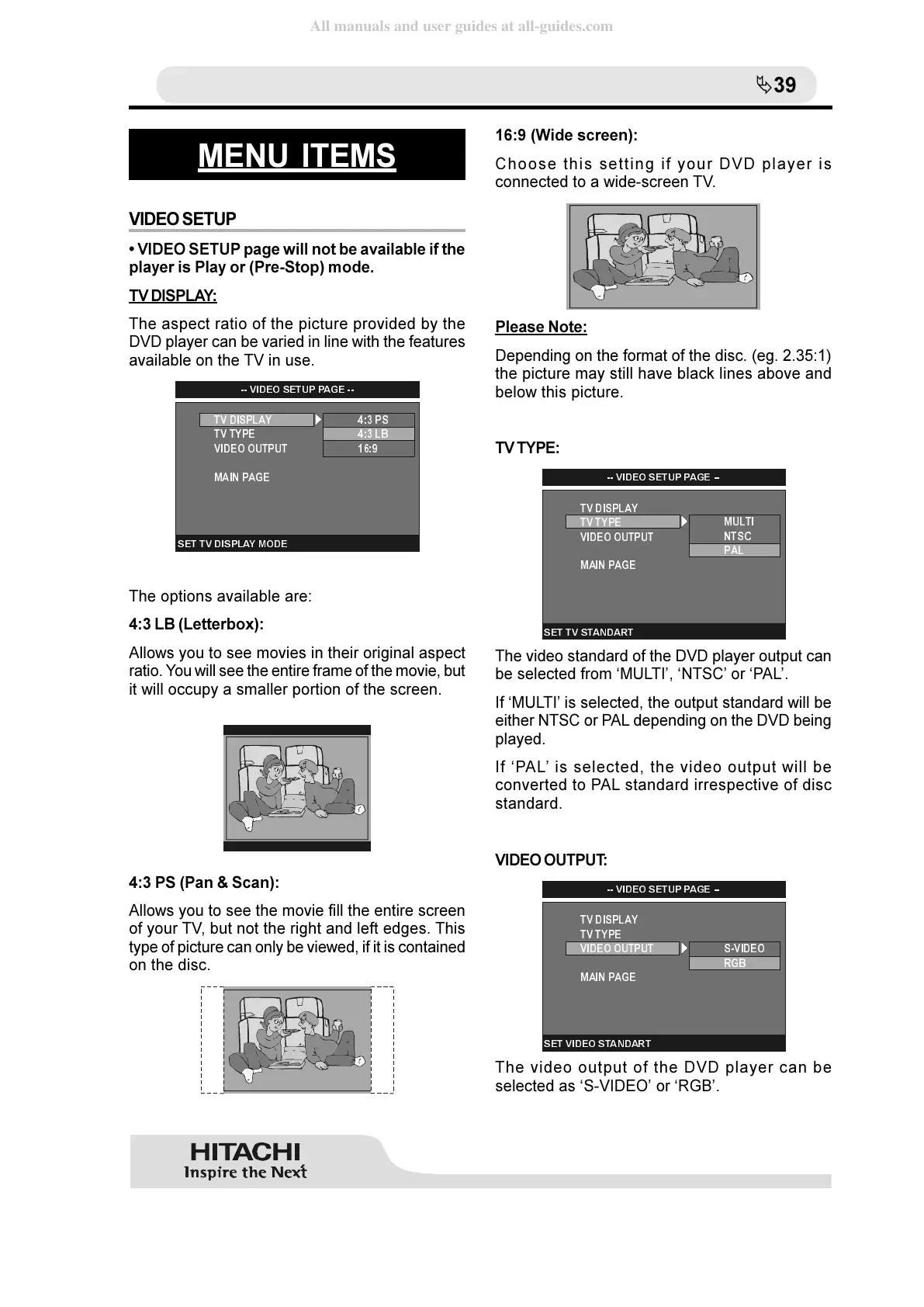
The aspect ratio of the picture provided by the
DVD player can be varied in line with the features
available on the TV in use.
9,'(26(7833$*(
6(779',63/$<02'(
79',63/$<
797<3(
9,'(2287387
0$,13$*(
36
/%
The options available are:
4:3 LB (Letterbox):
Allows you to see movies in their original aspect
ratio. You will see the entire frame of the movie, but
it will occupy a smaller portion of the screen.
4:3 PS (Pan & Scan):
Allows you to see the movie fill the entire screen
of your TV, but not the right and left edges. This
type of picture can only be viewed, if it is contained
on the disc.
16:9 (Wide screen):
Choose this setting if your DVD player is
connected to a wide-screen TV.
Please Note:
Depending on the format of the disc. (eg. 2.35:1)
the picture may still have black lines above and
below this picture.
TV TYPE:
9,'(26(7833$*(
6(77967$1'$57
79',63/$<
797<3(
9,'(2287387
0$,13$*(
08/7,
176&
3$/
The video standard of the DVD player output can
be selected from MULTI, NTSC or PAL.
If MULTI is selected, the output standard will be
either NTSC or PAL depending on the DVD being
played.
If PAL is selected, the video output will be
converted to PAL standard irrespective of disc
standard.
VIDEO OUTPUT:
9,'(26(7833$*(
6(79,'(267$1'$57
79',63/$<
797<3(
9,'(2287387
0$,13$*(
69,'(2
5*%
The video output of the DVD player can be
selected as S-VIDEO or RGB.



 To Next Page