- 25 -
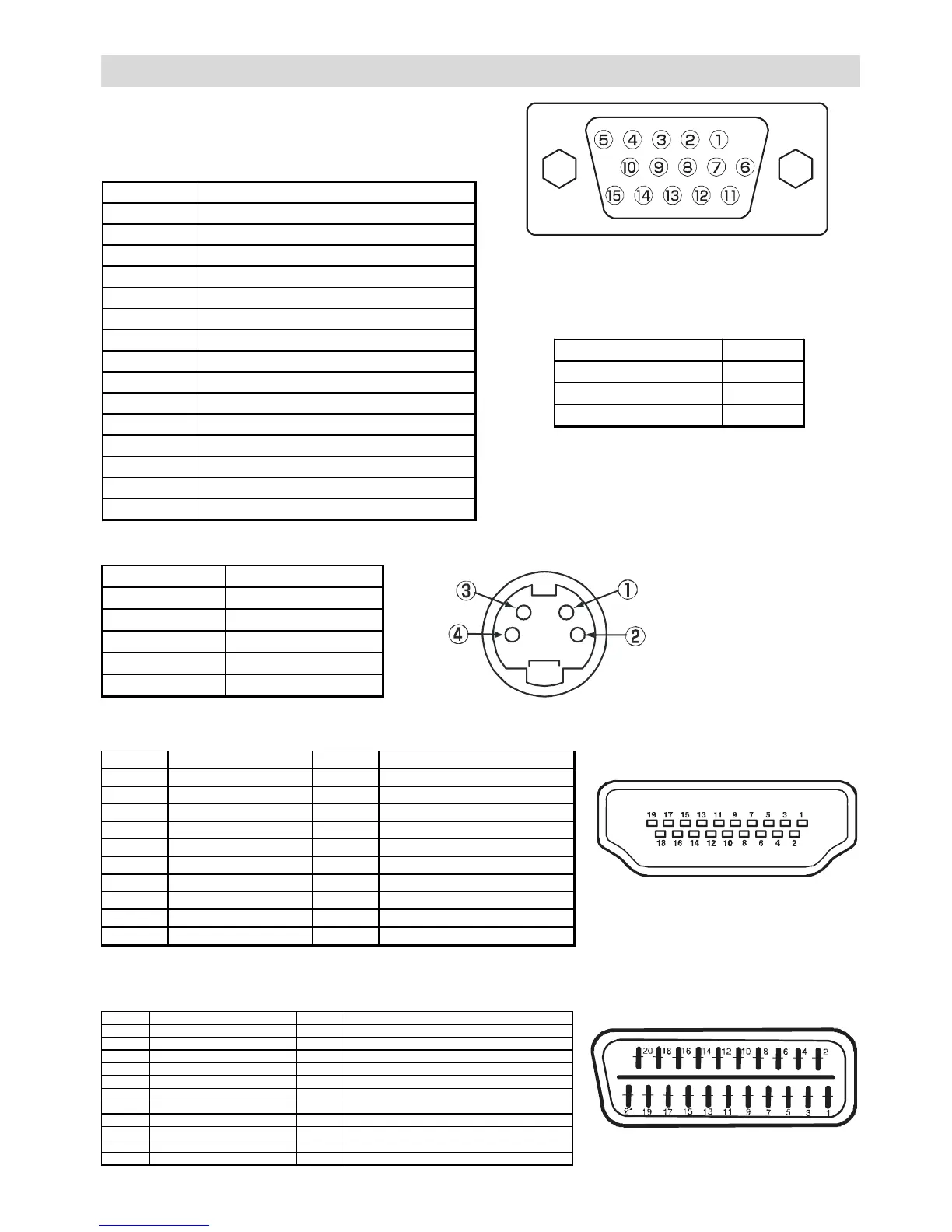
Signal Input
PC RGB Terminal (D-sub 15-pin connector)
Pin Input signal
1R
2 G or sync on green
3B
4 No connection
5 No connection
6 R.GND
7G.GND
8 B.GND
9 No connection
10 GND
11 No connection
12 [SDA]
13 H.sync or H/V composite sync
14 V.sync. [V.CLK]
15 [SCL]
• When different kinds of input signals are simul-
taneously input to the monitor via a graphics
board or the like, the monitor will automatically
select the signals in the following priority order:
Sync signal type Priority
H/V separate sync. 1
H/V composite sync. 2
sync.on Green * 3
• Even in the case of the recommended signals
shown on the following page, there may be
instances when correct display is not pos-
sible. In this case, use H/V separate sync, H/
V composite sync.
S-input connector pin specifications
Pin Input signal
1Y
2 Y-GND
3C
4 C-GND
Frame GND
HDMI connector pin specifications
Pin Input signal Pin Input signal
1 TMDS Data2+ 11 TMDS Clock Shield
2 TMDS Data2 Shield 12 TMDS Clock-
3 TMDS Data 2- 13 CEC
4 TMDS Data 1+ 14 Reserved (N.C. on device)
5 TMDS Data1 Shield 15 SCL
6 TMDS Data1- 16 SDA
7 TMDS Data0+ 17 DDC/CED Ground
8 TMDS Data0 Shield 18 +5V Power
9 TMDS Data0- 19 Hot Plug Detect
10 TMDS Clock+
SCART connector pin specifications
Pin Input signal Pin Input signal
1 AUDIO OUT (RIGHT) 12 Not used
2 AUDIO IN (RIGHT) 13 RGB-R GND
3 AUDIO OUT (LEFT/MONO) 14 GND
4 AUDIO GND 15 RGB-R / S.VHS CHROMINANCE IN
5 RGB-B GND 16 BLANKING SIGNAL
6 AUDIO IN (LEFT/MONO) 17 COMPOSITE VIDEO GND
7 RGB-B IN 18 BLANKING SIGNAL GND
8 AUDIO / RGB SWITCH / 16:9 19 COMPOSITE VIDEO OUT
9 RGB-G GND 20 COMPOSITE VIDEO / S.VHS LUMINANCE IN
10 Not used 21 GND / SHIELD (CHASSIS)
11 RGB-G IN
Specifications


 To Next Page