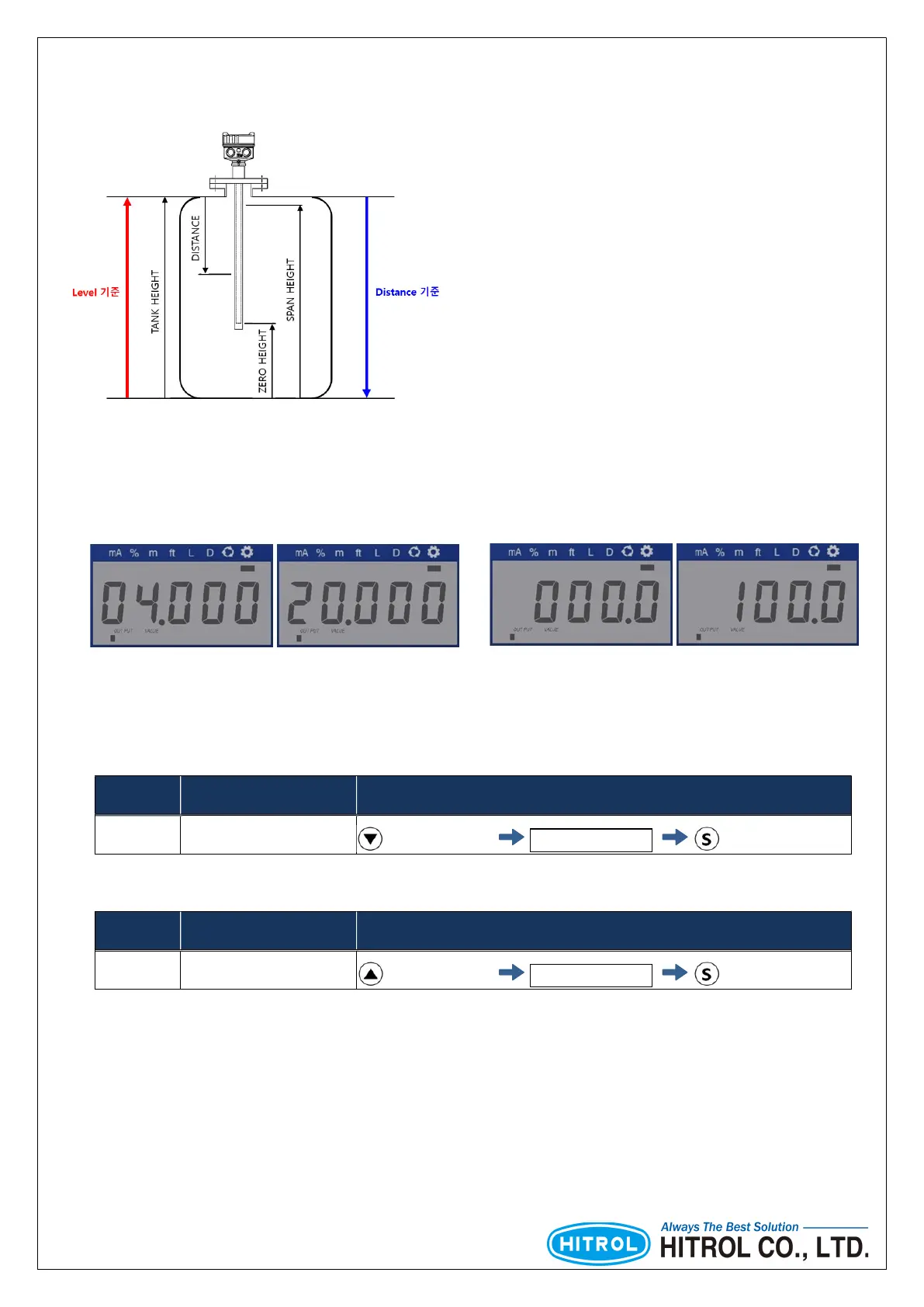
■ Height Setting
■ Zero, Span Quick Setting
□ Setting Screen
※ The default unit is set to “%”.
□ Zero Setting
□ Span Setting
※ Span setting when the level are more than 50%.
□ Others
No. Contents Quick Menu Setting
[02] Zero Setting Press for 1 sec. input the value Press for 1sec.
No. Contents Quick Menu Setting
[02] Span Setting Press for 1 sec. input the value Press for 1sec.
■ Level
This refers to the direction in which the medium is raised based on the
bottom of the tank.
■ Zero Height
The distance from the bottom of the tank to the zero point is called
“Zero Height”.
■ Span Height
T
he distance from the bottom of the tank to the span point is called
“Span Height”.
■ Tank Height
The distance from the bottom of the tank to the top of the tank is
called “Tank Height”.
■ Distance
This refers to the direction of the downing of the medium from the
top of the tank.
mA Setting
Percent Setting
▶ Zero & Span can be set regardless of display mode status
▶ It can set, save, and cancel the values. (Refer to Table 3)
changed when Zero & Span are setting.



 To Next Page