EasyManua.ls Logo

HITROL HT-100RT - 4. Setting and Operating; How to enter to Setting Manu; How to return to Setting Mode

Default Icon
34 pages
Print Icon
To Next Page IconTo Next Page
To Previous Page IconTo Previous Page
Loading...
4. Setting and Operating
How to enter to Setting Manu
How to return to Setting Mode
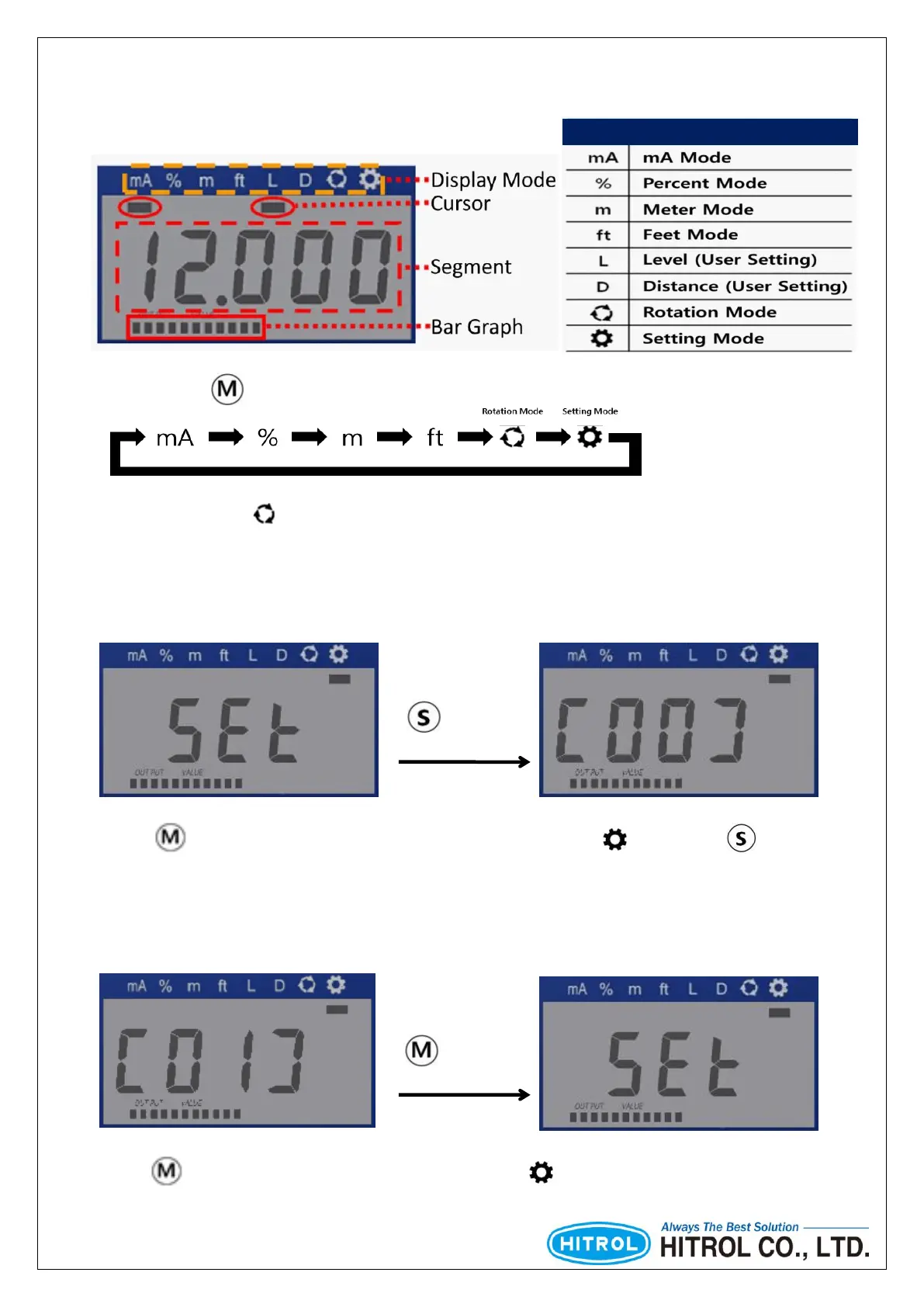
Display Mode
1 sec.
1 sec.
Whenever button is pressed, Display Mode is switched sequentially.
Rotation mode ( ) show each display mode automatically at interval of 1 second by default. It can
be set up to 10 second at intervals of 0.5 seconds.
Press button until the cursor is located to Setting Mode ( ) and Press button
for 1 second to enter Setting Menu (flickering: Green LED)
Press button for 1 second to exit to Setting Mode ( ). (flickering : Green LED)

Other manuals for HITROL HT-100RT

Related product manuals