8
MAINTENANCE
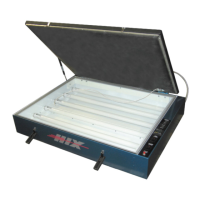
GLASS CLEANING OR BULB REPLACEMENT
In order to maintain short exposure times, keep the unit’s ex-
posure glass clean. Dusting is usually suffi cient. If more clean-
ing is required use a soft cloth moistened with alcohol. A dusty
environment will require more cleaning.
When you notice your exposure times getting longer or if the lamp
fails to operate, check the Troubleshooting Chart.
To clean back side of glass or replace bulbs:
1. Carefully lift front of glass from the gasket (leave back of glass
resting on its gasket).
2. Remove old bulb, Insert new bulb.
3. Carefully replace the glass as it was before.
4. Clean underside and lay back down carefully.
WARNING: To lift glass use fl exible (non rigid) item such as
putty knife. If you lift the glass, do so carefully so as to not
scratch or break the glass. Never use a screwdriver.
VACUUM PUMP MAINTENANCE
It is recommended to change the vacuum pump oil after 50 hours
of usage. The purity of the oil will determine the fi nal vacuum level
achieved. Always use the CPS recommended vacuum pump oil
(VPOQ/VPOP/VPOG). The oil provided with the pump has been
specially blended to maintain maximum viscosity at normal running
temperatures as well as cold weather starts.
OIL CHANGE PROCEDURES:
1. Be sure the pump oil is warmed up. If not warm, turn vacuum
pump “ON” for 10 minutes.
Vacuum
Bleeder Cord
5
SCREEN EXPOSURE
DETERMINING YOUR OPTIMUM EXPOSURE TIME
NOTE: This procedure should be followed for each new emulsion
type, new mesh count or mesh type (i.e. yellow, orange, white).
This procedure should also be followed periodically since the
bulb intensity will lessen with age.
Exposure Calculator (Preferred Method)
See your emulsion supplier for an exposure calculator and follow
their instructions.
By Step Trial Method
Expose dried coated screen in 1 minute intervals as follows:
1. Place cardboard sheet between positive and glass leaving ap-
proximately 2” of positive exposed. After 1 minute, move card-
board approximately 2” more and now expose for 1 minute. Then
move cardboard a 3rd time approximately 2” expose once again.
Repeat at least to 4 minutes. Now you have 4 expose areas of
1, 2, 3 and 4 minutes.
2. Inspect your newly exposed screen for proper exposure.
Underexposed: results in weak stencil with poor emulsion
adhesion and reduced resistance to printing inks and wash up
solvents. Overexposed: results in loss of fi ne detail.
3. Once you have determined the proper exposure for your emulsion
type fi ll in the chart provided at end of this manual as a ready
reference. This will save you time in the future.
NOTE: This procedure should be followed for each new emulsion
type, new mesh count or mesh type (i.e. yellow, orange, white).
This procedure should also be followed periodically since the
bulb intensity will lessen with age.


 To Next Page
 Loading...