−6−
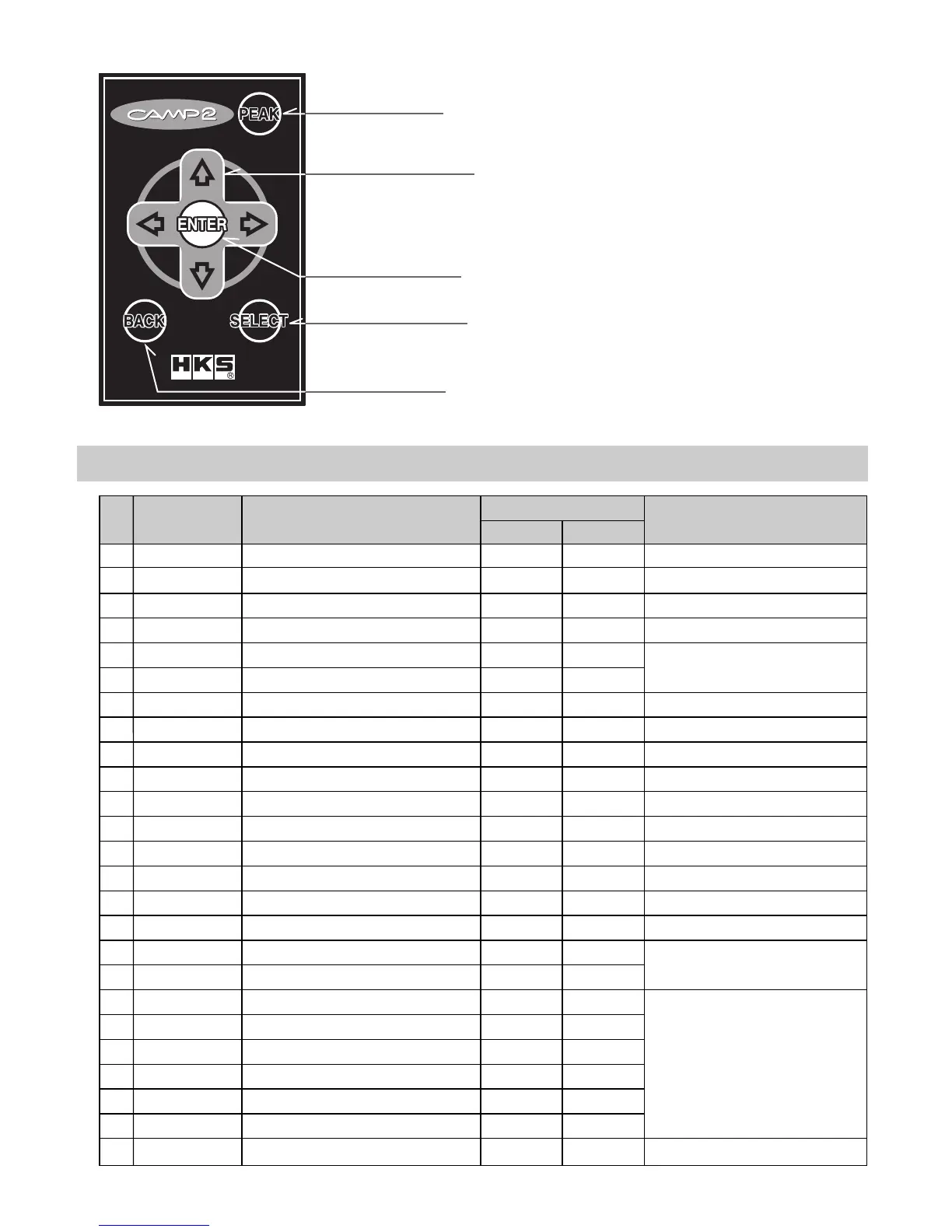
●CAMP2 Remote Controller
1.PEAK Button
2.Directional Arrow
Buttons (4)
3.ENTER Button
4.SELECT Button
5.BACK Button
2. ITEMS ON THE SCREEN
Item
SPEED
REV
WATER
IGN
CORRECT
LEARN
AIR
IN_TEMP
THROTTLE
IN_MAIN
O2_VOLT
AIRFLOW
INJECTOR
BATTERY
ECO
POWER
A/F
KNOCK
IF BOOST
IF WATER
IF OIL_T
IF OIL_P
IF FUEL_P
IF EXT_T
NONE
Description
Speed
Engine RPM
Water Temperature
Ignition Timing
A/F Correction Value
A/F Learning Value
Intake Air Volume
Intake Air Temperature
Throttle Position
Intake Manifold Pressure
O2 Voltage
Airflow Voltage
Injection Time
Battery Voltage
Fuel Efficiency
Horsepower
A/F Value
Knocking Value
I/F Unit's Boost Pressure
I/F Unit's Water Temperature
I/F Unit's Oil Temperature
I/F Unit's Oil Pressure
I/F Unit's Fuel Pressure
I/F Unit's EGT
−
№
1
2
3
4
5
6
7
8
9
10
11
12
13
14
15
16
17
18
19
20
21
22
23
24
25
Unit
SI
km/h
rpm
℃
CA
%
%
g / s
℃
%
×100kPa
V
V
ms
V
km / L
kW
−
−
×100kPa
℃
℃
×100kPa
×100kPa
℃
−
USA
mph
rpm
゜F
CA
%
%
g / s
゜F
%
PSI
V
V
ms
V
m / USG
HP
−
−
PSI
゜F
゜F
PSI
PSI
゜F
−
1.PEAK Button
Press this button to show the peak value.
2.Directional Arrow Buttons (4)
Press these directional arrow buttons to
relocate the pointer or change the value.
3.ENTER Button
Press this button to set the edited value or
setting.
4.SELECT Button
Press this button to select the menu.
5.BACK Button
Press this button to go back to the previous
screen.
Can only be displayed when an F-CON
is connected, and the F-CON iS is
connected to the OBD2 port.
These items can be shown when F-CON
& A/F Knock Amp. are connected.
Remarks
These items can be shown when the I/F
Unit is connected.



 To Next Page