−5−
NAMES & FUNCTIONS
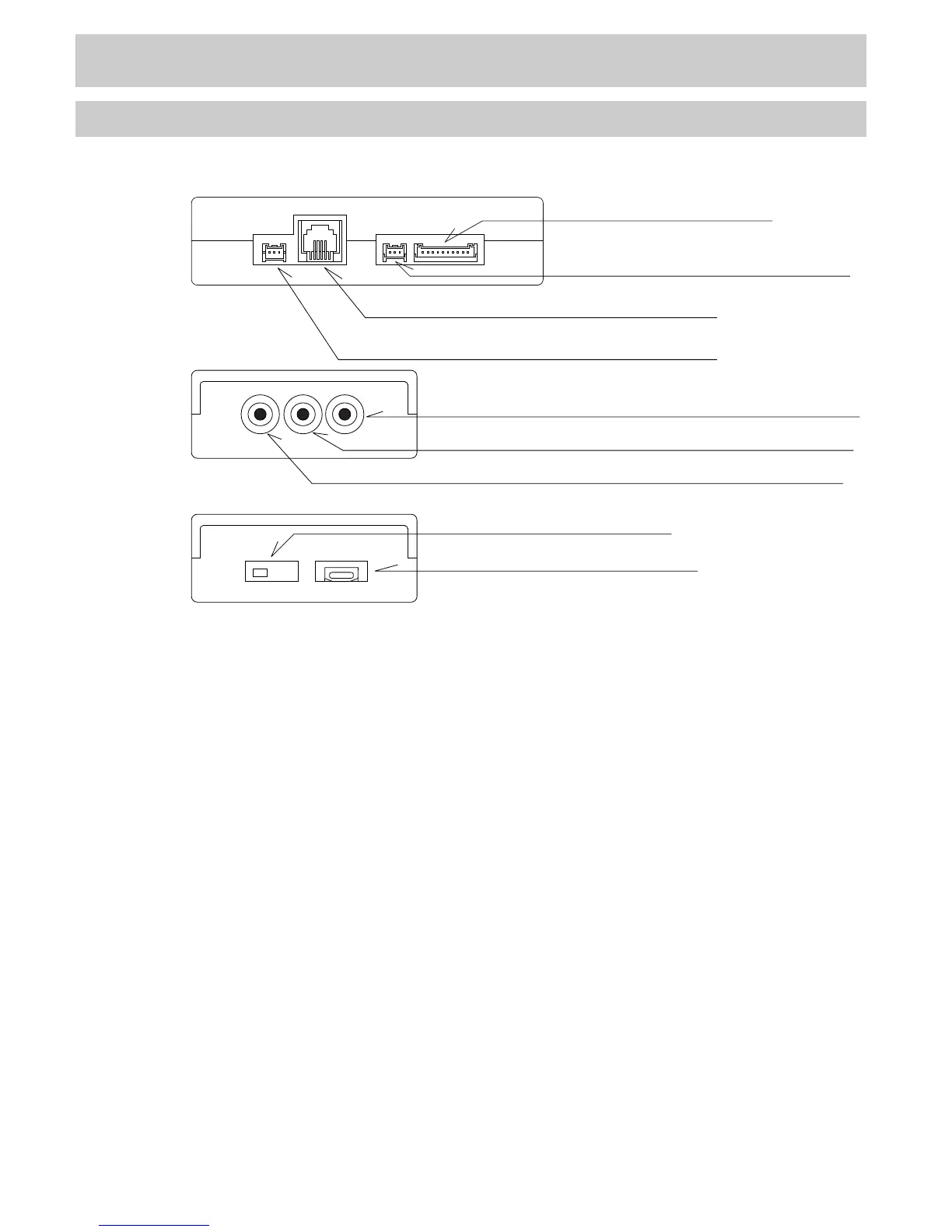
1.Name
1. Relay Harness Connector
Front
2. Remote Control Receiver Connector
3. F-CON Connector
4. I/F Unit Connector
Right
5. Video Signal Output Terminal (Yellow)
6. Audio Signal Output Terminal (White)
7. Audio Signal Output Terminal (Red)
8. Slide Switch
9. USB Connector
Left
●CAMP2 Main Unit
1.Relay Harness Connector
This is to connect the relay harness to the OBD2 harness.
2.Remote Control Receiver Connector
This is to connect the remote controller receiver.
3.F-CON Connector
This is to connect CAMP2 to F-CON using a modular cable.
4.I/F Unit Connector
This is to connect a meter harness to use HKS I/F Unit (P/N 44008-AK011) with CAMP2.
5.Video Signal Output Terminal (Yellow)
This is to connect the yellow AV cable to output video to the screen.
6.Audio Signal Output Terminal (White)
7.Audio Signal Output Terminal (Red)
This is to connect the white and red AV cable to output audio to the vehicle's on-board monitor.
8.Slide Switch
Slide the switch to the right when using the optional Nissan CONSULT harness.
(The default switch position is on the left to connect the OBD2 harness.)
9.USB Connector
Connect the CAMP2 unit to a PC using a USB cable. (This function will be enabled soon.)



 To Next Page