㧙㧙
6-4. All Data Reset
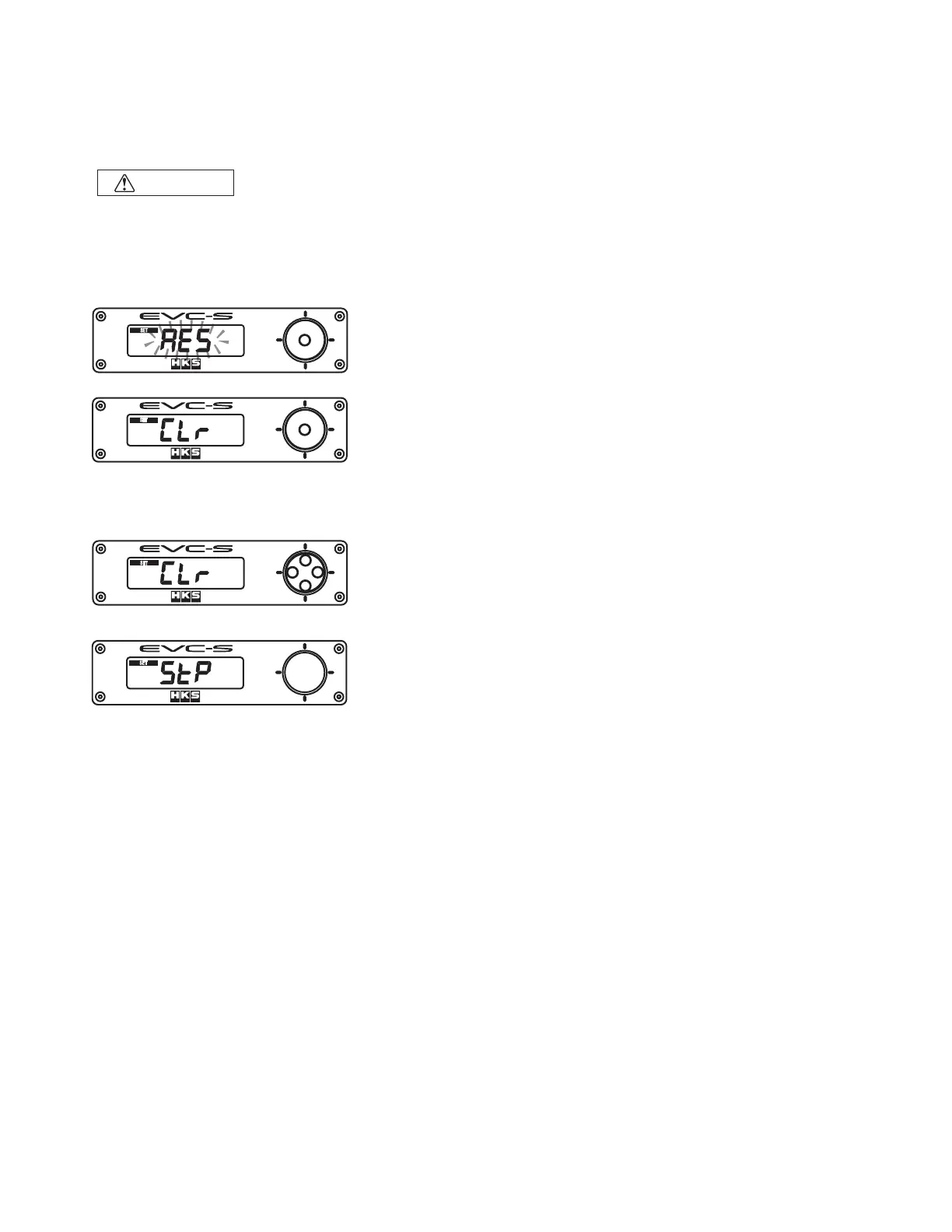
When All Data Reset is selected, "RES" blinks on the monitor.
Press the center of the switch to reset all data.
˴
Before resetting all data, "CLr" appears on the monitor.
Press the center of the switch to reset all data to the default
setting.
When resetting all data, stop the engine so the sensor's values can be learned at 0 boost (atmospheric
pressure) If not, incorrect sensor values are learned, and the boost pressure will be calibrated
incorrectly.
5'6
5'6
5'6
5'6
To cancel resetting all data, press the upper, lower, left, or right
side of the switch while "CLr" appears on the monitor.
˴
CAUTION
"StP" appears on the monitor and returns to the Function Setting
Mode without resetting the data.
All set values can be reset to the default settings.
After resetting the data, no data is retrievable.
If the lock number is forgotten, reset all data and set a new lock number.


 To Next Page