㧙㧙
Under the normal display, an After Image Display showing the highest positive boost pressure
can be selected to display. To select the After Image Display, refer to the following procedure.
6-2. After Image Display
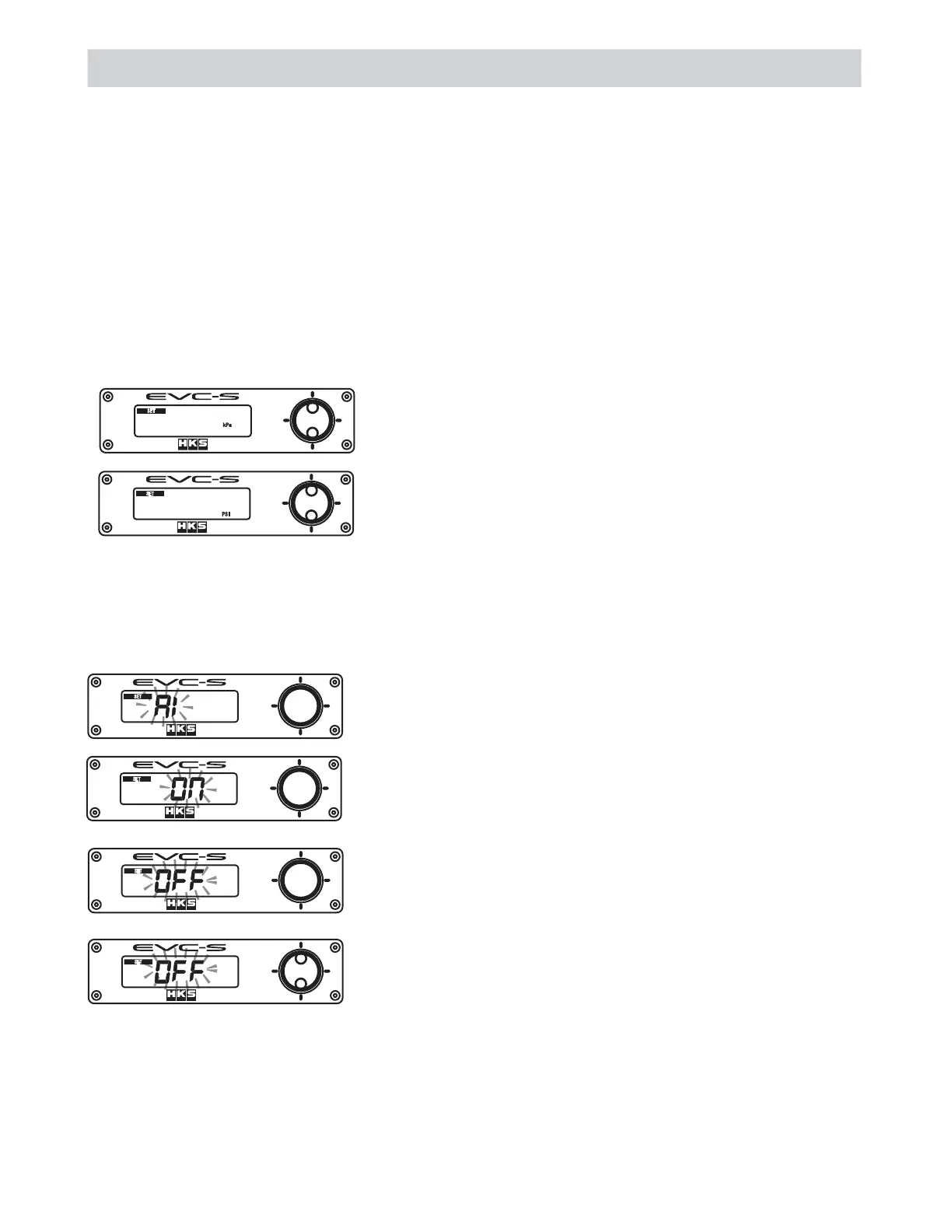
To display the After Image Display, select "ON."
"AI" and "ON" will alternately blink on the monitor.
5'6
5'6
5'6
5'6
To not display the After Image Display, select "OFF."
"AI" and "OFF" will alternately blink on the monitor.
To switch between "ON" and "OFF", press the upper or lower
side of the switch.
Make sure the selected setting appears on the monitor.
6. Function Setting Mode
˴
6-1. Boost Unit of Measure Setting
The boost pressure unit of measure is selectable between kPa and PSI.
Press the upper or lower side of the switch to select the unit of measure.
5'6
25+
5'6
M2C
˴˴
˴
This mode is for setting of the following: "Boost Unit of Measure Setting", "After Image Display",
"Data Lock" and "All Data Reset."
Press the right side of the switch longer than a second to go to the Function Setting Mode under
the Boost Control Mode.
Press the left or right side of the switch to select the item to set.
Press the right side of the switch longer than a second to return to the Boost Control Mode.
When no operation is done for approximately 120 seconds, the mode returns to the Boost Control
Mode.


 To Next Page