20
8. Treatment settings
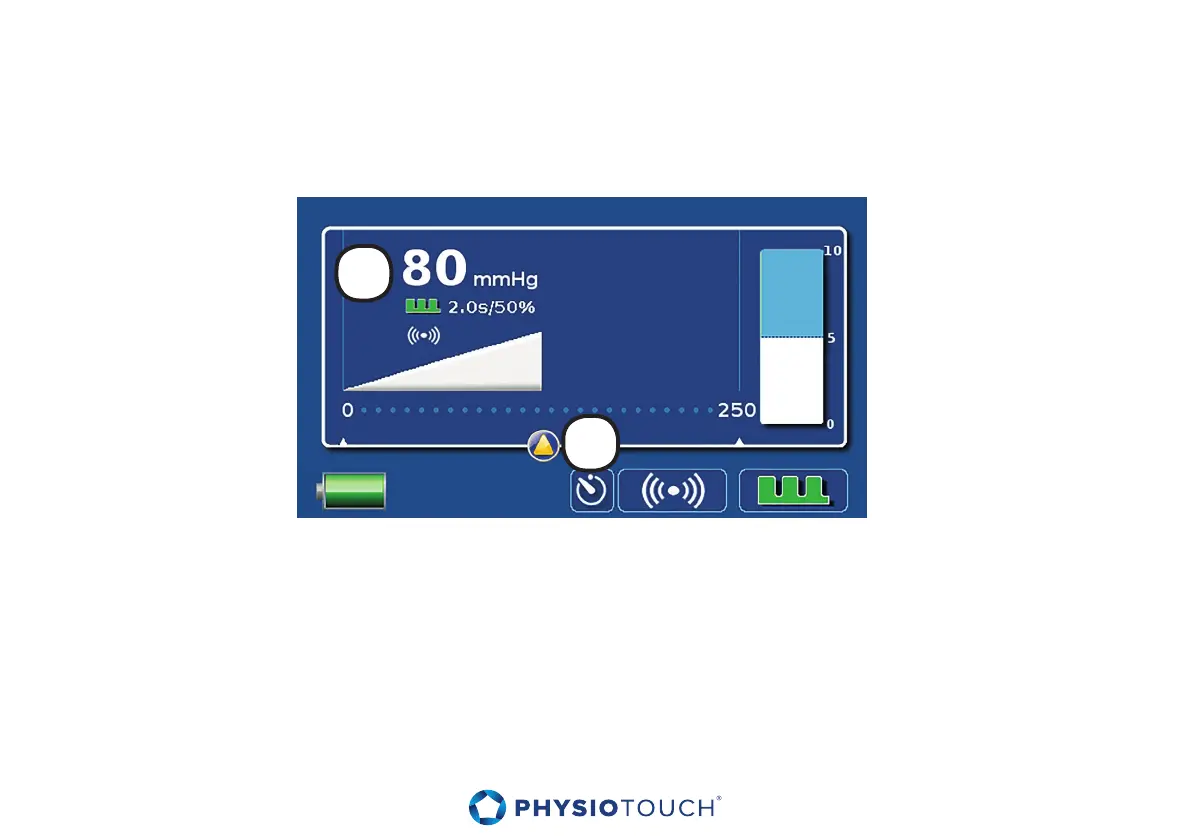
Turn on the device. PhysioTouch® - LymphaTouch® main screen will appear (see picture).
The default setting is 80 mmHg with 2 s. pulsations. The unit will start operation automatically when
the treatment cup is put close to the treated target.
1. The setting is indicated on the main screen on the top left, as well as graphically in the form of
a wedge. During treatment a blue wedge appears which indicates the current vacuum in the
treatment cup.
2. The vacuum is adjusted with the touch screen by moving the slider at the desired location.
If the desired vacuum is not achieved make sure that the treatment cup selected is suitable to the
aected area of the body. If necessary replace the treatment cup with a more appropriate size, or
reposition the treatment cup on the skin carefully. Also, the patient’s body hair may cause air leakage
from the treatment cup. Refer to the section ”Troubleshooting.”
1
2


 To Next Page