91
FireNET 4127 I & O Manual v1.90 UL
Section 7 - Basic Front Panel Operations and Programming
(Access Level 1, 2, and Real-Time Operation)
This section covers the basic user operations of the FN-4127 and is intended to provide
the casual user a basic understanding of how to complete common system operations.
In addition to providing an overview of the front panel controls this section also includes
instructions on how to:
• Perform a Lamp Test
• Silence the Panel Sounder
• View Multiple Fire Alarms on the Panel Display
• View Multiple System Events on the Panel Display
• Use the Menu Navigation Buttons
• Use the Help Function
• Silence an Alarm
• Resound an Alarm
• Reset an Alarm
• Initiate a Fire Drill
• Disable Portions of the System
• View the Status of System Devices
• Set system time
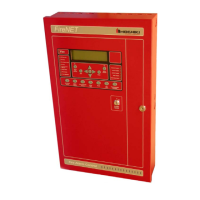
All of these operations are performed from the front panel keypad.
Please refer to the front panel photo in Figure 7.1 below while reading through this
section.
Figure 7.1 Front Panel Control


 To Next Page
 Loading...