•
p13
Troubleshooting
The power supply has built-in error messages to help troubleshoot problems with the
electrical circuit. The error messages, and possible corrective actions, are listed below:
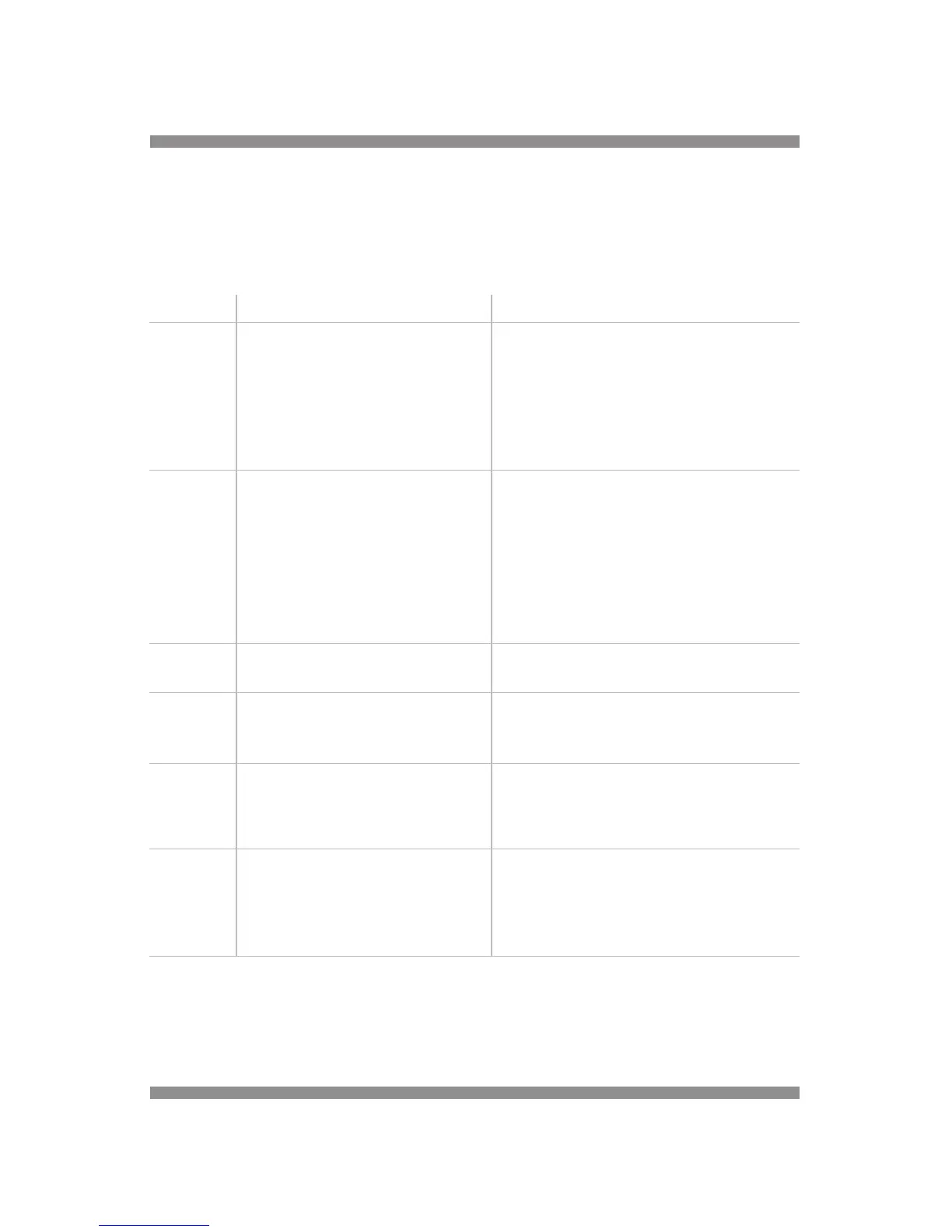
Error code Explanation Possible solutions
E1 No Load Detected.
The voltage leads to the electrophore-
sis cell are not attached.
The current load is below 4 mA, the
lower limit of the power supply.
Check all connections.
Verify that buffer volumes are sufficient to
contact all electrode wires and that buffer is
contacting both surfaces of the gel.
A constant volt run with low volt setting may
result in a current below the 4 mA limit.
Press any button* to clear the error code.
E3 Change in Load Resistance.
Open circuit was detected at some
point after a successful start.
Buffer is leaking from the cells.
There is a loose electrical connection
in the circuit.
Check and correct all potential resistance
problems.
Check buffer volumes.
Check all voltage leads.
Check the fit of power supply adapters, if used.
The output current may have fallen below the
4 mA limit of the power supply.
Press any button* to clear the error code.
E4 Power Failure during a continuous run
(no timer being used)
Restart the run, if desired.
Press any button* to clear the error code.
E5 Power Failure during a timed run with
PFD option disabled.
Run was not completed.
Restart the run, if desired.
Press any button* to clear the error code.
See page 12 for information on the PFD option.
E6 Power Failure during a timed run with
PFD option enabled.
Despite the power outage
the run was completed successfully.
Press any button* to clear the error code.
See page 12 for information on the PFD
option.
E7 Short Circuit
Load current exceeded 500 mA.
The voltage load is below 10 V, the
lower limit of the power supply.
Check for any short circuit or evidence of
electrical arcing.
Buffer concentration too high.
A constant current run with low current may
result in a voltage below the 10 V limit.
*Press any button, except the START/STOP button, to clear the Error Message.
Other Problems:
No display and/or fan not operating: Check that the power supply is plugged into a working
receptacle. Check that the main power switch is on. Check fuses.


 To Next Page