HMPRO36AD OPERATOR’S MANUAL
8
3.2. Installing, removing, and operating the annular cutter
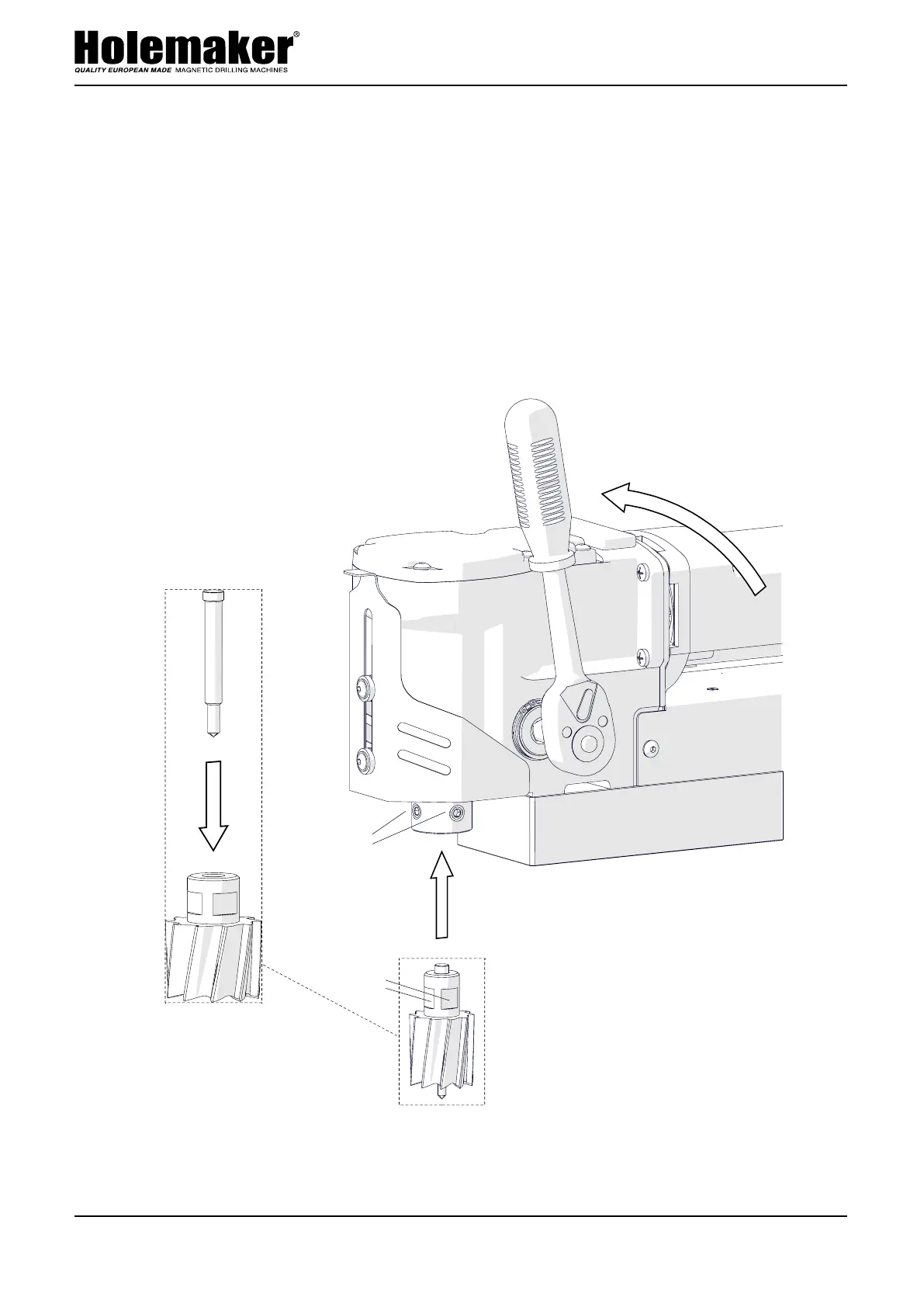
Unplug the machine from the power source, raise the chip guard, and then rotate the
handle to the left (1, Fig. 2) to access the set screws (2). Next, wear protective gloves,
insert the required pilot pin into the annular cutter (3), and then use a clean and dry
cloth to wipe the arbor and cutter. Next, place the cutter into the arbor (4) so that the
flats (5) are aligned with the set screws (2), and then use the 4 mm hex wrench to
tighten both set screws.
To remove the cutter, loosen the screws (2) with the 4 mm hex wrench.
Fig. 2. Installing the annular cutter
This document is protected by copyrights.
Copying, using, or distributing without permission of PROMOTECH is prohibited.
9
3
4
2
5
1


 To Next Page