13 of 20
Interval Days Watering
1. On the ZONE page, tap
INTERVAL DAYS [a]
2. Set the day interval
tapping the + or − [b]
3. Set START and
RUNTIMES [c] in the same
way as 7 DAY WATERING
4. Toggle through
ZONES2-4 [d] and
repeat steps 1-3
® This example shown will
water ZONE 1 every 2 days
for 10minutes at 6am
and 15 minutes at 1pm
Scheduling
d
b
c
a
Light up your garden with our RGB
or Warm White Bluetooth
®
Garden
Light Controllers. Complete
control all through iGardener
®
.
Bluetooth
®
Garden
Light Controllers
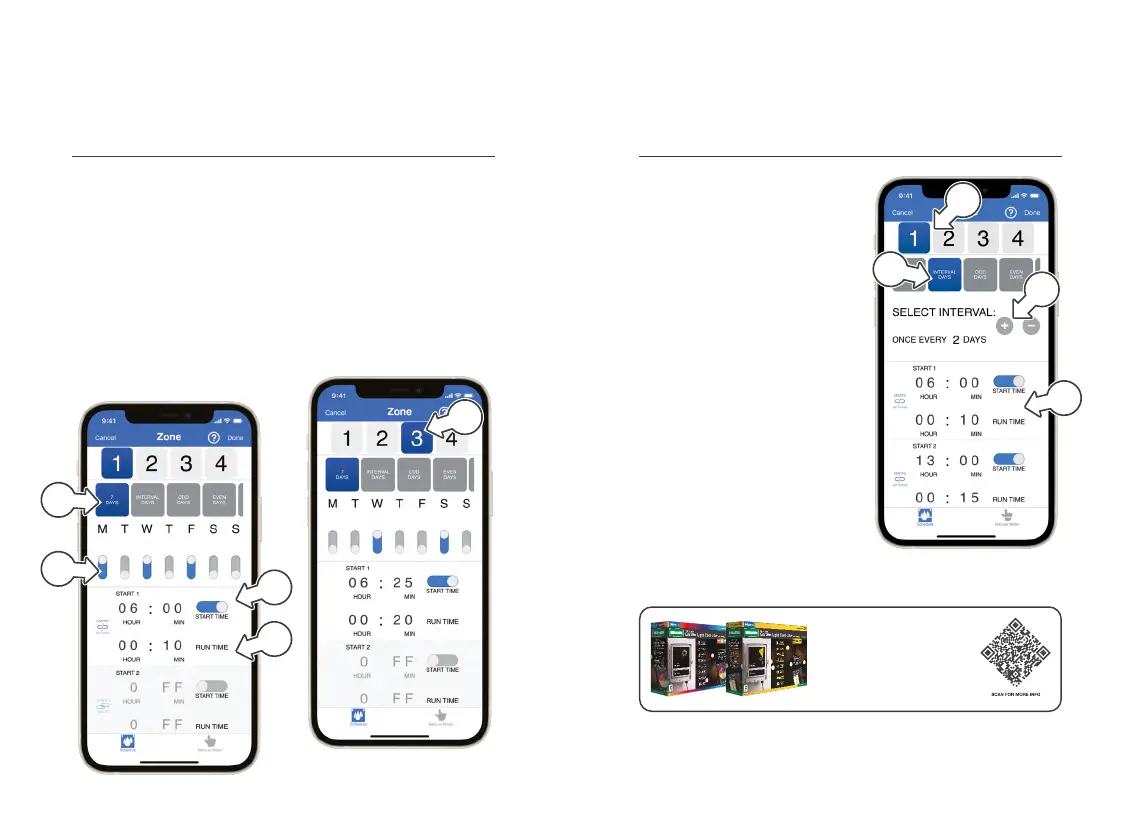
7 Days Watering
1. On the ZONE page,
7DAYS [a] watering will
be automatically selected
2. Use day switches to
toggle each day ON or
OFF as required [b]
3. Set up to 3
STARTTIMES[c] for
your BX4 as required
4. Set a RUN TIME [d] for each
of the START TIMES shown
® This example, will water
ZONE 1 on Monday,
Wednesday and Friday
for 10 minutes at 6am
5. Toggle through ZONES2-4[e]
and repeat steps 2-4
Scheduling
a
b
c
d
e


 To Next Page