Even (calendar) Days Watering
1. On the ZONE page,
tap EVEN DAYS [a]
2. Set START and
RUNTIMES [b] in the same
way as 7 DAY WATERING
3. Toggle through to
ZONE2 [c] and
repeat steps 1-3
® This example shown will
water ZONE1 at 6:30am
for 15 minutes on every
even day beginning 22
November 2021
Scheduling
a
b
c
Cycle Watering
This feature allows you to run short burst intervals starting at 5
seconds, suitable to use with a misting system or greenhouse.
1. On the ZONE page,
tap CYCLE [a]
® You may need to swipe the
scheduling options across to
access the CYCLE button
2. Use the day switches to
toggle each day ON or
OFF as required [b]
3. Set a START TIME [c]
4. Set a STOP TIME [d]
5. Set a RUN TIME [e]
6. Set a DELAY TIME [f]
7. Toggle through
ZONES2-4 [g] and
repeat steps 1-6
® Using this feature can drain
battery life when RUN
and DELAY TIMES are
set at a high frequency
® RUN and DELAY
TIMES must be set to
at least 5 seconds
® This example shown will
water ZONE1 on Tuesday,
Thursday and Saturday,
starting the cycle at 9am
and finishing at 5pm.
Watering will run for 1
minute 15 seconds, with a
30 minute delay in between
Scheduling
a
g
c
d
e
f
b
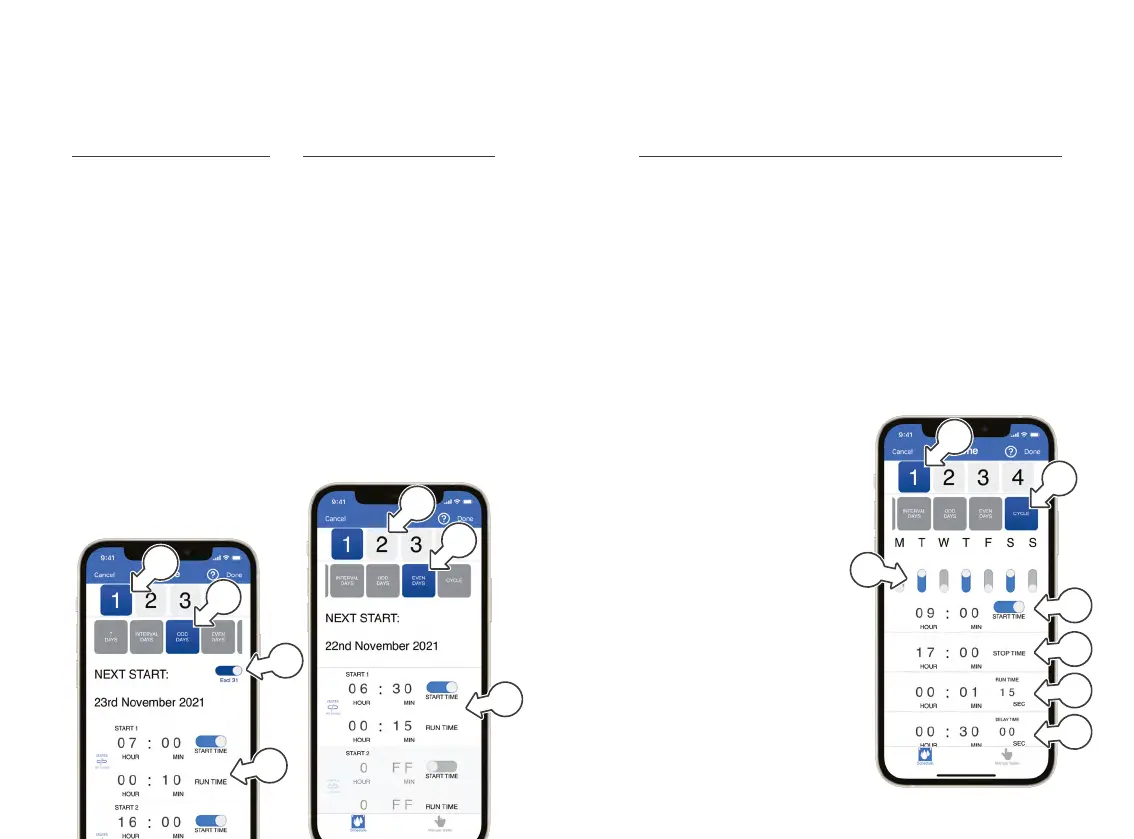
Odd (calendar) Days Watering
1. On the ZONE page,
tap ODD DAYS [a]
2. To skip watering on the 31st,
toggle EXCL31 [b] to ON
3. Set START and
RUNTIMES [c] in the same
way as 7 DAY WATERING
4. Toggle to ZONE2 [d]
and repeat steps 1-3
® This example will water
ZONE1 at 7am for
10minutes and 4pm for
15 minutes, on every
odd day beginning 23
November 2021, excluding
the 31st of any month
a
d
b
c


 To Next Page