4
INDICATOR LIGHTS
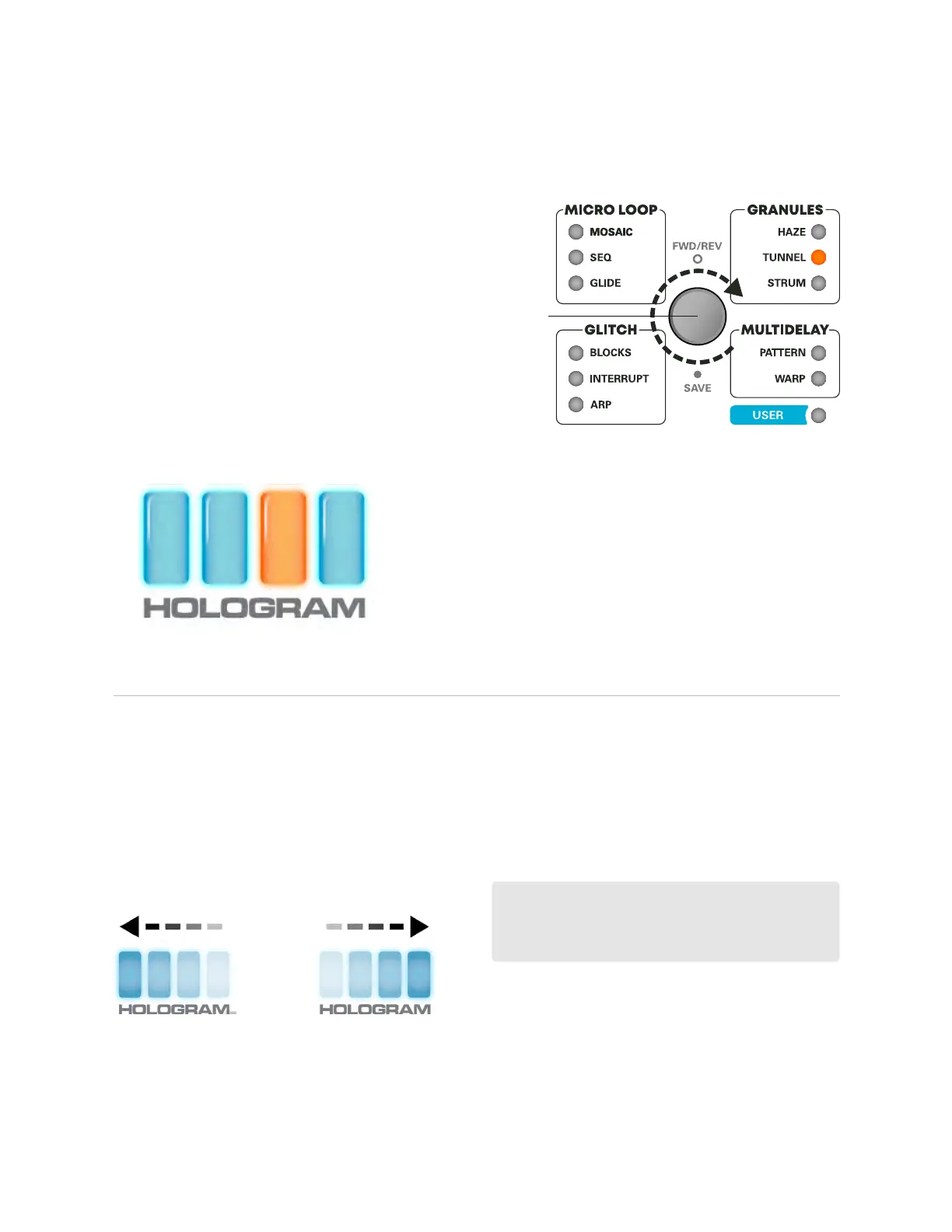
As you turn the PresetSelector, an amber cursor
will indicate your location within the active eect
bank. Each eect contains 4 presets (A-D). Idle the
cursor over the desired preset slot to select. Upon
selection, the surrounding bars will animate.
A B C D
PRESET SELECTOR
*In this example, Tunnel C is selected.
The PresetSelector is Microcosm’s primary
navigation device. Use it to scroll back and
forth through various eects and menus. An
amber light indicates active eect.
Preset
Selector
*The Selector can be congured to scroll
through the eects in a circle or down the two
rows in a list format (see Global Conguration).
The 4 lights found at the center of the pedal work as a
menu system for selecting eects and congurations.
Press & hold Preset Selector to copy current
settings and active loop (see Saving Presets).
PRESET SELECTOR FUNCTIONS
Reverse
(swipes left)
Forward
(swipes right)
*In Phrase Looper conguration and Global
Conguration modes, use the Preset Selector
to make selections.
Press down on the PresetSelector to reverse
eect playback. Indicator Lights animate to
reect playback direction.
FWD/REV
3 | NAVIGATION & CONTROLS
SAVINGPRESETS


 To Next Page