12.8 Headless Mode
1. After pairing/calibration, press the Headless Mode button on the
transmitter. A beep will be heard from the transmitter, and the lights on
the drone will keep blinking. The transmitter will beep slowly to indicate
that drone is in Headless Mode.
2. Press the Headless Mode button again, and you will hear 2 beeps,
the LED indicator lights on the drone will be solid which indicates the
drone exits the Headless Mode.
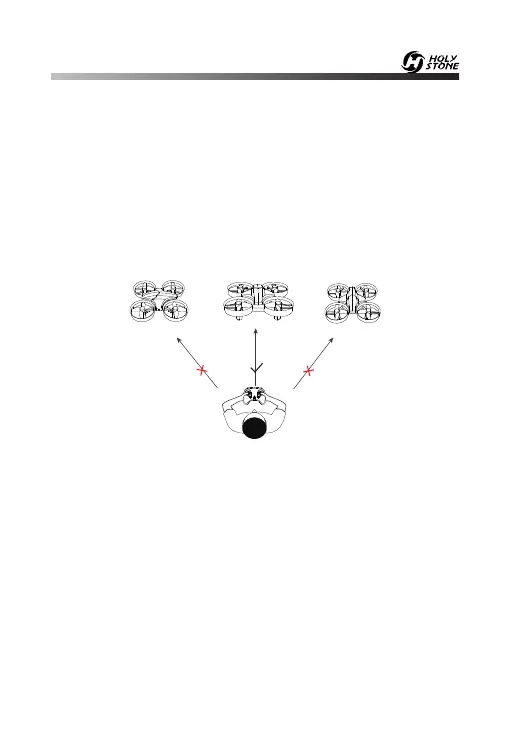
Please make the pilot stays facing the same direction
as the direction that the head of the drone faces at take-off.
Tail
Tail
Tail
Head
Head
Head
Under Headless Mode, the forward direction is the direction that the
head of drone faces when the drone takes off. In order to make sure
the pilot can tell drone's direction, we recommend that pilots to stay in
the same orientation as the drone head faces when the drone takes off.
If so, when the pilot pushes the direction joystick forward, the drone will
fly forward. If the pilot pushes the direction joystick backward, the drone
will fly towards him/her. If the pilot moves the right stick left / right, the
drone will move left/ right relative to you. It is very important that the
pilot stays in the same orientation as the drone head faces when the
drone takes off.
-20-



 To Next Page