-11-
8.2 Drone Battery
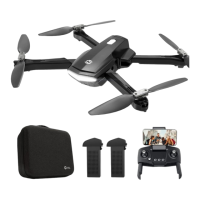
① Please remove the red insulation gasket first.
② Push the battery correctly into the drone battery compartment. Make
sure that you hear a click sound, which indicates that the battery is firmly
installed.
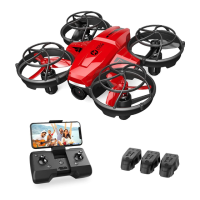
Press the lock button on the battery, and pull the battery out from the
fuselage.
- - - - - - - - - - - - - - - - - - - - - - - - - - - - - - - - - - - - - - - - - - - - - - - - - - - - - - - - - - -
Installation:
Removal:
Attention:
The battery should be installed firmly. Otherwise, the flight safety of your
drone may be affected. The drone may crash due to a power-cut during
the flight.
①
②


 To Next Page