13
HOMEDEPOT.COM/HOMEDECORATORS
Please contact 1-800-986-3460 for further assistance.
Assembly - Attaching the Light (continued)
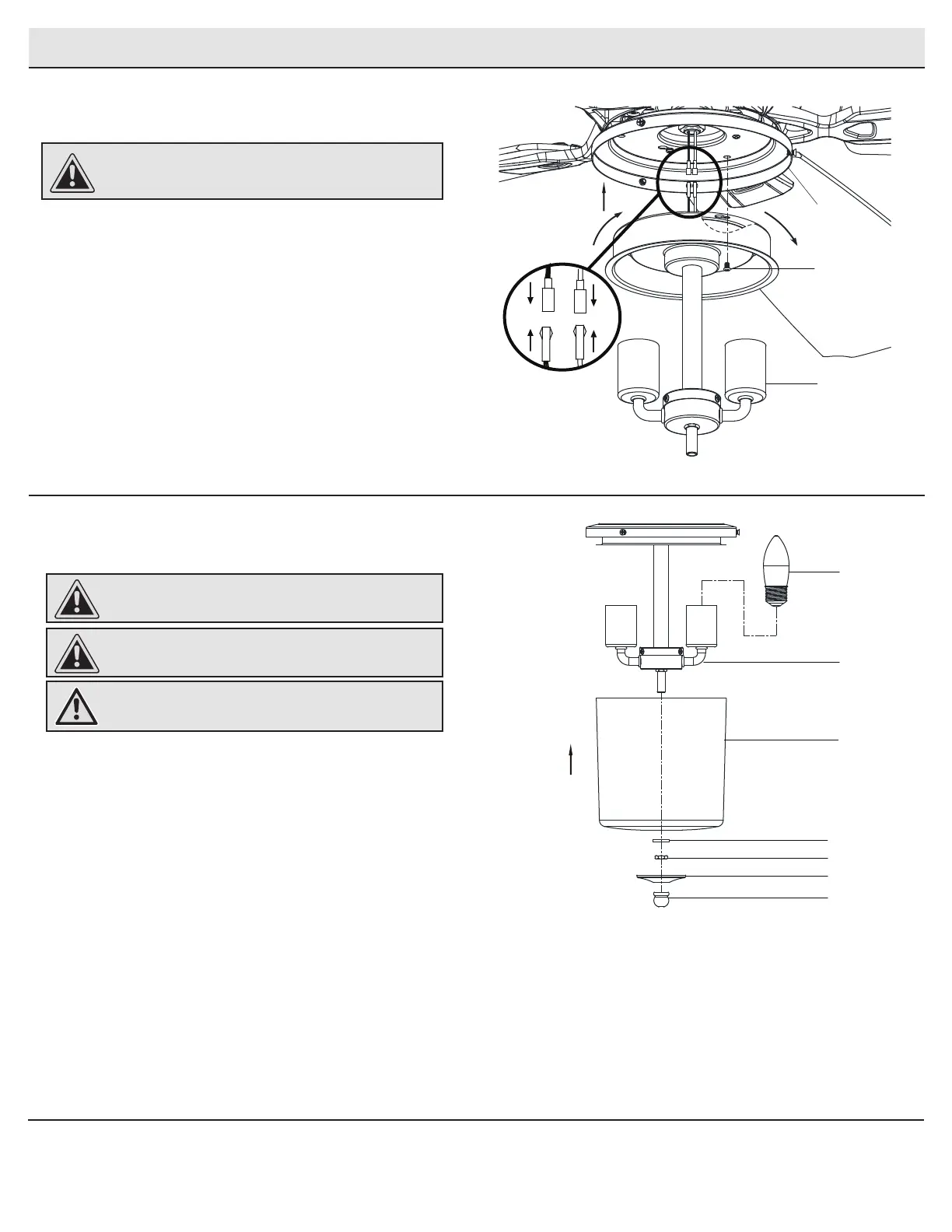
Attaching the light kit tter assembly
2
□ Remove one screw (LL) from the light kit pan (H), and loosen,
but do not remove the other two screws.
□ Connect the wires from the light kit tter assembly (I) to the
wires from the fan motor assembly (E) by connecting the
molded adaptor plugs together. Carefully tuck all wires and
splices into the switch cup.
□ Push the light kit tter assembly (I) up to the light kit pan (H) so
that the two loosened screw heads t into the keyholes slots.
Turn the light kit tter assembly (I) clockwise to secure.
□ Re-install the screw (LL) that was removed in step 1.
□ Make sure all the screws are rmly tightened.
CAUTION: To reduce the risk of electric shock, disconnect
the electrical supply circuit to the fan before installing the
light xture.
Installing the LED bulbs and
glass shade
3
□ With power off, install the two light bulbs, (included) (L) by
screwing them into the light bulb sockets.
□ Remove the washer (EE), the nut (UU), the bottom cover (XX)
and the nial (YY) from the threaded nipple of the light kit
tter assembly (I).
□ Position the glass shade (J), re-install the washer (EE), the
nut (UU), the bottom cover (XX) and the nial (YY) over the
threaded nipple, and tighten the nial securely.
CAUTION: Make sure the power is off before attaching or
removing the glass shade.
WARNING: Allow the glass shade to cool completely before
removing.
I
LL
H
CAUTION: Do not over tighten the hex nut. Overtightening
the hex nut may cause the glass shade to break.
XX
EE
YY
L
UU
I
J


 To Next Page
 Loading...