TANDA
16
Troubleshooting
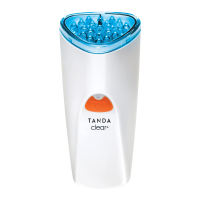
In the event that the Clear+ fails to perform as intended, the following notes will help to identify
potential problems with the device and its setup.
If Do this
Light indicator is off while the power
adaptor is plugged into a working
AC outlet.
Battery pack is fully charged (device is ready to use).
Or
Battery isn’t charging properly (ensure the device
is secure in the recharging stand).
Device turns off after 3 minutes. This indicates the end of a treatment cycle. Press the
orange button to start another treatment cycle.
Device will not start when the orange
power button is pressed.
Ensure the white plug is not in the bottom of device.
Or
Charge the device (indicator light will be orange
when charging properly).
Or
Check to see the treatment head is secure.
Indicator light is ashing green but
treatment head is not illuminated.
Ensure that the light surface is touching the skin.
The indicator light is not orange when
device is charging.
Ensure that the handpiece is rmly in the recharging
stand and the stand is plugged into a working AC outlet.
Device shuts off in mid-treatment or
after only a few treatments.
Take treatment head off and let the device cool
for 5-10 minutes.
Or
Ensure you are charging your device correctly,
see Charging The Battery.
If you still have questions please visit homedics.co.uk for more tips and troubleshooting.




 To Next Page