EasyManua.ls Logo

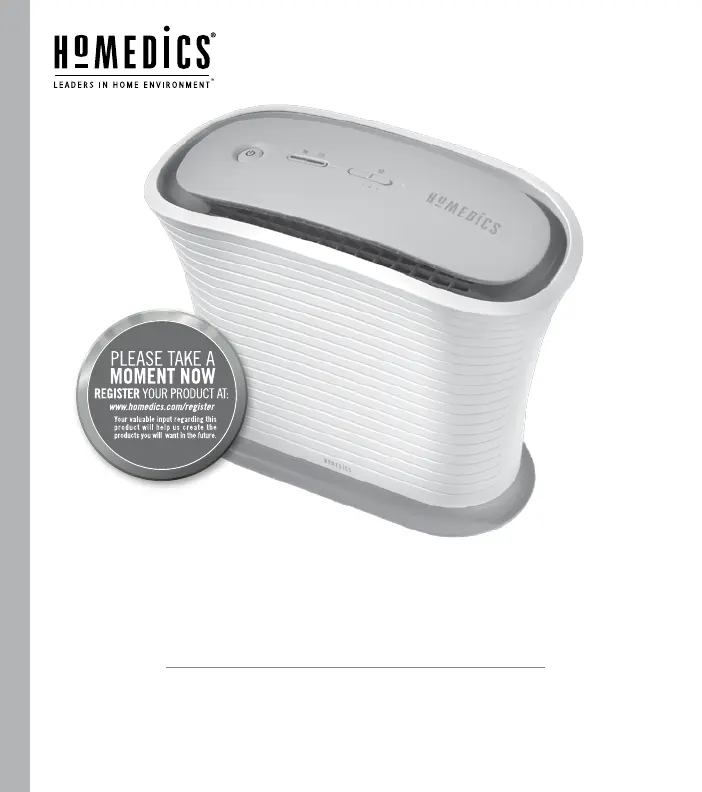
HoMedics TOTALCLEAN AP-15 - User Manual

HoMedics TOTALCLEAN AP-15
30 pages
Print Icon
To Next Page IconTo Next Page
Loading...
INSTRUCTION MANUAL AND WARRANTY INFORMATION
AP-15
TWO YEAR LIMITED WARRANTY
TOTALCLEAN
AIRPURIFIER
TM

Questions and Answers

  • J
    johnsonjodiJul 28, 2025
    How to fix HoMedics TOTALCLEAN AP-15 that won't turn on?
    • J
      James RichardsJul 29, 2025
      If your HoMedics Air Cleaner isn't turning on, ensure the unit is properly plugged into a working outlet. If it's plugged in, press the ON/OFF button to turn the power on. Also, check your circuits and fuses, and try a different outlet to rule out power issues.
  • P
    patrickbaxterAug 4, 2025
    What to do if HoMedics TOTALCLEAN AP-15 has reduced airflow?
    • C
      Connie WalkerAug 4, 2025
      If your HoMedics Air Cleaner has reduced airflow or poor filtering, start by checking the back grille to ensure it's free from any obstructions. If the grille is clear, the True HEPA or Carbon Odor Filter may be clogged and need replacement.
  • B
    Brian MasseyAug 12, 2025
    Why does the replace filter light stay on after replacing the filter on my HoMedics TOTALCLEAN AP-15?
    • V
      vrobinsonAug 12, 2025
      If the replace filter light remains on after replacing the filter on your HoMedics Air Cleaner, it means the appropriate replace filter indicator needs to be reset. To reset it, press and hold the appropriate replace filter button for 3 seconds.
  • B
    Bryan NealAug 19, 2025
    Why is my HoMedics Air Cleaner producing odors?
    • R
      Robert AndersonAug 20, 2025
      If your HoMedics Air Cleaner seems to be producing odors, the filters likely need replacing. Replace the filters as needed to resolve this issue.

Summary

Product Registration

Product Registration Prompt

Encourages users to register their product online at www.homedics.com/register for future benefits.

Important Safety Instructions

Electrical Shock Precautions

Details measures to reduce the risk of electric shock, including cord safety and proper outlet use.

General Safety Warnings

Provides warnings to prevent burns, fire, electric shock, and injury to persons during operation.

Unique Features and Specifications

Filtration Technology

Explains the True HEPA filtration and Carbon Odor Filter capabilities for air purification.

Operational Modes

Describes the fan speed settings and the night mode feature for user convenience.

Maintenance Indicators

Details the indicators that alert users when it's time to replace the filters.

Performance Metrics

Provides recommended room size and air purification rate information for optimal performance.

How to Use and Operate

Initial Setup and Filter Installation

Guides on unpacking, placing the unit, and installing the Carbon Odor and True HEPA filters.

Controls and Settings

Explains how to turn the unit on/off, activate night mode, and select fan speed settings.

Maintenance and Troubleshooting

Filter Replacement Guide

Provides instructions and frequency for replacing the Carbon Odor and True HEPA filters.

Cleaning Procedures

Details recommended methods for cleaning the air purifier unit and its components.

Troubleshooting Common Issues

Offers solutions for common problems like unit not operating or reduced airflow.

Limited Two Year Warranty

HoMedics TOTALCLEAN AP-15 Specifications

General IconGeneral
Product TypeAir Purifier
ModelAP-15
CADR Smoke50
Filter TypeHEPA
Pre-filterYes
Activated Carbon FilterYes
UV-C LightYes
Fan Speeds3
Power SourceAC
Weight7.5 lbs
Coverage Area150 sq ft
Noise Level50 dB

Related product manuals