Continued
127
uuGauges and DisplaysuDriver Information Interface
Use the driver information interface to customize certain features.
■
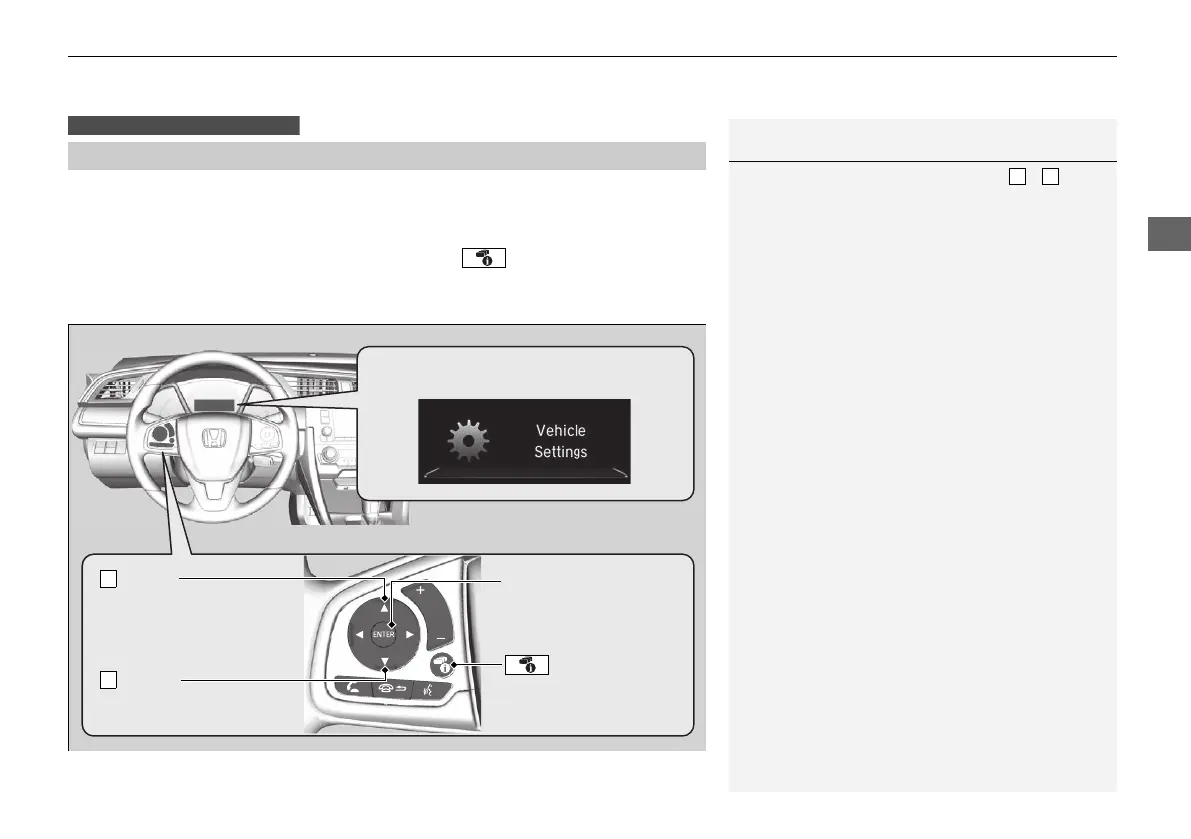
How to customize
Select the Vehicle Settings screen by pressing the button while the ignition
switch is in ON (w, and the vehicle is at a complete stop, and the shift lever is in (P.
Select Vehicle Settings, then press the ENTER button.
■
Customized Features
Models with color audio system
1Customized Features
To customize other features, press the /
button.
2 List of customizable options P. 130
2 Example of customization settings P. 134
When you customize settings:
Shift to
(P.
ENTER Button
Press to set your
selection.
Button
Press to go to Vehicle
Settings.
Button
Press to scroll upwards.
Button
Press to scroll downwards.
Driver information interface:
Goes to Vehicle Settings.
21 CR-V PET ELP_MAP_HMIN_HCM-31TLA6400.book 127 ページ 2020年9月2日 水曜日 午後1時35分











 To Next Page