uuBluetooth® HandsFreeLink®uHFL Menus
416
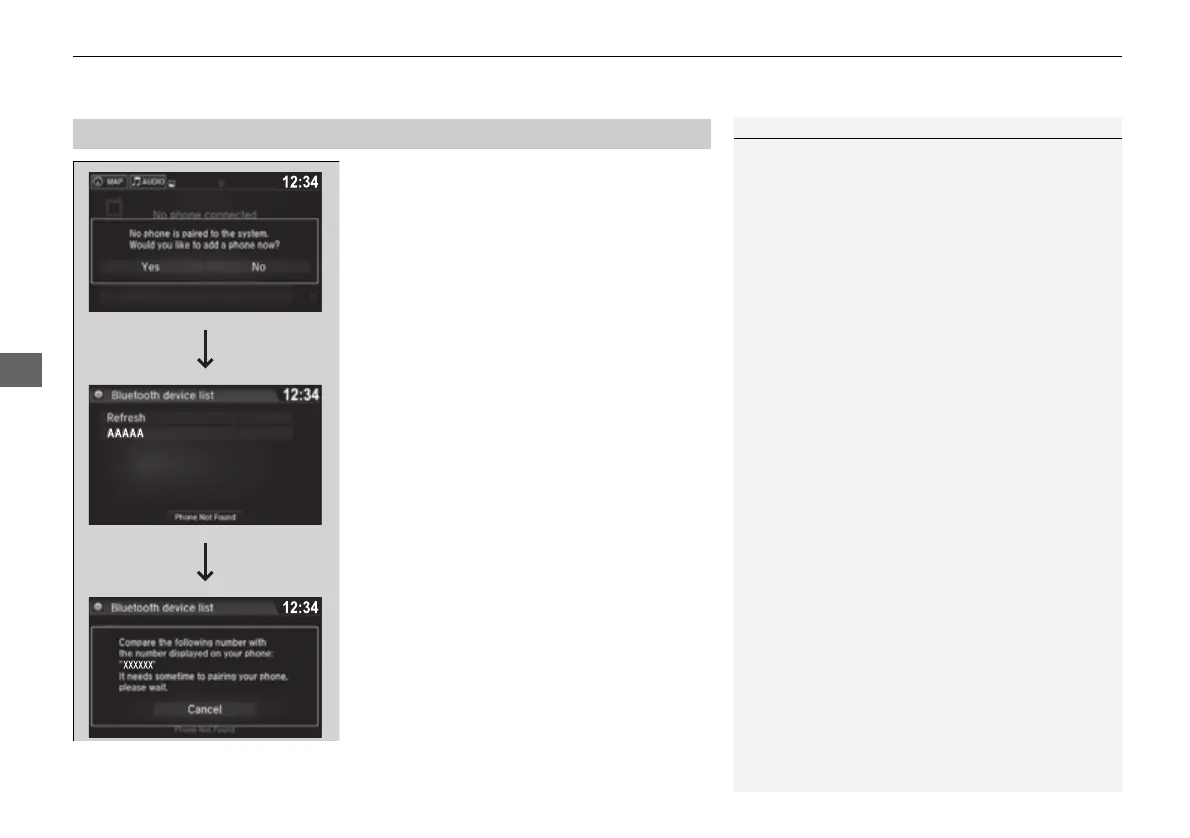
■ To pair a cell phone (when there is no
phone paired to the system)
1. Select Phone.
2. Select Yes.
3. Make sure your phone is search or
discoverable mode, then select Continue.
u HFL automatically searches for a
Bluetooth® device.
4. Select your phone when it appears on the
list.
u If your phone does not appear, you can
select Refresh to search again.
u If your phone still does not appear, select
Phone Not Found and search for
Bluetooth® devices using your phone.
From your phone, search for
HandsFreeLink.
5. The system gives you a pairing code on the
audio/information screen.
u Confirm if the pairing code on the screen
and your phone match.
This may vary by phone.
■
Phone Setup
1Phone Setup
Your Bluetooth-compatible phone must be paired to
the system before you can make and receive hands-
free calls.
Phone Pairing Tips:
• You cannot pair your phone while the vehicle is
moving.
• Up to six phones can be paired.
• Your phone's battery may drain faster when it is
paired to the system.
• If your phone is not ready for pairing or not found
by the system within three minutes, the system will
time out and return to idle.
16 PILOT-31TG76000.book 416 ページ 2016年10月19日 水曜日 午後5時4分















 To Next Page