382
uuBlu-ray/DVD Rear Entertainment System
*
uPlaying a DVD/Blu-ray
TM
Playing a DVD/Blu-ray
TM
To play a DVD or Blu-ray
TM
, insert a DVD or Blu-ray
TM
into the lower slot of the front
audio system, and select Rear in the audio/information screen.
u The system automatically starts the DVD or Blu-ray
TM
. DVD or Blu-ray
TM
is
available for the rear seat passenger only.
■
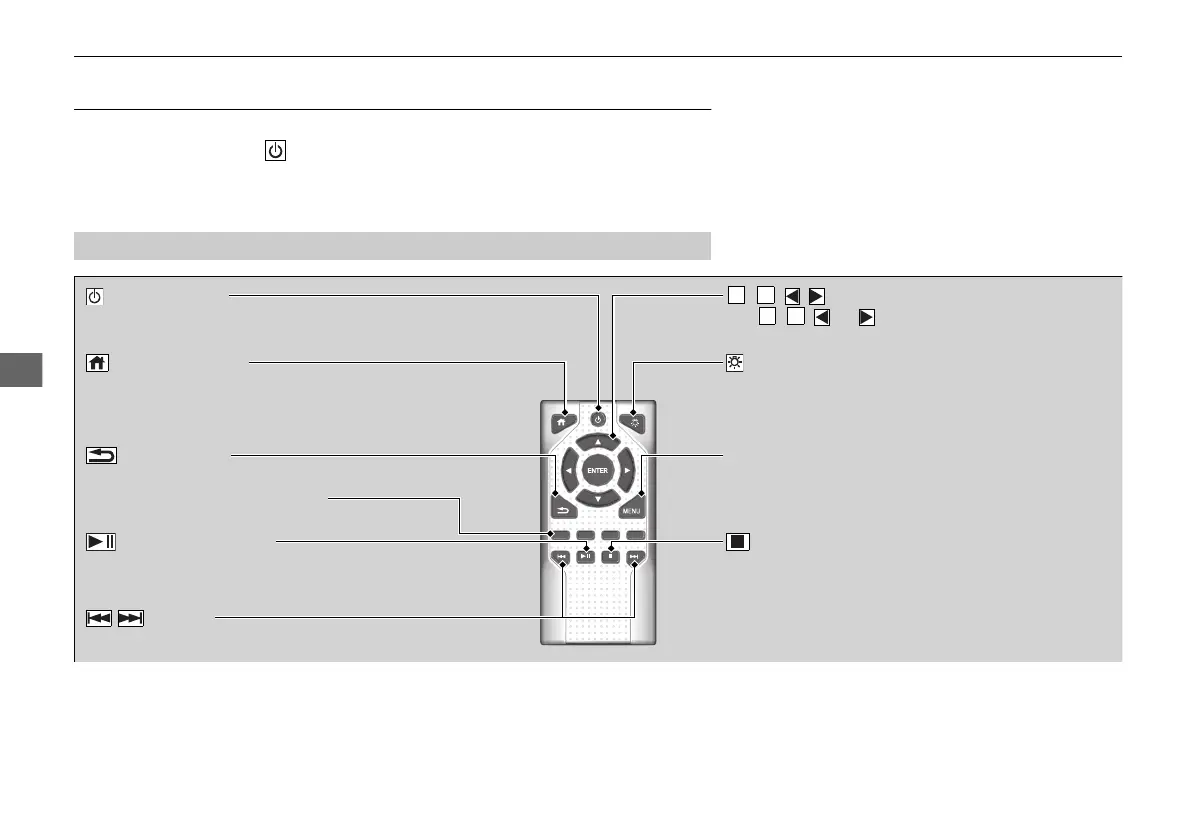
System Controls
(Power) Button
Press to turn the Blu-ray/DVD rear entertainment system
on or off.
(Home) Button
Press to display the home screen.
(Light) Button
Press to illuminate the buttons for a few seconds.
/ Buttons
Press to change chapters.
(Play/Pause) Button
Press to pause or play a DVD or Blu-ray
TM
.
(Stop) Button
Press to stop a DVD or Blu-ray
TM
.
MENU Button
Press to display the menu items.
Red/Green/Yellow/Blue Button
Press to use on a DVD or Blu-ray
TM
menu.
(Back) Button
Press to go back to the previous display or operation.
, , , and ENTER Buttons
Use , , , or to highlight a menu item, and
press the ENTER button to make a selection.
21 PILOT-31TG76500.book 382 ページ 2020年3月18日 水曜日 午後4時38分



 To Next Page