244
uuAudio SystemuAudio Remote Controls
Audio Remote Controls
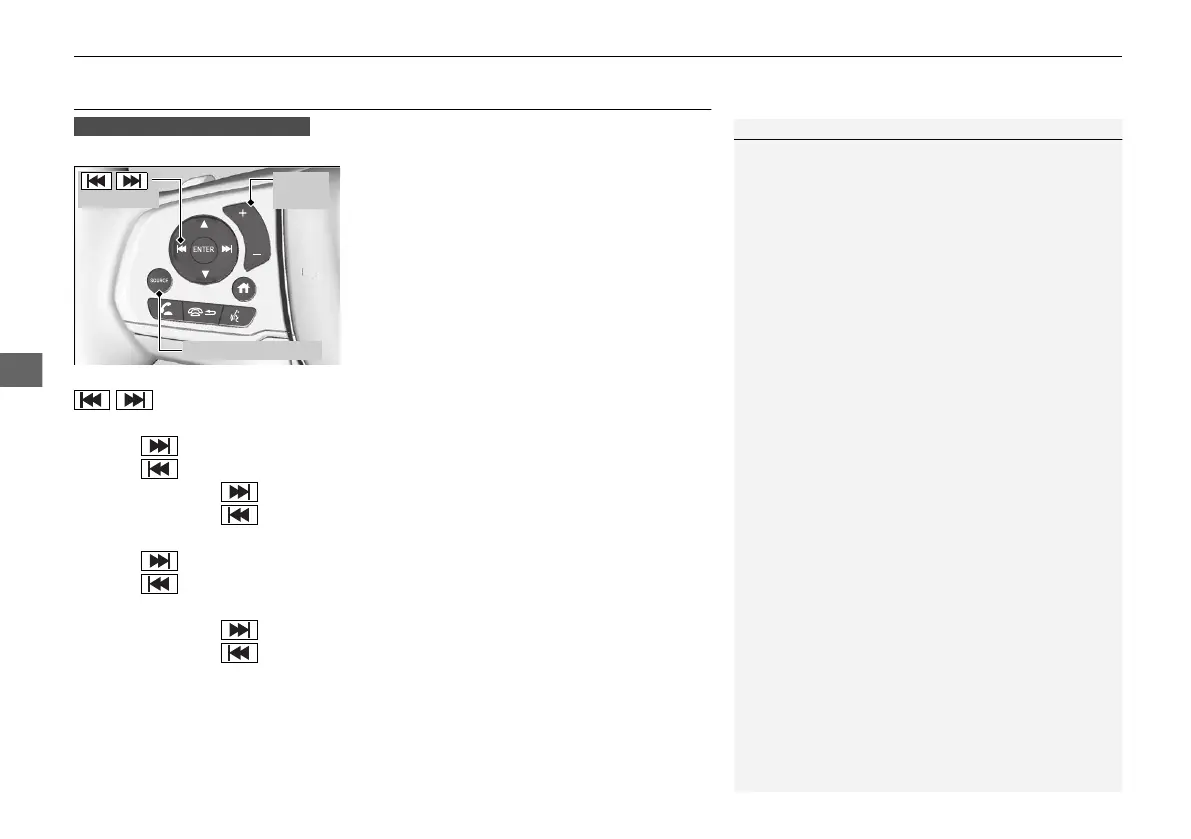
Allow you to operate the audio system while driving.
SOURCE Button
Cycles through the audio modes as follows:
FM1FM2AMUSB/iPodBluetooth®
AudioAUX
(+/(- (Volume) Bar
Press
(+: To increase the volume.
Press (-: To decrease the volume.
/ Buttons
• When listening to the radio
Press : To select the next preset radio station.
Press : To select the previous preset radio station.
Press and hold : To select the next strong station.
Press and hold : To select the previous strong station.
• When listening to an iPod, USB flash drive, or Bluetooth® Audio
Press : To skip to the next song.
Press : To go back to the beginning of the current or previous song.
• When listening to a USB flash drive, or Bluetooth® Audio
Press and hold : To skip to the next folder.
Press and hold : To go back to the previous folder.
1Audio Remote Controls
Some modes appear only when an appropriate
device or medium is used.
Depending on the Bluetooth® device you connect,
some functions may not be available.
Models with color audio system
/
Buttons
SOURCE Button
(+/(-
Bar
21 PILOT-31TG76500.book 244 ページ 2020年3月18日 水曜日 午後4時38分



 To Next Page