EasyManua.ls Logo

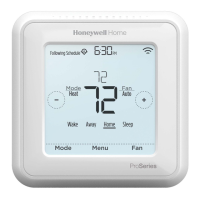
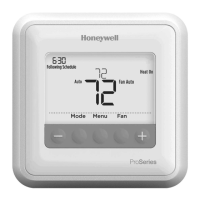
Honeywell Home TH5110D - User Manual

Honeywell Home TH5110D
8 pages
Print Icon
To Next Page IconTo Next Page
Loading...
OPERATING INSTRUCTIONS
69-1713-01
Operating Instructions
TH5110D
NON-PROGRAMMABLE THERMOSTAT
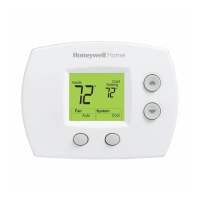
The TH5110D Thermostat provides electronic control of
24 Vac single- stage heating and cooling systems or
750 mV heating systems.
For assistance with your product please visit
www.honeywellhome.com
or call Customer Care toll free
at 1-800-468-1502.
Read and Save these Instructions
FEATURES
• Large, Clear, Backlit Display: Easy-to-see and read—
even in the dark.
• Precise Comfort Control: ±1ºF of your set
temperature.
• Simplified Operation: Soft-key controls.
Simultaneously displays both room temperature and
temperature setting.
• Easy Change Battery Holder.
• Built-in Compressor Protection: Minimum-off timer
protects compressor from restarting too early after a
shutdown.
GET TO KNOW YOUR
THERMOSTAT
Thermostat
Display
Inside
M37933A
Cool
Cool
Setting
Auto
Fan
System
DIGITAL DISPLAY
FAN BUTTON
SYSTEM BUTTON
TEMPERATURE
SETTING BUTTON
TEMPERATURE
SETTING BUTTON
BATTERY
HOLDER
BATTERY HOLDER LATCH
M22084A
PRESS TO RELEASE
BATTERY HOLDER
RAISES
TEMPERATURE
SETTING
TWO AAA
ALKALINE
BATTERIES
LOWERS
TEMPERATURE
SETTING
SELECTS HEAT, OFF, COOL OR AUTO
SELECTS AUTO OR ON
PRESS
Replace Battery
H
eat
C
oo
l
On
On
In
s
i
de
S
ettin
g
CoolH
ea
t
H
eat
Cool
AutoOff
ste
F
an
O
n Aut
o
INSIDE
TE
M
PERAT
U
R
E
TEMPERATURE
SETTING
INDICATES
THERMOSTAT IS
"CALLING" FOR
HEAT OR COOL
CURRENT
SYSTEM SETTING
M22083
CURRENT
FAN SETTING
INDICATES BATTERIES ARE
LO
W AND M
US
T BE REPLA
C
E
D

Questions and Answers

  • K
    Kristen MurphyJul 27, 2025
    How to fix a blank display on Honeywell Home TH5110D?
    • A
      Anthony MarksJul 27, 2025
      If the display on your Honeywell Home Thermostat is blank, there could be a few reasons. First, check the circuit breaker to ensure it hasn't tripped. Next, verify that the power switch for your heating or cooling system is turned on. Also, make sure the furnace door is securely closed. Finally, if your thermostat uses batteries, ensure that fresh AAA alkaline batteries are properly installed in the battery holder.
  • F
    francisco88Jul 31, 2025
    What to do if the Honeywell Home TH5110D Thermostat heating system does not turn on?
    • J
      Jennifer TaylorJul 31, 2025
      If your Honeywell Home Thermostat's heating system isn't turning on, try these steps: First, ensure the system is set to Heat by pressing the System button. Next, check that the heat temperature setting is higher than the current room temperature, and that “Heat On” is steadily displayed. Check the circuit breaker and make sure it is not tripped. Also, confirm the power switch at the heating/cooling system is on, and the furnace door is securely closed. Wait five minutes to see if the heating system responds.
  • T
    Tristan SanchezAug 4, 2025
    Why Honeywell Home TH5110D Thermostat cooling system is not turning on?
    • R
      Rebecca MunozAug 5, 2025
      If the cooling system on your Honeywell Home Thermostat isn't activating, make sure the system is set to Cool using the System button. Verify that the cooling temperature is set lower than the room temperature and that “Cool On” is steadily displayed. Check the circuit breaker to ensure it hasn't tripped, and confirm that the power switch for the heating/cooling system is on. Also, check that the furnace door is securely closed. Allow five minutes for the cooling system to respond.
  • S
    Shelly KaufmanAug 9, 2025
    Why is “Heat On” flashing on my Honeywell Home TH5110D display?
    • S
      Stephen ReevesAug 9, 2025
      If “Heat On” is flashing on your Honeywell Home Thermostat (heat pump models only), the compressor minimum-off timer is active. Please wait up to five minutes for the heating system to turn on.
  • E
    Eric WilliamsAug 13, 2025
    What does it mean when “Cool On” is flashing on Honeywell Home TH5110D Thermostat?
    • E
      erica17Aug 14, 2025
      If the “Cool On” indicator is flashing on your Honeywell Home Thermostat display, it means the compressor minimum-off timer is active. Allow up to five minutes for the cooling system to activate.
  • A
    Aaron WilliamsAug 17, 2025
    How to make “Heat On” appear on Honeywell Home TH5110D Thermostat display?
    • S
      Samuel Ball IIIAug 17, 2025
      If “Heat On” is not displayed on your Honeywell Home Thermostat, set the System setting to Heat and ensure the temperature is set above the current room temperature.
  • T
    Thomas RobertsAug 22, 2025
    What to do if “Cool On” is not showing on Honeywell Home TH5110D Thermostat?
    • S
      Samantha PerezAug 22, 2025
      To display “Cool On” on your Honeywell Home Thermostat, set the System setting to Cool and ensure the temperature setting is below the current room temperature.

Summary

OPERATING INSTRUCTIONS

GET TO KNOW YOUR THERMOSTAT

Overview of the thermostat's components and display functions.

FEATURES

Key features and benefits of the TH5110D thermostat.

OPERATE YOUR THERMOSTAT

Set System Setting

How to select heating, cooling, or automatic system modes.

Change Temperature Setting

Instructions for adjusting the desired temperature setting.

Set Fan Setting

How to configure fan operation to Auto or On.

REPLACE BATTERIES

REVIEW BATTERY TIPS

Recommendations for battery replacement and maintenance.

BUILT-IN COMPRESSOR PROTECTION

Explanation of the minimum-off timer for compressor safety.

AUTO CHANGEOVER

Change Temperature Setting

How to adjust temperature settings when the system is in Auto mode.

Troubleshooting Tips

CUSTOMER ASSISTANCE

FIVE-YEAR LIMITED WARRANTY

Honeywell Home TH5110D Specifications

General IconGeneral
BrandHoneywell Home
ModelTH5110D
CategoryThermostat
LanguageEnglish

Related product manuals