Need help?
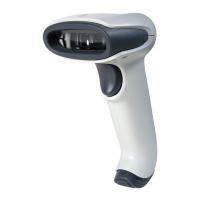
Do you have a question about the Honeywell 3800gPDF - Hand Held Decoding Linear Imager and is the answer not in the manual?
Instructions for connecting the imager via USB interface.
Details on connecting the imager using a keyboard wedge interface.
Guide to connecting the imager using an RS-232 serial port.
Explains how to properly aim and read bar codes with the imager.
Procedures to restore factory default settings for the imager.
How to set or identify the terminal ID for the imager's interface.
Lists compatible terminals and their corresponding IDs.
Configuration for keyboard layout based on country.
Setting the data transmission speed for RS-232 connections.
Configuring serial communication parameters like data bits, stop bits, and parity.
Settings for managing data flow control in RS-232 communication.
Customizing beeper and LED feedback for successful bar code reads.
Options for activating the imager scan, including manual and automatic modes.
Managing the order and format of data sent to the host.
Adding custom data before or after scanned bar code information.
Adjusting timing between data transmissions for reliability.
Overview of tools to modify how scanned data is presented.
Step-by-step guide to creating custom data output formats.
Enabling or disabling the data formatting feature.
Activating or deactivating the imager's secondary communication port.
Configuring trigger behavior for the secondary interface.
Enabling or disabling decoding of all supported bar code types.
Setting minimum and maximum lengths for bar code data.
Configuration options for Codabar bar code symbology.
Settings for Code 39 bar code symbology, including check digits.
Configuration options for Code 128 bar code symbology.
Settings for UPC-A bar code symbology, including check digits and addenda.
Configuration for GS1 DataBar symbologies.
Settings for PDF417 bar code symbology, specific to certain models.
Configuration for GS1 Composite symbologies.
Mapping of keyboard function codes to ASCII values and CTRL+ key combinations.
Table detailing interface key support across different terminal types.
Restoring the imager to its factory default configuration settings.
Temporarily configuring the imager for Visual Xpress communication.
An overview of the Visual Xpress software for imager programming.
Description of key functions within Visual Xpress, such as Scan Data and Configure.
Structure and conventions for serial command syntax.
How to query the imager about its current settings and values.
Serial commands to activate and deactivate the imager's trigger.
Detailed technical specifications for the 3800g imager model.
Technical specifications for the 3800gHD and 3800gPDF models.
Pin configuration details for various imager interface cables.
Information regarding product repairs and authorized service centers.
Instructions for cleaning the imager to maintain performance.
Step-by-step guide for replacing the imager's interface cable.
Guidance for diagnosing and resolving common scanner issues.
Contact information for obtaining technical support for the imager.
Details on how to obtain service and repair for Honeywell products.
Terms and conditions of the product's limited warranty.
A reference table listing bar code symbologies, AIM IDs, and Code IDs.
A chart mapping ASCII character codes to their hexadecimal and decimal representations.
 General
| Type | Hand Held Decoding Linear Imager |
|---|---|
| Light Source | LED |
| Decode Capability | 1D barcodes |
| Scan Pattern | Linear |
| Interface | USB, RS-232, Keyboard Wedge |
| Scan Rate | 100 scans per second |
| Resolution | 4 mil |
| Operating Temperature | 0°C to 50°C |
| Storage Temperature | -40°C to 70°C (-40°F to 158°F) |
| Humidity | 5% to 95% (non-condensing) |
| Dimensions | 6.5 in x 3 in x 2.5 in |
| Depth of Field | 1.5 in to 15 in (3.8 cm to 38 cm) |
| Electrical Safety | UL |
| EMC | FCC, CE |
| Laser Safety | IEC60825-1, EN60825-1 |

 To Next Page