
 Need help?
Do you have a question about the Honeywell 5804 - Ademco Wireless Key and is the answer not in the manual?
Enroll the serial number by holding down all 4 buttons during programming in an RF keypad.
Enroll the device sequentially into each receiver, disconnecting the other one.
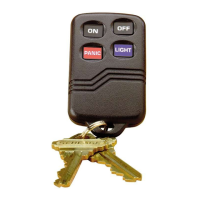
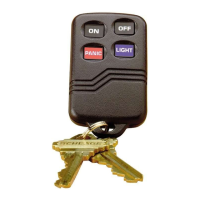
The ADEMCO 5804E is a compact, 4-button portable wireless key transmitter designed for use with wireless alarm systems that support 5800 Series receivers. This device is primarily intended for arming and disarming alarm systems, but each of its four buttons can be programmed for any desired zone response. A key feature of the 5804E is its support for High-Security mode, which employs rolling-code encrypted messaging to enhance security when communicating with the RF receiver. It is crucial to note that this device must be used with a 5881EN or a 6128RF (UL version) receiver to ensure proper functionality and compliance.
Programming the 5804E involves assigning a unique serial number, which is factory-assigned, and distinct "loop" numbers for each of its four buttons. During installation, these loop numbers must be programmed into the control panel. Each button should be assigned to an individual zone, and the Input Type should be designated as "BR" (Button Type RF). When the control panel prompts for the serial number, users can either press and release the button they are programming twice or manually enter the serial number via the keypad. For detailed instructions on programming the transmitter's serial number at the control panel, users should refer to the control unit's installation instructions. A design feature to prevent accidental transmissions requires that buttons on this transmitter be pressed for at least 1/2 second to activate the transmitter.
Activating the High-Security mode involves a specific sequence of steps. First, program the desired button in the control panel. After programming is complete, exit programming mode and wait for 60 seconds. Next, put the system into Go/No Go mode. Then, press all four buttons on the 5804E simultaneously until the panel beeps. To synchronize the device in High-Security Mode, press any button ONCE until the panel beeps, indicating receipt. If no beep is heard, users should exit Go/No Go mode and repeat the procedure from the step where the system is put into Go/No Go mode. Finally, exit Go/No Go mode using the user code followed by "1 (OFF)". When programming the 5804E locally in an RF keypad, such as a 6150RF, all four buttons must be held down while enrolling the serial number in the RF keypad. For systems utilizing two receivers in High-Security mode, the 5804E must be enrolled into each receiver one at a time. This is achieved by disconnecting one receiver, enrolling the 5804E as described for High-Security mode, then disconnecting the first receiver, reconnecting the second, and repeating the enrollment procedure. This meticulous process ensures proper High Security operation with both receivers.
The 5804E is supplied with colored buttons (red and blue) and colored adhesive identification labels (blue, red, gray, and green). Each label features a specific command function and symbol printed on it, along with an adhesive back for easy application. To apply a label, slowly peel it off and paste it onto the desired button. If a user decides to re-enroll a button later, the label can be easily removed, or a new label can be pasted over the existing one. Additional colored buttons (red and blue) are also provided, which can be used with or without the labels. These buttons are designed to be inserted only into their designated areas.
For maintenance, specifically inserting the colored buttons, the process involves several steps. First, hold the transmitter with the buttons facing down and remove the case back by prying it open with a small screwdriver. Carefully remove the PC board by its rubber casing, ensuring the board does not come out of the casing and avoiding bending the exposed battery tabs. Then, replace the desired buttons, either red or blue, into each button's designated opening. Once finished, replace the PC board, ensuring the button tabs on the board face the four buttons, and snap the case front and back together. After inserting the new buttons, it is recommended to check the 5804E for proper operation.
The 5804E is powered by two replaceable lithium batteries, designed to provide up to 4 years of life. For battery replacement, the case back is removed using a small screwdriver. The old batteries are then removed, and new batteries are placed in the case back locations, ensuring the positive (+) end faces down. To close the device, the case front and back are snapped together. An important note for battery replacement is to avoid removing the Printed Circuit Board.
 Battery
| battery type 1 | Maxell CR2025 |
|---|---|
| battery type 2 | Duracell DL 2025 |
| battery type 3 | Varta CR2025 |
 Weight and Dimensions
| width | 2.25" / 57 mm |
|---|---|
| height | 1.50" / 38 mm |
| depth | 0.5" / 12.7 mm |



 To Next Page