EasyManua.ls Logo

Honeywell Chronotherm IV - User Manual

Honeywell Chronotherm IV
16 pages
Print Icon
To Next Page IconTo Next Page
Loading...
1
Manual for
Chronotherm IV
Congratulations…
You are the owner of the Chronotherm IV, type T 8602A, the most advanced digital
programmable thermostat that Honeywell has ever produced.
With the Chronotherm IV thermostat you can realise almost any wishes in the field of
home-climate control you can wish for. For a maximum of six periods per day you can set
the temperature, and finetune the desired temperature to half a degree.
The Chronotherm IV is equipped with Adaptive Intelligent Recovery, which makes sure
that the desired temperature is being reached on the time you requested. Using the
thermostat is most simple.
Honeywell has experience in developing thermostats for more than a hundred years. The
combination of this experience with state-of-the-art technology ensures your top level in
home comfort. With the aid of this manual you’ll learn step by step to program your
thermostat, and additional examples show you how you can use your thermostat most
efficiently.
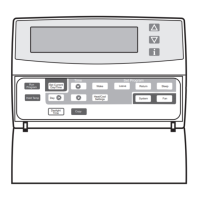
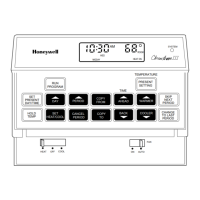
Translation of Dutch terms on the Control Panel (see the inside of front cover of Dutch
manual)
4. Today as Sunday / Tomorrow as Sunday
5. Holiday Timer
6. Temperature Continuous (manual mode)
7. Start Program (back to functioning according to program)
8. (from left to right, top to bottom:) Rising / Leaving / Sleep / Coming Home
9. Forward / Back
10. Summertime – Wintertime
11. Copy Day
12. Setting Day / Time
13. Day
1. Time, day of the week and room temperature are continuously shown on the display.
The flame-symbol indicates when the heater is being activated.
2. Pressing one of these buttons the set temperature is being changed for only the
duration of the present period.
3. Shows the temperature which is set at the present moment, the temperature outside
and the and the set temperature of the tele-function (if these additions have been
installed).

Other manuals for Honeywell Chronotherm IV

Questions and Answers

  • G
    Gregory StanleyAug 13, 2025
    Why is my Honeywell Chronotherm IV heating not working?
    • S
      Sarah SilvaAug 14, 2025
      If your Honeywell Thermostat's heating isn't turning on, several factors could be at play. First, ensure the thermostat is receiving power by checking for 24 Vac between the R and C terminals. If there's no power, inspect the circuit breaker (reset if tripped), the system fuse (replace if blown), and the HVAC equipment's power switch (set to 'On'). Also, verify the wiring between the thermostat and HVAC equipment, fixing any breaks or loose connections. If power is present, confirm that the system selection is set to 'Heat' and that the heating setpoint is higher than the room temperature. Lastly, the thermostat might be in a minimum off time mode; wait up to five minutes to see if the system responds.
  • T
    Tammy GonzalezAug 17, 2025
    Why is my Honeywell Chronotherm IV Thermostat cooling not turning on?
    • J
      Justin ButlerAug 17, 2025
      If your Honeywell Thermostat's cooling isn't activating, begin by checking the power supply. Ensure there's 24 Vac between the R and C terminals. If power is absent, check the circuit breaker (reset if tripped), replace any blown fuses, and ensure the HVAC equipment's power switch is in the 'On' position. Inspect and repair any faulty wiring between the thermostat and the HVAC equipment. If power is available, make sure the system selection is set to 'Cool' and that the cooling setpoint is below the current room temperature. Also, the thermostat might be in a minimum off time mode; wait up to five minutes. You can also reconfigure minimum off time in Installer Setup number 33 if required.
  • S
    suttonrodneyAug 21, 2025
    How to unlock temperature settings on Honeywell Chronotherm IV?
    • R
      Rachel DavidsonAug 21, 2025
      If you're unable to adjust the temperature settings on your Honeywell Thermostat, it might be due to temperature limits or configured setpoint stops. Check that your desired heating temperature is within 40 to 90°F (4.5 to 32°C) and your cooling temperature is within 48 to 99°F (7 to 37°C). Also, check Installer Setup numbers 34 and 35 to reconfigure the setpoint stops if needed.
  • S
    Sharon PughAug 25, 2025
    Why is my Honeywell Thermostat showing the wrong temperature?
    • C
      Chelsea CrossAug 26, 2025
      If the temperature displayed on your Honeywell Thermostat is incorrect, there are several potential causes. The room temperature display may need reconfiguration via Installer Setup number 37. Also, ensure that the thermostat is correctly configured for either °F or °C display by checking Installer Setup number 14. Finally, the thermostat's location could be causing inaccurate readings; consider relocating it.
  • T
    Toni GarciaAug 28, 2025
    What to do if Honeywell Chronotherm IV Thermostat shows heat or cool but no air is coming out?
    • J
      jjacksonAug 29, 2025
      If your Honeywell Thermostat shows the system is on (flame for heat, snowflake for cool) but there's no corresponding warm or cool air from the registers, it suggests that the heating or cooling equipment itself may not be operating. Verify the operation of heating or cooling equipment in self-test.
  • J
    Jessica ChristianSep 2, 2025
    Why is the outdoor temperature wrong on my Honeywell Chronotherm IV Thermostat?
    • F
      fisherlaurenSep 2, 2025
      If the outdoor temperature display on your Honeywell Thermostat is incorrect, it could be due to a wiring issue or the wrong sensor. Refer to the C7089B1000 installation instructions to check the wiring between the thermostat and the sensor. If the wiring is correct, ensure you are using the correct sensor (C7089B1000).
  • S
    Samantha MckinneySep 5, 2025
    Why does my Honeywell Thermostat turn on and off quickly?
    • E
      elizabethgarnerSep 5, 2025
      If your Honeywell Thermostat's heating or cooling cycles on and off quickly, the heat or cool circuit may be opening up or becoming high impedance. To resolve this, add a resistor in parallel with the load or install an interface relay.
  • C
    Cheryl WalkerSep 8, 2025
    How to display outdoor temperature on Honeywell Chronotherm IV?
    • X
      xcampbellSep 8, 2025
      If the outdoor temperature isn't displayed on your Honeywell Thermostat, first check if the option is activated. Go to Installer Setup number 24 and set it to 1. Note that your thermostat must have OT terminals and a C7089B1000 sensor installed for this feature to work.

Summary

Easy Programming Steps

Three-Step Programming Guide

Outlines the three essential steps to program the thermostat for desired week settings.

Programming Your Thermostat

Setting Date, Time, and Season

Guides on setting the correct day, time, and selecting Summer or Winter time.

Programming Daily Schedules

Choosing Period Count (4 or 6)

Instructions on switching between four or six daily programming periods.

Programming a Single Day

Step-by-step guide to setting times and temperatures for individual periods.

Setting Specific Periods

Detailed steps for setting RISING, LEAVING, COMING HOME, and SLEEP periods.

Modifying and Deleting Programs

Modifying Period Settings

Procedure for changing the start time and temperature of existing periods.

Temporary Program Changes

Changing Temperature Temporarily

How to adjust temperature for the current period, ending at the next scheduled period.

Holiday and Timer Functions

Programming Holiday Periods

Setting a fixed temperature for up to 99 days for holidays or absences.

Thermostat Maintenance and Troubleshooting

Troubleshooting Common Issues

Addresses problems like blinking settings, heater not starting, and frequent cycling.

Honeywell Chronotherm IV Specifications

General IconGeneral
DisplayLCD
Programming7-day programmable
Backup BatteryYes
Power Source24VAC
TypeProgrammable
Voltage20-30 VAC
Stages1 Heat/1 Cool
Temperature Range40°F to 90°F
CompatibilitySingle Stage Heating and Cooling Systems

Related product manuals