EasyManua.ls Logo

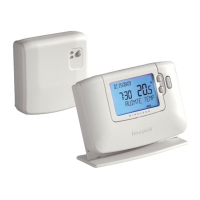
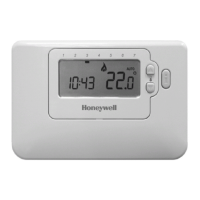
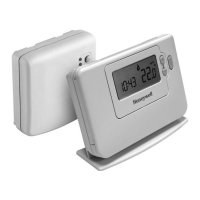
Honeywell CMT927 - User Manual

Honeywell CMT927
18 pages
Print Icon
To Next Page IconTo Next Page
Loading...
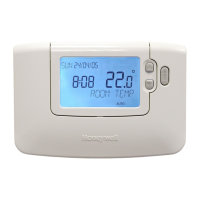
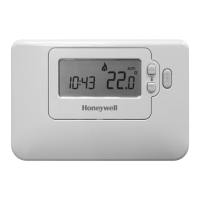
CM927 - User Guide
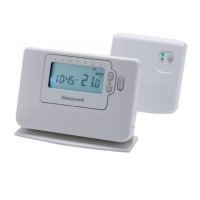
7 day Wireless Programmable Room Thermostat
with LoT Technology
Description
The Honeywell CM927 is a ‘wireless’ programmable room thermostat designed to
control your heating system efficiently, providing comfortable temperatures when you
are at home and energy savings when you are away. With ‘wireless’ communication
there is no need to provide a wired connection between the thermostat and boiler.
The following instructions explain how to set up, program and operate your
Honeywell CM927 Programmable Room Thermostat.
Features
Wireless connection to the boiler allows you to mount the Chronotherm in your
room without decor disruption
Armchair programming feature lets you program your Chronotherm while
resting comfortably in your armchair
Ergonomic User Interface features an OK-button making the CM927 very
easy to use so you always stay in control.
LoT Technology provides informative ‘on-screen’ feedback and operational
assistance to the user.
Extra Large LCD (Liquid Crystal Display) Screen with Backlight provides
added user friendliness and clearer viewing – even in the dark.
7-day heating program lets you set the CM927 independently for each day of
the week to match your lifestyle, whilst maximizing energy savings.
6 independent temperature levels per day lets you set any 6 temperatures you
require (from 5 to 35°C) so you can enjoy economical comfort every day
Holiday button saves energy by letting you reduce the temperature for 1 to 99
days while you are away from home, resuming normal operation on your return.
Party button lets you temporarily maintain (or adjust) the current temperature for 1
- 23 hours. Useful when you have guests or leave the house for a short period.
Day Off button copies Sunday’s program into any other day of the week, so that
you can make the CM927 follow this program if you have a day or days off.
Automatic Summer/Winter Time Change will adjust the clock automatically for
‘Daylight Saving Time’.
Built-in Memory holds the user program indefinitely so that it is never lost
even if you remove the batteries.
Optimum Start option is an advanced feature which ensures that the optimum
temperature conditions are achieved at the required times (option set by your
installer).
Honeywell Control Systems Ltd.
Arlington Business Park,
Bracknell
Berkshire
RG12 1EB
Technical Help Desk: 08457 678999
www.honeywelluk.com
50039989-003 A
© 2009 Honeywell International Inc.
...an explanation for householders
A programmable room thermostat is both a programmer and a room
thermostat. A programmer allows you to set ‘On’ and ‘Off’ time periods to suit
your own lifestyle. A room thermostat works by sensing the air temperature,
switching on the heating when the air temperature falls below the thermostat
setting, and switching it off once this set temperature has been reached.
So, a programmable room thermostat lets you choose what times you want the heating to be on, and
what temperature it should reach while it is on. It will allow you to select different temperatures in your
home at different times of the day (and days of the week) to meet your particular needs.
Turning a programmable room thermostat to a higher setting will not make the room heat up any faster.
How quickly the room heats up depends on the design of the heating system, for example, the size
of boiler and radiators.
Neither does the setting affect how quickly the room cools down. Turning a programmable room thermostat
to a lower setting will result in the room being controlled at a lower temperature, and saves energy.
The way to set and use your programmable room thermostat is to find the lowest temperature settings
that you are comfortable with at the different times you have chosen, and then leave it alone to do its job.
The best way to do this is to set low temperatures first, say 18°C, and then turn them up by one degree
each day until you are comfortable with the temperatures. You won’t have to adjust the thermostat
further. Any adjustments above these settings will waste energy and cost you more money.
If your heating system is a boiler with radiators, there will usually be only one programmable room
thermostat to control the whole house. But you can have different temperatures in individual rooms
by installing thermostatic radiator valves (TRVs) on individual radiators. If you don’t have TRVs, you
should choose a temperature that is reasonable for the whole house. If you do have TRVs, you can
choose a slightly higher setting to make sure that even the coldest room is comfortable, then prevent
any overheating in other rooms by adjusting the TRVs.
The time on the programmer must be correct. Some types have to be adjusted in spring and autumn
at the changes between Greenwich Mean Time and British Summer Time.
You may be able to temporarily adjust the heating programme, for example, ‘Override’, ‘Advance’ or
‘Boost’. These are explained in the manufacturer’s instructions.
Programmable room thermostats need a free flow of air to sense the temperature, so they must not be
covered by curtains or blocked by furniture. Nearby electric fires, televisions, wall or table lamps may
prevent the thermostat from working properly.
WHAT IS A PROGRAMMABLE ROOM THERMOSTAT?
®
Question and Answer IconNeed help?

Do you have a question about the Honeywell CMT927 and is the answer not in the manual?

Summary

What is a Programmable Room Thermostat?

Getting Started with the CM927

Installing the Batteries

Procedure for installing AA LR6 alkaline batteries into the thermostat unit for initial setup.

Setting the Date and Time

Instructions for configuring the current date and time on the thermostat using slider switch and buttons.

Running the Built-In Heating Program

Activating the thermostat's default heating program by setting the slider switch to AUTO mode.

Programming the CM927

The Built-in Heating Program

Details the factory default heating schedule with 6 temperature periods for weekdays and weekends.

Reviewing the Heating Program

Guidance on how to view the programmed heating periods for each day of the week.

Modifying the Heating Program

Step-by-step instructions on how to change time and temperature settings for heating periods.

Disabling; Enabling Time Periods

Instructions to disable or enable specific heating periods (2-6) from the daily program.

Operating the CM927

Choosing the Operating Mode

Explanation of the three operating modes: AUTO, MAN (Manual), and OFF for thermostat control.

During Normal Operation

Details on checking room and target temperatures, and frost protection settings.

Holiday Function

How to set a constant temperature for a specified number of days when away from home.

Party Function

Function to temporarily extend heating program for a set number of hours at a specific temperature.

Day Off Function

Allows running Sunday's heating program for a specified number of days during the week.

Adjusting the Time

Procedure to manually adjust the thermostat's time display during normal operation.

Fine Tuning the CM927

Changing the User Parameters

Guide to modifying basic settings like time format, resetting program, and enabling auto time change.

FAQs & Troubleshooting

Troubleshooting Guide

Table listing common symptoms, possible causes, and remedies for thermostat issues.

How to Change Batteries

Instructions on replacing the thermostat's batteries when the power is low.

Setting One Temperature for the Day

Method to set a single, constant temperature throughout the day using Manual mode.

What is Optimum Start?

Explanation of the energy efficiency feature that adjusts heating start times for target temperatures.

Room Unit Positioning

Guidance on optimal placement of the thermostat's room unit for reliable RF communication and accurate readings.

Removing the Thermostat

Steps for safely detaching the thermostat from its wall bracket or table stand.

BDR91 Relay Box LED Status

Meaning of the green LED indicator on the BDR91 relay box for system operation.

Air-Conditioning Control

Instructions on using the CM927 thermostat to control an air-conditioning system's cooling modes.

HR 80 Radiator Controller Operation

Information on operating an HR 80 radiator controller in conjunction with the CM927 thermostat.

Summary

What is a Programmable Room Thermostat?

Getting Started with the CM927

Installing the Batteries

Procedure for installing AA LR6 alkaline batteries into the thermostat unit for initial setup.

Setting the Date and Time

Instructions for configuring the current date and time on the thermostat using slider switch and buttons.

Running the Built-In Heating Program

Activating the thermostat's default heating program by setting the slider switch to AUTO mode.

Programming the CM927

The Built-in Heating Program

Details the factory default heating schedule with 6 temperature periods for weekdays and weekends.

Reviewing the Heating Program

Guidance on how to view the programmed heating periods for each day of the week.

Modifying the Heating Program

Step-by-step instructions on how to change time and temperature settings for heating periods.

Disabling; Enabling Time Periods

Instructions to disable or enable specific heating periods (2-6) from the daily program.

Operating the CM927

Choosing the Operating Mode

Explanation of the three operating modes: AUTO, MAN (Manual), and OFF for thermostat control.

During Normal Operation

Details on checking room and target temperatures, and frost protection settings.

Holiday Function

How to set a constant temperature for a specified number of days when away from home.

Party Function

Function to temporarily extend heating program for a set number of hours at a specific temperature.

Day Off Function

Allows running Sunday's heating program for a specified number of days during the week.

Adjusting the Time

Procedure to manually adjust the thermostat's time display during normal operation.

Fine Tuning the CM927

Changing the User Parameters

Guide to modifying basic settings like time format, resetting program, and enabling auto time change.

FAQs & Troubleshooting

Troubleshooting Guide

Table listing common symptoms, possible causes, and remedies for thermostat issues.

How to Change Batteries

Instructions on replacing the thermostat's batteries when the power is low.

Setting One Temperature for the Day

Method to set a single, constant temperature throughout the day using Manual mode.

What is Optimum Start?

Explanation of the energy efficiency feature that adjusts heating start times for target temperatures.

Room Unit Positioning

Guidance on optimal placement of the thermostat's room unit for reliable RF communication and accurate readings.

Removing the Thermostat

Steps for safely detaching the thermostat from its wall bracket or table stand.

BDR91 Relay Box LED Status

Meaning of the green LED indicator on the BDR91 relay box for system operation.

Air-Conditioning Control

Instructions on using the CM927 thermostat to control an air-conditioning system's cooling modes.

HR 80 Radiator Controller Operation

Information on operating an HR 80 radiator controller in conjunction with the CM927 thermostat.

Overview

The Honeywell CM927 is a wireless programmable room thermostat designed to efficiently control your heating system, providing comfortable temperatures when you are at home and energy savings when you are away. With wireless communication, there is no need for a wired connection between the thermostat and the boiler.

Function Description

The CM927 acts as both a programmer and a room thermostat. As a programmer, it allows you to set 'On' and 'Off' time periods to suit your lifestyle. As a room thermostat, it senses the air temperature, switching on the heating when the air temperature falls below the thermostat setting and switching it off once this set temperature has been reached. This combined functionality enables you to choose specific times for heating and the desired temperature during those times, allowing for different temperatures at various times of the day and days of the week to meet your particular needs.

Turning the programmable room thermostat to a higher setting will not make the room heat up any faster; the speed depends on the heating system's design (e.g., boiler and radiator size). Similarly, the setting does not affect how quickly the room cools down. Setting a lower temperature will result in the room being controlled at a lower temperature, saving energy. The recommended way to use the thermostat is to find the lowest comfortable temperature settings for your chosen times and then leave it to operate. This can be achieved by starting with low temperatures (e.g., 18°C) and gradually increasing them by one degree each day until comfortable. Any adjustments above these comfortable settings will waste energy and cost more money.

For heating systems with a boiler and radiators, there is usually only one programmable room thermostat to control the entire house. However, individual room temperatures can be managed by installing thermostatic radiator valves (TRVs). If TRVs are not present, a temperature reasonable for the whole house should be chosen. With TRVs, a slightly higher setting can be selected to ensure the coldest room is comfortable, preventing overheating in other rooms by adjusting the TRVs. The time on the programmer must be accurate, with some types requiring adjustment during spring and autumn for Greenwich Mean Time and British Summer Time changes.

The thermostat also includes special functions like 'Override,' 'Advance,' or 'Boost' for temporary adjustments to the heating program, as explained in the manufacturer's instructions. For accurate temperature sensing, the programmable room thermostat requires a free flow of air and should not be covered by curtains or blocked by furniture. Nearby heat sources like electric fires, televisions, or lamps can interfere with its proper operation.

Usage Features

The CM927 offers a range of features designed for user convenience and energy efficiency:

  • Wireless Connection: Eliminates the need for wired connections between the thermostat and the boiler, allowing flexible placement without disrupting decor.
  • Armchair Programming: Enables users to program the thermostat comfortably from their armchair.
  • Ergonomic User Interface with 'OK-button': Makes the CM927 easy to use, ensuring users remain in control.
  • LoT Technology: Provides informative on-screen feedback and operational assistance.
  • Extra Large LCD Screen with Backlight: Enhances user-friendliness and visibility, even in low light conditions.
  • 7-day Heating Program: Allows independent programming for each day of the week, matching individual lifestyles and maximizing energy savings.
  • 6 Independent Temperature Levels per Day: Users can set up to six different temperatures (from 5 to 35°C) per day for economical comfort.
  • Holiday Button: Saves energy by reducing the temperature for 1 to 99 days while away from home, automatically resuming normal operation upon return.
  • Party Button: Temporarily maintains or adjusts the current temperature for 1 to 23 hours, useful for guests or short absences.
  • Day Off Button: Copies Sunday's program to any other day of the week, allowing the CM927 to follow this program during days off.
  • Automatic Summer/Winter Time Change: Automatically adjusts the clock for Daylight Saving Time.
  • Built-in Memory: Retains the user program indefinitely, even if batteries are removed.
  • Optimum Start Option: An advanced feature (installer-set) that ensures desired temperature conditions are met at the required times.

Operating Modes: The thermostat can operate in Automatic, Manual, or Off modes.

  • AUTO (automatic) mode: Follows the programmed temperature schedule (default or personalized), offering optimal comfort and energy savings.
  • MAN (manual) mode: Acts as a simple thermostat with a fixed setpoint (5°C to 35°C), adjustable via buttons. The thermostat maintains this temperature until a different mode or temperature is selected.
  • OFF mode: Controls to a minimum temperature of 5°C for frost protection, adjustable by an installer.

During Normal Operation:

  • Temperature Enquiry: In AUTO and MAN modes, pressing the 'i' button displays the programmed 'target' temperature for 5 seconds before returning to the current room temperature. In OFF mode, it displays 'FROST TEMP'.
  • Temperature Override: In AUTO mode, the programmed temperature can be manually adjusted using the up/down buttons. This override is cancelled at the next programmed temperature change.

Special Functions:

  • HOLIDAY Function: Sets a constant temperature (default 10°C) for 1-99 days, saving energy while away. The holiday counter reduces daily, and normal operation resumes on the return date. It can be cancelled by pressing the holiday button again or moving the slider switch.
  • PARTY Function: Extends the heating program for a specified number of hours (1-23) at a particular temperature, useful for entertaining or short absences to save energy. It can be cancelled by pressing the party button again or moving the slider switch.
  • DAY OFF Function: Temporarily runs Sunday's heating program for 1-99 days, useful for unexpected days off. It can be cancelled by pressing the day off button again or moving the slider switch.
  • Adjusting the Time: The time can be adjusted during normal operation using the time change buttons and confirmed with the OK button.

Fine Tuning the CM927:

The user mode allows modification of basic settings:

  • Change Time Format: Selects between 12-hour (AM/PM) or 24-hour format.
  • Reset Built-in Program: Resets the heating program to factory defaults.
  • Enable/Disable Summer/Winter Time Change: Activates or deactivates automatic clock adjustments for Daylight Saving Time.

Maintenance Features

  • Battery Replacement: The thermostat continuously monitors battery power. A flashing battery symbol indicates low battery, typically after about 2 years. To replace, lift the front cover, remove the battery cover, insert 2 x AA LR6 Alkaline Batteries with correct orientation, and replace the cover. Program settings are retained, but time and date may need adjustment.
  • Troubleshooting Guide: The manual provides a comprehensive troubleshooting guide for common issues such as a blank LCD screen, flashing symbols, heating not switching on, RF communication problems, and incorrect temperature control.
  • RF Communication: The device is wireless, and proper placement is crucial for reliable RF communication. It should be at least 30cm from metal objects and 1 meter from other electrical equipment (radio, TV, PC). The BDR91 relay box's green LED indicates normal RF system operation; when ON, the boiler is ON. If RF communication is lost, the BDR91 push button can manually switch the boiler on/off.
  • Optimum Start: This energy efficiency feature adjusts the heating start time based on external temperature to ensure the desired room temperature is reached at the programmed time, rather than just starting the heating at that time.
  • Table Stand or Wall Mounted Bracket: The thermostat can be used with either. After programming, it should always be returned to its holder for proper operation.
  • Air-Conditioning Control: The CM927 can also control air-conditioning systems if set up correctly. By pressing the up/down temperature change buttons together for 5 seconds, it switches between heating and cooling modes. A default cooling program is provided and can be modified.
  • HR 80 Radiator Controller Operation: The manual details how to operate an HR 80 radiator controller with the CM927, including display information, adjustment dial usage for manual temperature override, and valve control (ON/OFF).

Honeywell CMT927 Specifications

General IconGeneral
DisplayLCD
Wi-Fi EnabledNo
Battery BackupYes
Temperature Range5°C to 35°C
MountingWall-mounted
Programmability7-day programming
WirelessYes
TypeProgrammable Thermostat
CompatibilityHeating systems
Control ModeManual
Power SourceBatteries
Wireless Range30 meters (indoors)

Related product manuals