Kit Instruction, continued
44-45-33-60B Page 3 of 4
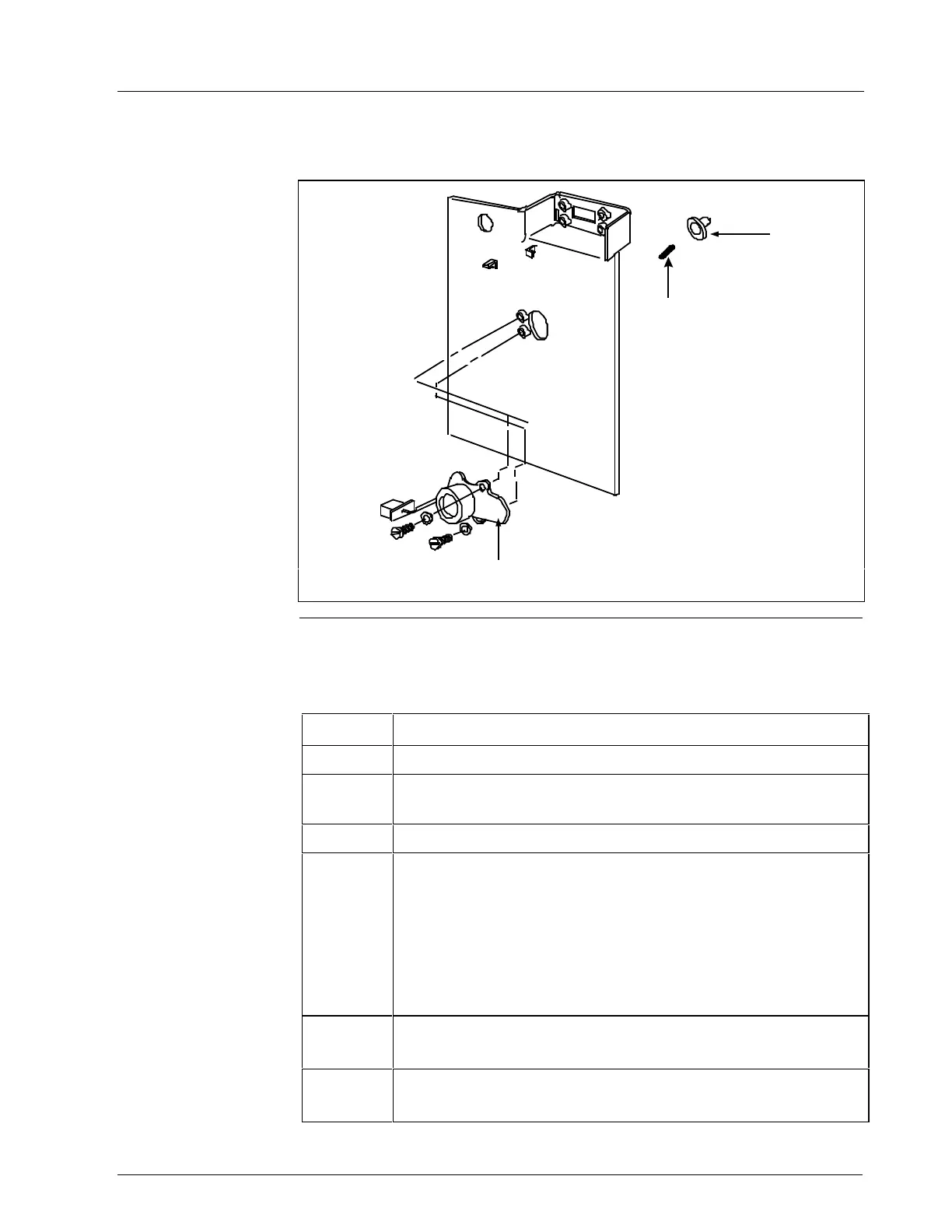
Component Location Refer to Figure 2 for the component locations and Table 2 for the
for DR4500 installation procedure.
Chart
Hub
Chart Motor
Spring
24241
Figure 2 – Component Location
DR4500 Procedure Follow the procedure in Table 2 to replace the existing chart hub in your
recorder.
Table 2 – Chart Hub Assembly Replacement for DR4500 Recorder
Step Action
1
Open the chart door and swing the chart plate out.
2
Remove chart hub and motor assembly by removing screws.
Save screws. Pull hub off the motor.
3
Select the appropriate chart hub from the kit.
4
For Classic models (DR45A1, DR45A2):
Assemble chart hub to chart motor—no spring is used. See
Chart hub types on page 1.
For Truline models (DR45AT, DR45AR, DR45AW, DR45AH,
DR45AP, DR45AS):
Slip new spring over chart motor shaft before pushing on the
chart hub assembly. See Chart hub types on page 1.
5
Hold motor in place and adjust chart hub flush with platen
and centered in platen opening.
6
Re-install motor with screws. Ensure that chart hub rotates
freely and does not bind.



 To Next Page
 Loading...