EasyManua.ls Logo

Honeywell ERM5220R1018/U - User Manual

Honeywell ERM5220R1018/U
60 pages
Print Icon
To Next Page IconTo Next Page
Loading...
INSTALL GUIDE
33-00135EFS-07
Home
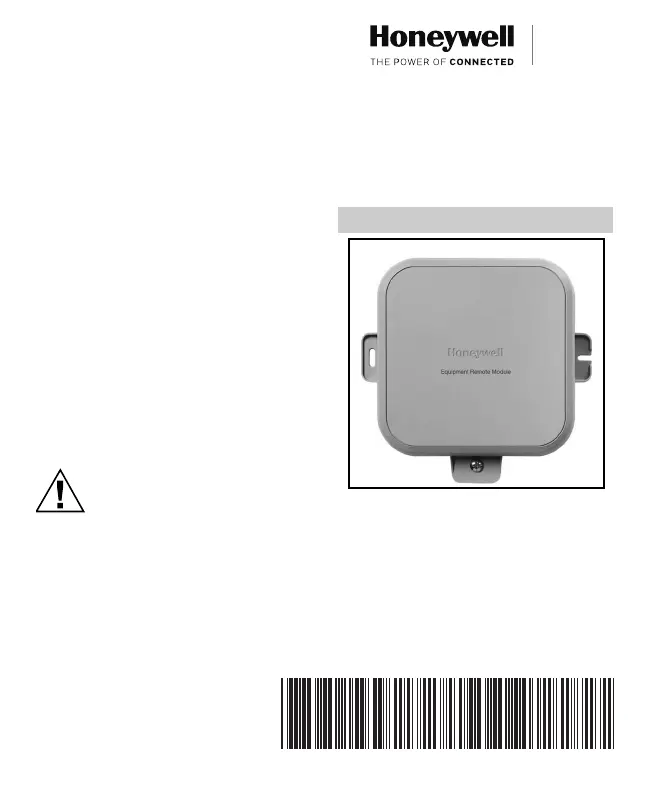
ERM5220R
Equipment Remote Module
WITH REDLINK™ WIRELESS TECHNOLOGY
Table of Contents
About the ERM5220R 2
Installation Checklist 3
Terminal Designations 4
Installation 6
Checkout 12
Troubleshooting 13
Specifications 15
5 Year Warranty 17
CAUTION
Read these installation instructions completely and follow them
carefully.
Installation must be performed by a qualified service technician
and must comply with local codes.
Disconnect power to all relevant devices before installing or
servicing the ERM.
Failure to connect the device according to these instructions may
result in damage to the device, the controls, and/or personal injury.
33-00135EFS_D.book Page 1 Friday, September 8, 2017 1:59 PM

Questions and Answers

  • J
    Justin ThompsonAug 15, 2025
    What to do if the compressor doesn’t turn on and “Y” LED is blinking on my Honeywell ERM5220R1018/U?
    • S
      Sarah SaundersAug 15, 2025
      If the compressor on your Honeywell Remote Control isn’t turning on and the “Y” LED is blinking, it's likely due to a 5-minute compressor lockout after a power cycle. Please wait 5 minutes; the compressor will automatically turn on after this safety timeout.
  • S
    Sarah CarterAug 18, 2025
    Why is the connected LED on my Honeywell Remote Control red?
    • B
      Bryan RileyAug 19, 2025
      If the connected LED on your Honeywell Remote Control is red, it indicates a loss of communication with the system. Verify that the thermostat and/or Equipment Interface Module are powered and functioning correctly.
  • J
    Jonathan MasonAug 21, 2025
    How to fix no LEDs on my Honeywell Remote Control?
    • S
      Sean PierceAug 21, 2025
      If no LEDs are illuminated on your Honeywell Remote Control, it indicates that there is no power to the device. Verify that there is 24 VAC at the R/C terminals.
  • A
    Amber SmithAug 25, 2025
    How to troubleshoot Honeywell Remote Control relays not switching as expected?
    • J
      jwhiteAug 26, 2025
      If the relays on your Honeywell Remote Control aren’t switching as expected, it may be due to an incorrect jumper configuration. Check the jumper configuration. If it is incorrect, unenroll from the system, change the jumper, and then re-enroll with the system.
  • D
    Donna GayAug 28, 2025
    Why is the outdoor temperature reading too high on my Honeywell ERM5220R1018/U thermostat?
    • T
      tracycarpenterAug 28, 2025
      If the outdoor temperature reading at the thermostat for your Honeywell Remote Control is too high, it's likely due to sun exposure on the sensor. Ensure the outdoor temperature sensor isn't in direct sunlight. You may need to use a longer wire to mount it in an ideal, shaded location.
  • J
    Joseph RubioSep 1, 2025
    What to do if my Honeywell ERM5220R1018/U thermostat shows “—” for outdoor temperature?
    • D
      Dawn YoungSep 1, 2025
      If your Honeywell Remote Control thermostat displays “—” for the outdoor temperature, it indicates that the wired outdoor temperature sensor has failed. Check the sensor for a short circuit or an open circuit.
  • M
    mossjessicaSep 4, 2025
    Why is the connected LED off on my Honeywell ERM5220R1018/U Remote Control?
    • G
      gonzalesemilySep 4, 2025
      If the connected LED on your Honeywell Remote Control is off, it indicates that the device is not enrolled with the system. Enroll the device with the system.
  • A
    Angel StewartSep 7, 2025
    Why is no outdoor temperature shown on my Honeywell ERM5220R1018/U thermostat?
    • M
      Michelle ThompsonSep 7, 2025
      If no outdoor temperature is shown on the thermostat for your Honeywell Remote Control, it could be because there is no wired outdoor temperature sensor connected to the ERM, or the device is configured as a boiler. Connect the outdoor temperature sensor to the S1/S1 terminals. Note that the device only reports outdoor temperature when configured as a compressor.
  • J
    Jim GeorgeSep 12, 2025
    Why doesn’t the emergency backup control function on my Honeywell ERM5220R1018/U Remote Control?
    • Q
      qcaldwellSep 12, 2025
      If the emergency backup control isn’t functioning on your Honeywell Remote Control (when configured as a boiler), it indicates that there is no valid indoor temperature sensor. Check the sensor for a short circuit or open circuit, or install an indoor temperature sensor on the S1/S1 terminals.

Summary

Important Safety Precautions

About the ERM5220 R

Installation Checklist

Terminal Designations

INSTALLATION

Wiring

Details wiring preparation and connection steps for the ERM device.

Mounting ERM

Guides the physical mounting of the ERM, including location and orientation.

Checkout

TROUBLESHOOTING

Reset Procedure

Provides instructions on how to reset the ERM by holding the connect button.

SPECIFICATIONS

FCC Regulations

IC Regulations

5 YEAR WARRANTY

Honeywell ERM5220R1018/U Specifications

General IconGeneral
TypeRemote Control
Model NumberERM5220R1018/U
BrandHoneywell
CategoryRemote Control
Power SourceBattery
Battery TypeAAA
Number of Batteries2
DisplayLCD
FunctionsTemperature control
CompatibilityCompatible with Honeywell thermostats

Related product manuals