CV41 Vehicle Mount Computer (Windows CE) User Guide 55
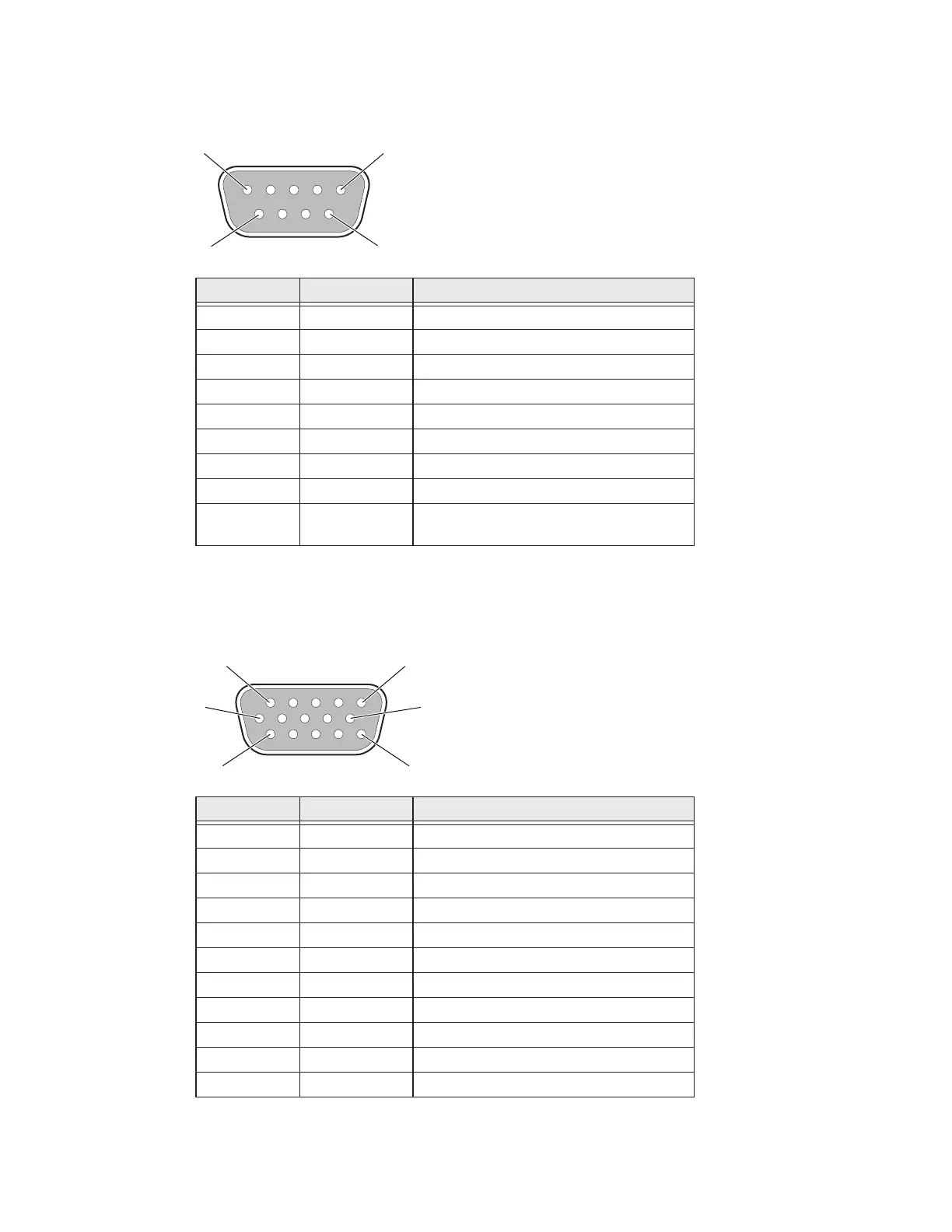
USB Port
The USB port is located on the back of the smart dock.
CANBUS/Audio Port
The CV41 CANBUS and audio port is located on the smart dock. The CV41 cannot sup-
port CANBUS and audio simultaneously.
Pin Signal Description
1 GND Common ground
2 USBC_D+ USB client data signal
3 USBC_D- USN client data signal
4 USB_H1_PWR USB host 1 (5 V output power)
5 GND Common ground
6 GND Common ground
7 USB_H1_D+ USB host 1 data signal
8 USB_H1_D- USB host 1 data signal
9 USBC_VBUS USB client (5 V detect from attached
host)
9
6
1
Pin Signal Description
1 - CAN reserved
2 CAN_L CAN_L bus line dominant low
3 CAN_GND CAN ground
4 - CAN reserved
5 GND Optional ground
6 Audio return Headset return
7 Audio output Headset output
8 Mic input Microphone input
9 Mic return Microphone return
10 Audio return
11 GND Optional ground
1
11
1
5
15
6


 To Next Page