
 To Next Page
A
Albert OrtizAug 15, 2025
What to do if Honeywell Primus 880 fails?
- JJames ChenAug 16, 2025
If the Honeywell Radar fails, it is currently inoperable and should be repaired or replaced when possible.

What to do if Honeywell Primus 880 fails?
If the Honeywell Radar fails, it is currently inoperable and should be repaired or replaced when possible.
What to do if Honeywell Primus 880 shows a caution?
If the Honeywell Radar displays a caution, a failure has been detected that might compromise the calibration accuracy. In this case, use information from the radar for advisory purposes only.
What to do if the XMIT switch is off on Honeywell Primus 880 Radar?
If the XMIT switch located on the RTA of the Honeywell Radar is off, this disables the transmitter. Check the switch at the next opportunity.
What to do if the SCAN switch is off on Honeywell Radar?
If the SCAN SWITCH located on the RTA of the Honeywell Radar is off, it will disable the antenna scan. Check the switch when possible.
What to do if there is no autotilt on Honeywell Primus 880?
If there is no autotilt on the Honeywell Radar, no altitude information is available to make the altitude compensated tilt calculation. Have the system checked when possible.
What to do if Honeywell Radar shows 'Spoking likely'?
If the Honeywell Radar indicates 'Spoking likely', a problem has been detected that may cause spoking to occur. Have the system checked when possible.
What does 'Stab uncal' mean on Honeywell Radar?
If the Honeywell Radar shows 'Stab uncal', an error in the antenna positioning system has been detected. Have the RTA checked when possible.
What does 'Turb uncal' mean on Honeywell Radar?
If the Honeywell Radar displays 'Turb uncal', a problem has been detected with the turbulence detection hardware. Have the RTA checked when possible.
What does 'Tilt uncal' mean on Honeywell Primus 880?
If the Honeywell Radar shows 'Tilt uncal', an error in the antenna position system has been detected. Have the RTA checked when possible.
What does 'Picture uncal' mean on Honeywell Radar?
If the Honeywell Radar displays 'Picture uncal', radar functions are okay, but receiver calibration is degraded. Have the RTA checked when possible.
Describes the PRIMUS 880 system's purpose for weather and ground mapping.
Describes the system with a dedicated radar indicator and optional EFIS.
Describes the system using EFIS as the radar display with controllers.
Describes the system with EFIS/MFD display and controllers.
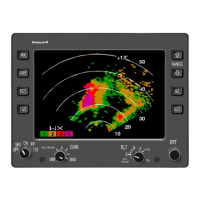
Details controls located on the WI-880 Weather Radar Indicator front panel.
Details controls and display features of the WC-880 Weather Radar Controller.
Details controls and display features of the WC-884 Weather Radar Controller.
Outlines control positions required before powering up the radar system.
Explains the radar system's standby mode for power application without transmission.
Describes weather detection mode, calibration, and associated procedures.
Details ground mapping mode, tilt control, and display interpretation.
Explains the self-test mode and maintenance function for system verification.
Explains the echo principle, PPI display, and how radar presents storm data.
Discusses techniques to minimize ground clutter and manage tilt for weather targets.
Covers antenna stabilization, dynamic error, and accelerative error sources.
Explains how to interpret radar images based on reflectivity, conditions, and patterns.
Details turbulence probability, detection theory, and operation modes.
Explains ground mapping operation, tilt settings, and display interpretation.
Provides information on radiation safety precautions and safe distances from the antenna.
Describes how the system provides troubleshooting information via fault codes or text.
Explains how to use test mode to view fault information when TEXT FAULTS are enabled.
Provides contact information for Honeywell's technical publications and customer response center.
Lists and defines acronyms and abbreviations used throughout the guide.
Transcribes FAA advisory circulars on radiation safety for airborne weather radar.
Describes thunderstorm hazards to aviation, including squall lines, tornadoes, and turbulence.
Explains how the EGPWS combines aircraft data with a terrain database for alerts.
Details the push buttons and annunciators used to control and indicate EGPWS operation.
Describes the EGPWS display formats, color coding, and operational modes.
 General