EasyManua.ls Logo

Honeywell Quantum T 3580 - User Manual

Honeywell Quantum T 3580
60 pages
Print Icon
To Next Page IconTo Next Page
Loading...
QuantumT
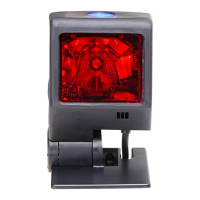
Omnidirectional Laser Scanner
3580
User’s Guide

Questions and Answers

  • J
    jamiebakerJul 30, 2025
    Why Honeywell Quantum T 3580 Barcode Reader unit has no LEDs, beeper or motor spin?
    • M
      Matthew MaloneJul 30, 2025
      The Honeywell Barcode Reader might not have LEDs, beeper, or motor spin due to several reasons. It could be that no power is being supplied to the scanner, so check the transformer, outlet, and power strip, and ensure the cable is plugged into the scanner. Alternatively, some host systems might not supply enough current, so use the power supply included with the scanner. Other potential causes include a too-short 'same symbol timeout' (adjust it for a longer increment), a disabled beeper (enable it), no tone selected (select one), the bar code type not being selected (verify selection), or the scanner being configured for a character length lock or minimum length that isn't met (verify the bar code meets the criteria).
  • B
    Brandon DavisAug 2, 2025
    What to do if my Honeywell Quantum T 3580 powers up OK but doesn't communicate properly with the host?
    • L
      Lisa PriceAug 2, 2025
      If your Honeywell Barcode Reader powers up but doesn't communicate with the host, the issue might be with the host's com port. Check to ensure the baud rate and parity of the scanner and the host match. Also, verify that the cable is properly connected to the correct com port.
  • E
    emilydavisAug 7, 2025
    Why does Honeywell Barcode Reader lock up after the first scan?
    • L
      lowejamesAug 7, 2025
      The Honeywell Barcode Reader might lock up after the first scan because it is configured to support ACK/NAK, RTS/CTS, XON/XOFF or D/E, but the host isn't properly supporting the handshaking. Verify that some form of host handshaking is supporting the handshaking.
  • M
    Mary GriffinAug 11, 2025
    What to do if my Honeywell Barcode Reader scans the bar code but there is no data?
    • C
      Cheryl ChaseAug 11, 2025
      If your Honeywell Barcode Reader scans a barcode but no data is transmitted, the unit may not be configured correctly. Make sure that the proper PC type (i.e., AT, PS2 or XT) is selected.
  • T
    Tiffany JacksonAug 15, 2025
    What to do if my Honeywell Quantum T 3580 Barcode Reader scans but the data is not correct?
    • D
      Derrick RamosAug 16, 2025
      If your Honeywell Barcode Reader scans, but the data is incorrect, the unit may not be configured correctly. Verify that the correct country code and data formatting are selected.
  • D
    David MannAug 20, 2025
    Why does Honeywell Quantum T 3580 beep for some bar codes but not others of the same type?
    • B
      Brandon HuberAug 20, 2025
      If your Honeywell Barcode Reader beeps for some barcodes but not others of the same type, it might not be configured correctly for that bar code type. Check if check digits are set properly.
  • M
    Michael BennettAug 25, 2025
    Why does Honeywell Barcode Reader lock up after the first scan (white LED stays on)?
    • D
      Debbie DeanAug 25, 2025
      If your Honeywell Barcode Reader locks up after the first scan and the white LED stays on, verify that the scanner’s data format matches the requirements of the host system.

Summary

Scanner Installation Procedures

RS232, RS232 TTL, Light Pen or Laser Emulation Installation

Instructions for installing the scanner using RS232, TTL, Light Pen, or Laser emulation.

RS485 Installation

Instructions for installing the scanner using the RS485 interface.

Keyboard Wedge Installation

Instructions for installing the scanner using the Keyboard Wedge interface.

Stand-Alone Keyboard Installation

Instructions for installing the scanner using the Stand-Alone Keyboard interface.

USB Installation

Instructions for installing the scanner using the USB interface.

Scanner Operation Guide

Configurable Scan Pattern Modes

Explains primary and single line scan pattern modes and configurable patterns.

Configurable Button Functions

Details the four configurable modes for the scanner's physical button.

Failure Mode Indicators

Lists indicators for scanner failures and recommended actions.

Depth of Field Specifications

Details normal scan zone depth of field specifications.

Default Settings - Communication Parameters

Configuration Modes

Scanner Configuration with MetroSet2 Software

Details the MetroSet2 Windows-based software for scanner configuration.

Upgrading the Firmware

Scanner and Cable Terminations

Regulatory Compliance Information

Safety Precautions

Provides safety warnings related to laser exposure and proper usage.

Customer Support and Assistance

Technical Assistance

Provides contact methods for installation and troubleshooting assistance.

Honeywell Quantum T 3580 Specifications

General IconGeneral
BrandHoneywell
ModelQuantum T 3580
CategoryBarcode Reader
LanguageEnglish

Related product manuals