EasyManua.ls Logo

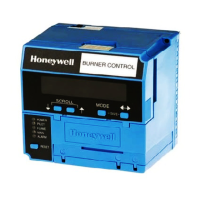
Honeywell RM7897A1002 - User Manual

Honeywell RM7897A1002
16 pages
Print Icon
To Next Page IconTo Next Page
Loading...
INSTALLATION INSTRUCTIONS
66-1151
RM7897A1002, RM7897C1000
7800 SERIES
Relay Modules
APPLICATION
The RM7897A,C are microprocessor-based integrated burner
controls for automatically fired gas, oil, or combination fuel
single burner applications. The RM7897A,C system consist of
a relay module, subbase, amplifier, and purge card. Options
include keyboard display module (KDM), Personal Computer
Interface, Data ControlBus™ Module, remote display
mounting, Expanded Annunciator and Combustion System
Manager® Software.
Functions provided by the RM7897A,C include automatic
burner sequencing, flame supervision, system status
indication, system or self-diagnostics and troubleshooting.
The RM7897 adds a proof of closure input to the standard
primary control function of the RM7895/RM7896 product. It
adds a blinking fault code function to the POWER LED on
Alarm shutdown. It also adds programmable postpurge using
the S7800A1142 Keyboard Display Module (KDM). The
RM7897A1002 offers selectable pilot operation, intermittent
on terminal 8 or interrupted on terminal 21.
The RM7897C1000 offers interrupted pilot and delayed main
valve for 2-step firing (Low-High-Low) applications.
This document provides installation and static checkout
instructions. Other applicable publications are:
SPECIFICATIONS
Electrical Ratings (See Table 3):
Voltage and Frequency:
RM7897A,C: 120 Vac (+10/-15%), 50/60 Hz (± 10%).
Power Dissipation: 10W maximum.
Maximum Total Connected Load: 2000 VA.
Fusing Total Connected Load: 15A Fast Blow, type SC or
equivalent.
Environmental Ratings:
Ambient Temperature:
Operating: -40°F to 140°F (-40°C to +60°C).
Storage: -40°F to 150°F (-40°C to +66°C).
Humidity: 85% relative humidity continuous, noncondensing.
Vibration: 0.5G environment.
Approvals:
Underwriters Laboratories Inc. Listed: File No. MP268,
Guide No. MCCZ.
Canadian Standards Association Certified: Pending.
Factory Mutual Approved: Report No. Pending.
IRI Acceptable.
Federal Communications Commission: Part 15, Class B,
Emissions.
Publication
No. Product
63-2278 Q7700 Network Interface Unit Product Data
65-0084 Q7800A,B 22-Terminal Wiring Subbase
Product Data
65-0288 S7800A1142 Keyboard Display Module
Product Data
65-0091 S7810A Data ControlBus Module™ Product
Data
65-0095 S7820 Remote Reset Module Product Data
65-0097 221729C Dust Cover Installation
Instructions
65-0101 S7830 Expanded Annunciator Product Data
65-0102 ZM7850A Combustion System Manager™
Operating Instructions
65-0109 R7824, R7847, R7848, R7849, R7851,
R7861, R7886 Flame Amplifiers for the
7800 Series Product Data
65-0131 221818A Extension Cable Assembly
Product Data
65-0229 7800 SERIES Relay Modules Checkout and
Troubleshooting Product Data.
65-0092 QS7800A ControlBus™ Module, Standard
65-0227 QS7800B ControlBus™ Module, Multidrop
Publication
No. Product


Questions and Answers

  • A
    Arthur PorterSep 3, 2025
    What causes wiring problem or internal fault in Honeywell Control Unit?
    • F
      fwileySep 4, 2025
      If the Honeywell Control Unit reports a 'Wiring Problem/ Internal Fault', indicating that a pilot (ignition) valve terminal, main valve, ignition, or Main Valve 2 was on when it should be off, take the following precautions: remove system power and turn off the power supply and fuel supply. Check the wiring and correct any errors. Inspect the Pilot Fuel Valve(s) and connections. Reset and sequence the relay module. If the fault persists, replace the relay module.
  • A
    apadillaSep 18, 2025
    How to troubleshoot device specific fault on Honeywell Control Unit?
    • A
      ashley21Sep 18, 2025
      If your Honeywell Control Unit displays a 'Device Specific' fault related to special OEM input circuits, check the wiring and operation of these special OEM inputs. Reset and sequence the relay module. If the fault reappears, remove power from the device, reapply power, and then reset and sequence the relay module. If the fault does not repeat on the next cycle, check for electrical noise being copied into the relay module through the external loads or possibly an electrical grounding issue. If the fault persists, replace the relay module.
  • J
    Jesus OrtegaSep 16, 2025
    What causes internal faults in Honeywell RM7897A1002 Control Unit?
    • S
      Sheila PalmerSep 16, 2025
      If your Honeywell Control Unit is displaying 'Internal Faults' due to a Relay Module Self-Test failure, reset and sequence the relay module. If the fault reappears, remove power, reapply power, and then reset and sequence the relay module. If the fault does not repeat on the next cycle, check for electrical noise being copied into the relay module through the external loads or possibly an electrical grounding issue. If the fault persists, replace the relay module.
  • M
    Mrs. Margaret SpencerSep 14, 2025
    How to fix internal faults on Honeywell RM7897A1002?
    • R
      Ralph JohnsonSep 14, 2025
      If your Honeywell Control Unit is displaying 'Internal Faults' indicating a Relay Module self-test failure, reset and sequence the relay module. If the fault reappears, remove power from the device, reapply power, and then reset and sequence the relay module. If the fault persists, replace the relay module.
  • D
    dana94Sep 12, 2025
    Why is man-open switch, start switch, or control on in wrong state on Honeywell RM7897A1002?
    • K
      Karen GreenSep 12, 2025
      If your Honeywell Control Unit shows a problem with the 'Man-Open Switch; Start Switch or Control On' being in the wrong operational state, check the wiring and correct any errors. Make sure that the Manual Open Valve Switch, Start Switch, and Control are operating properly. Note if the Stat Switch is held “On” too long. Reset and sequence the relay module. If the fault persists, replace the relay module (RM7838A1014; RM7838B1013 or RM7838C1004 only).
  • T
    tina85Sep 12, 2025
    What causes high fire switch or low fire switch failure on Honeywell RM7897A1002?
    • W
      Whitney RangelSep 12, 2025
      If your Honeywell Control Unit indicates a 'High Fire Switch or Low Fire Switch' failure, check the wiring and correct any errors. Reset and sequence the relay module. Use the manual motor potentiometer to drive the motor open and closed, verifying at the motor switch that the end switches are operating properly. If a manual potentiometer is unavailable, use the RUN/TEST switch. Reset and sequence the relay module. If the fault persists, replace the relay module.
  • J
    Julie AndersonSep 9, 2025
    How to troubleshoot preignition interlock on Honeywell RM7897A1002 Control Unit?
    • J
      John BurnettSep 9, 2025
      If your Honeywell Control Unit is experiencing a 'Preignition Interlock' fault, check the wiring and correct any errors. Check the Preignition Interlock switches to ensure they are functioning properly. Also, check the fuel valve operation. Reset and sequence the relay module while monitoring the Preignition Interlock status. If the fault persists, replace the relay module.
  • C
    Curtis RowlandSep 7, 2025
    What to do if Honeywell Control Unit shows configuration jumper problem?
    • K
      Kelli PearsonSep 7, 2025
      If the Honeywell Control Unit displays a 'Configuration Jumper Problem', indicating that the configuration jumpers differ from the sample taken at startup, inspect the jumper connections, ensuring that any clipped jumpers were completely removed. Reset and sequence the relay module. If the fault persists, replace the relay module.
  • K
    Kim JohnsonSep 5, 2025
    How to fix flame amplifier problem on Honeywell RM7897A1002?
    • K
      kyle02Sep 5, 2025
      If the Honeywell Control Unit displays a 'Flame Amplifier Problem', where flame is not sensed, or sensed when it should be on or off, check the wiring and correct any errors. Ensure the flame amplifier and flame detector are compatible. Remove the flame amplifier and inspect the connections, then reseat the amplifier. Reset and sequence the relay module. If the code reappears, replace the flame amplifier and/or the flame detector. If the fault persists, replace the relay module.
  • R
    Ryan WelchAug 20, 2025
    How to fix low AC line voltage on Honeywell RM7897A1002?
    • H
      Henry HarperAug 21, 2025
      If your Honeywell Control Unit displays 'Low AC Line Voltage', start by checking the connections of the relay module and display module. Then, try resetting and sequencing the Relay Module. Also, check the 7800 power supply to ensure the frequency and voltage meet the required specifications. Finally, inspect the backup power supply if applicable.

Summary

Product Application Overview

Technical Specifications

Installation Guide

Installation Pre-checks and Warnings

Essential pre-installation checks and warnings.

Site Selection for Installation

Guidelines for selecting an appropriate installation site.

Wiring Subbase Mounting

Instructions for physically mounting the subbase.

Static Checkout Procedure

Relay Module Mounting

Key Technical Features

Operational Sequences

Burner Sequence of Operation

Describes the burner control sequence steps.

Run;Test Switch Operation

Explains the function of the Run/Test switch.

Configuration and Settings

Site-Configurable Jumper Settings

Details jumper options for site-specific configuration.

Troubleshooting Faults

Honeywell RM7897A1002 Specifications

General IconGeneral
BrandHoneywell
ModelRM7897A1002
CategoryControl Unit
LanguageEnglish

Related product manuals