EasyManua.ls Logo

Honeywell RM7898A1000 - User Manual

Honeywell RM7898A1000
32 pages
Print Icon
To Next Page IconTo Next Page
Loading...
INSTALLATION INSTRUCTIONS
32-00209-03
SIL
3
Capable
RM7898A
7800 SERIES Valve Proving
Primary Relay Modules
APPLICATION
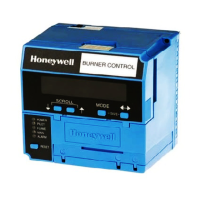
The RM7898 is a microprocessor-based integrated burner
control for automatically fired gas, oil or combination fuel
single burner applications. The RM7898 system consist of a
relay module, subbase, amplifier, and purge card. Options
include Keyboard Display Module (KDM), Personal Computer
Interface, Data ControlBus™ Module, remote display
mounting, Expanded Annunciator and Combustion System
Manager® Software.
Functions provided by the RM7898 include automatic
burner sequencing, flame supervision, system status
indication, system or self-diagnostics and
troubleshooting.
This document covers the following 7800 Series Relay
Modules:
RM7898A1000
RM7898A1018
RM7898A2000
RM7898A2018
The RM7898 provides unique functions to a standard
primary control.
As received, the RM7898 offers the following features:
Interrupted pilot with 10 second pilot flame establishing
period.
Main valve operation with 10 second MFEP.
Pre-Ignition Interlock (POC) input.
Shutter-driven output when appropriate amplifier is
selected (R7861A, R7886A, R7851C).
Blinking Fault Code Power LED on safety shutdown.
RM7898A1018 offers early spark shutoff when flame is
sensed.
Available features when appropriate terminals are
energized:
Intermittent pilot T8 (Terminal 19).
Direct spark feature for Valve Proving System (VPS)
(Terminal 18).
Valve Proving System function (Terminal 17).
See “Appendix b - ignition options” on page 25 for
examples of 24 single or dual fuel system combinations
with or without using the Valve Proving feature.
Programmable features using the S7800A1142 Keyboard
Display Module (KDM) (not included):
Postpurge time—(up to 60 minutes).
Valve Prove System features, including:
—VPS test time
When in burner sequence to conduct VPS time
(Never, Before, After, Both or Split):
NOTE: The S7800A1142 Series 5 or higher can be pro-
grammed for ModBus Communication. (See 65-0288
Spec Sheet.)
At commissioning time, the Valve Proving System may be
scheduled to occur at one of five different times:
1. Never—Device default as received; valve proving
does not occur. (Demand wired to Terminal 6.)
2. Before—Valve proving after standby and safe start
check, prior to ignition trials, concurrent with Pre-
Purge.
3. After—Valve proving occurs after the Run state
before the device goes to Standby, concurrent with
postpurge.
4. Both—Valve proving occurs at both times Before and
After noted above.
5.
Split—The Main Valve 2 (MV2) (high pressure) seat test
is performed at the Before time and the Main Valve 1
(MV1) (low pressure) seat test is performed during the
After time.
To perform Valve Proving, it must be commissioned and
Demand Input (Terminal 17) must be used.
The following assumptions apply when using the RM7898
Valve Proving testing.
Fig. 1. Valve Proving System—simplified diagram.
MV1
MV2
VP
SW.
M24161
OUTLET
INLET
1
CAUTION: VALVE ENERGIZING TIMING IS BASED ON HONEYWELL VALVE
OPENING TIMES OF 13 SECONDS MAXIMUM.
− FOR VALVES WITH TIMINGS GREATER THAN 13
SECONDS OR THOSE THAT DO NOT OPEN THE ACTIVE
VALVE WITHIN THE ENERGIZED TIME, A BYPASS
SOLENOID VALVE (1/4”, 120 VAC) IS REQUIRED TO
OBTAIN THE PROPER TEST PRESSURES.
− THE BYPASS VALVE WILL BE WIRED IN PARALLEL TO THE
VALVE IT IS BYPASSING (TERMINAL 9 FOR MV1 OR
TERMINAL 21 FOR MV2).
1


Questions and Answers

  • C
    Cheryl ChangSep 12, 2025
    What does Honeywell Control Unit Code 4-1 *Purge Card Problem* mean?
    • A
      Amy BarrSep 12, 2025
      If your Honeywell Control Unit displays Code 4-1, indicating a *Purge Card Problem*, it means there is no purge card or the purge card timing has changed from the original configuration. Here’s how to address it: 1. Make sure the purge card is seated properly. 2. Inspect the purge card and the connector on the Relay Module for any damage or contaminants. 3. Reset and sequence the Relay Module. 4. If the fault code reappears, replace the purge card. 5. Reset and sequence the Relay Module. 6. If the fault code persists, replace the Relay Module.
  • R
    Roy RogersAug 25, 2025
    What does Honeywell RM7898A1000 Control Unit Code 4-2 *Wiring Problem/Internal Fault* mean and how to fix it?
    • J
      joel32Aug 25, 2025
      Code 4-2 on your Honeywell Control Unit indicates a *Wiring Problem/Internal Fault*, specifically that the pilot (ignition) valve terminal, main valve, ignition, or Main Valve 2 was on when it should have been off. To resolve this: **WARNING:** Electrical Shock Hazard; Fire or Explosion Hazard. Can cause severe injury, death, or property damage. Remove system power and turn off the power supply. 1. Remove system power and turn off the fuel supply. 2. Check the wiring and correct any errors. 3. Inspect the Pilot Fuel Valve(s), both places, and connections. 4. Reset and sequence the Relay Module. 5. If the fault persists, replace the Relay Module.
  • J
    Jocelyn PaulAug 26, 2025
    How to troubleshoot Honeywell RM7898A1000 Control Unit Code 1-1 *Low AC Line Voltage*?
    • G
      Gregory SheltonAug 26, 2025
      If your Honeywell Control Unit displays Code 1-1, indicating *Low AC Line Voltage*, follow these steps: 1. Check the Relay Module and Display Module connections. 2. Reset and sequence the Relay Module. 3. Check the 7800 power supply to ensure frequency and voltage meet specifications. 4. Check the backup power supply, as appropriate.
  • C
    cparksAug 27, 2025
    What to do if Honeywell RM7898A1000 displays Code 4-3 *Flame Amplifier Problem*?
    • I
      iellisAug 27, 2025
      If your Honeywell Control Unit displays Code 4-3, indicating a *Flame Amplifier Problem*, here’s how to troubleshoot: 1. Check the wiring and correct any errors. 2. Ensure that the flame amplifier and flame detector are compatible. 3. Remove the flame amplifier and inspect its connections. Reseat the amplifier. 4. Reset and sequence the Relay Module. 5. If the code reappears, replace the flame amplifier and/or the flame detector. 6. If the fault persists, replace the Relay Module.
  • A
    Angela PrestonAug 29, 2025
    What does Honeywell RM7898A1000 Code 3-1 *Running/Interlock Switch Problem* mean?
    • J
      James JonesAug 29, 2025
      If your Honeywell Control Unit displays Code 3-1, which indicates a *Running/Interlock Switch Problem* during Pre-Purge, follow these steps: 1. Check the wiring and correct any errors. 2. Inspect the fan to ensure there is no air intake blockage and that it is supplying air. 3. Make sure the Lockout Interlock switches are functioning properly and the contacts are free from contaminants. 4. Reset and sequence the Relay Module to Pre-Purge (place the TEST/RUN Switch in the TEST position, if available). Measure the voltage between terminal 7 and G (ground); 120 Vac should be present. Switch TEST/RUN back to RUN. 5. If steps 1 through 4 are correct and the fault persists, replace the Relay Module.
  • A
    Amber JamesAug 30, 2025
    How to resolve Honeywell RM7898A1000 Code 2-3 *Flame Signal Overrange*?
    • J
      Jennifer MontoyaAug 30, 2025
      If your Honeywell Control Unit shows Code 2-3, indicating a *Flame Signal Overrange*, it means the flame signal value is too high to be valid. Here's how to address it: 1. Make sure the flame detector and flame amplifier are compatible. 2. Remove the flame amplifier and inspect its connections. Reset the flame amplifier. 3. Reset and sequence the Relay Module. 4. Check the flame detector sighting position; reset and recycle. Measure flame strength. Verify that it meets specifications. If not, refer to the flame detector and/or flame amplifier checkout procedures in the installation instructions. 5. If the code reappears, replace the flame amplifier and/or the flame detector. 6. If the fault persists, replace the Relay Module.
  • A
    Antonio ShawNov 20, 2025
    What to do if Honeywell Control Unit displays Code 2-2 *Flame Signal Absent*?
    • A
      Alfred CunninghamNov 20, 2025
      If your Honeywell Control Unit displays Code 2-2 indicating a *Flame Signal Absent*, here's what you can do: * First, measure the flame signal to ensure it meets specifications. * Next, verify the compatibility of the flame amplifier and flame detector. * Inspect the main fuel valve(s) and their connections. * Confirm that the fuel pressure is adequate for the combustion chamber, and inspect the connections to the fuel pressure switches, ensuring they function correctly. * Also, inspect the Airflow Switch to ensure proper operation. * Check the flame detector's sighting position, then reset and recycle, measuring the flame signal strength again. If it doesn't meet specifications, consult the installation instructions for flame detector and amplifier checkout procedures. * If...
  • T
    Teresa LambertSep 13, 2025
    What does Honeywell Control Unit Code 5-3 *Man-Open Sw.; Start Sw. or Control On* mean?
    • J
      jameschaseSep 14, 2025
      If your Honeywell Control Unit displays Code 5-3, indicating *Man-Open Sw.; Start Sw. or Control On* in the wrong operational state, here's how to address it: 1. Check the wiring and correct any errors. 2. Make sure that the Manual Open Valve Switch, Start Switch, and Control are operating properly. 3. Note that the Start Switch held 'On' too long can also trigger this error. 4. Reset and sequence the Relay Module. 5. If the fault persists, replace the Relay Module (RM7838A1014; RM7838B1013 or RM7838C1004 only).
  • S
    stewartkevinSep 12, 2025
    What does Honeywell RM7898A1000 Code 6-3 *Device Specific* mean?
    • M
      Michael MillsSep 12, 2025
      If your Honeywell Control Unit displays Code 6-3, indicating *Device Specific*, it indicates a fault with special OEM input circuits. To resolve this: 1. Check wiring and operation of special OEM inputs. 2. Reset and sequence the Relay Module. 3. If the fault reappears, remove power from the device, reapply power, then reset and sequence the Relay Module. 4. If the fault does not repeat on the next cycle, check for electrical noise being copied into the Relay Module through the external loads or possibly an electrical grounding issue. 5. If the fault persists, replace the Relay Module.
  • J
    James CampbellSep 7, 2025
    What does Honeywell RM7898A1000 Code 5-2 *High Fire Sw. or Low Fire Sw.* mean?
    • M
      michael52Sep 8, 2025
      If your Honeywell Control Unit displays Code 5-2, indicating a *High Fire Sw. or Low Fire Sw.* failure, follow these steps: 1. Check the wiring and correct any errors. 2. Reset and sequence the Relay Module. 3. Use a manual motor potentiometer to drive the motor open and closed. Verify at the motor switch that the end switches are operating properly. Use RUN/TEST switch if a manual potentiometer is not available. 4. Reset and sequence the Relay Module. 5. If the fault persists, replace the Relay Module.

Summary

APPLICATION

INSTALLATION INSTRUCTIONS

SPECIFICATIONS

Electrical Ratings

Details voltage, frequency, power dissipation, and total connected load ratings for the RM7898.

INSTALLATION

Product Installation Guidance

Provides critical steps and warnings to follow before and during product installation.

VALVE PROVING TEST OPTIONS

WIRING SUBBASE AND SEQUENCE CHART (WITH VALVE PROVING)

FINAL WIRING CHECK

TERMINAL RATINGS AND COMBINATIONS

RM7898 Terminal Specifications

Lists the voltage, current, and pilot duty ratings for each terminal on the RM7898.

STATIC CHECKOUT PROCEDURE

Pre-Installation Checkout Steps

Explains performing checkout on the subbase before installing the relay module.

Safety Precautions During Testing

Highlights warnings for fire/explosion hazards and electrical hazards during testing.

STATIC CHECKOUT TESTS

Test 1: Line Voltage at Terminal 5

Verifies line voltage presence at terminal 5 as part of the checkout procedure.

Test 3: Burner Motor Operation Verification

Checks burner motor start and line voltage at terminal 7 within 10 seconds.

Test 6: Ignition and Pilot Valve Operation

Verifies ignition spark and automatic pilot valve operation.

VALVE PROVING SYSTEM EXPLANATION

Purpose and Leak Detection

Explains the system's goal to test valve seat integrity and detect leaks.

Valve Proving Schedule Options Overview

Details the five scheduling options for the Valve Proving system: Never, Before, After, Both, Split.

VALVE PROVING SYSTEM DETAILS

Split Test Procedure Description

Explains how upstream and downstream seat tests are performed in the Split option.

Pressure Switches for VPS Selection

Identifies the need for and recommends specific Honeywell pressure switches for Valve Proving.

SETUP OF VALVE PROVING FUNCTION

Standby;Setup Screen Navigation Guide

Guides users on navigating to the Setup screen from the Standby state.

Password Entry for Setup Access

Details the procedure for entering the password to access the setup menu.

Setting Valve Proving Test Time Procedure

Instructs on how to set the duration for the Valve Proving test via the KDM.

SETUP CONFIRMATION AND POSTPURGE CONFIGURATION

Saving Valve Proving Setup Changes Method

Explains how to save the configured Valve Proving settings.

Setting Post Purge Time Procedure

Guides on configuring the Post Purge time using the KDM interface.

FINALIZING SETUP AND MODULE MOUNTING

PRINCIPAL TECHNICAL FEATURES

Safety Shutdown (Lockout) Conditions List

Lists all conditions that will cause the RM7898 to enter a safety shutdown (lockout) state.

OPERATION SEQUENCE OVERVIEW

PRE-PURGE AND IGNITION TRIALS

CONFIGURABLE JUMPER OPTIONS

TROUBLESHOOTING GUIDE

Understanding Blink Fault Codes

Explains how blink codes identify faults and how to interpret them.

Code 1-1: Low AC Line Voltage Fault

Describes a low AC line voltage fault and recommended troubleshooting steps.

Code 2-1: Unexpected Flame Signal Fault

Details faults related to unexpected flame signals during standby or purge.

CONTINUED BLINKING FAULT CODE TROUBLESHOOTING

Code 2-2: Flame Signal Absent Fault

Troubleshooting for no flame signal at the end of PFEP or during RUN.

Code 3-3: VPS in Improper State Fault

Troubleshooting for the Valve Proving Switch being in the wrong state during a VPS test.

FURTHER FAULT CODE TROUBLESHOOTING

Code 4-3: Flame Amplifier Problem Fault

Troubleshooting steps for issues with the flame amplifier or detector.

APPENDIX A: VALVE PROVING TEST PROCEDURE

Valve Proving Test Purpose and Leak Detection

Explains the system's goal to test valve seat integrity and detect leaks.

Calculating Valve Train Volume Formula

Provides the formula to calculate the volume between the two valves for testing.

Calculating Valve Proving Test Time Formula

Provides the formula to calculate the minimum test time based on pressure and volume.

VPS WORKSHEET EXAMPLE AND TABLES

Example Calculation of Valve Proving Test Time

Shows an example calculation for the Valve Proving test time.

APPENDIX B - IGNITION OPTIONS

CONTINUED IGNITION OPTIONS

VALVE PROVING DUAL FUEL WIRING DIAGRAMS

MORE VALVE PROVING DUAL FUEL WIRING DIAGRAMS

SAFETY AND SECURITY FEATURES

Physical Device Protection Recommendations

Recommendations for securing the device physically and preventing unauthorized access.

Honeywell RM7898A1000 Specifications

General IconGeneral
Frequency50/60 Hz
ApplicationIndustrial and commercial burners
Operating Temperature-40°C to 70°C
ApprovalsUL, CSA, CE
MountingPanel Mount
Relay Outputs2
Weight0.5kg

Related product manuals