This document provides a comprehensive user manual for the Honeywell Pro Series Thermostat, specifically highlighting the T6 Pro model. The thermostat is designed to control heating and cooling systems in residential and light commercial applications, offering both programmable and non-programmable scheduling options.
Function Description
The Honeywell Pro Series Thermostat serves as a central control unit for your HVAC system. It allows users to set and maintain desired indoor temperatures, manage heating and cooling cycles, and control fan operation. The device is capable of handling various system types, including conventional forced air, heat pump, and radiant heat systems, with support for multiple stages of heating and cooling.
Key functions include:
- Temperature Control: Users can set a target temperature, and the thermostat will activate the heating or cooling system as needed to reach and maintain that temperature.
- System Mode Selection: The thermostat offers multiple system modes such as Auto, Heat, Cool, Em Heat (Emergency Heat), and Off, allowing users to choose the appropriate operation for their comfort needs.
- Fan Control: Users can select different fan modes, including Auto (fan runs only when heating or cooling is active), On (fan runs continuously), and Circ (fan runs randomly about 33% of the time to circulate air).
- Scheduling: Depending on the model and settings, the thermostat supports various scheduling options: Non-Programmable, 5-2 Programmable, 5-1-1 Programmable, and 7-Day Programmable. This allows users to create custom temperature schedules to optimize energy usage and comfort throughout the week.
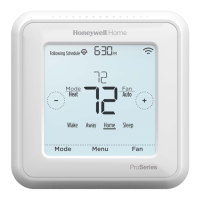
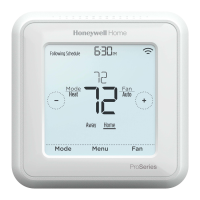
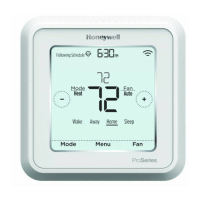
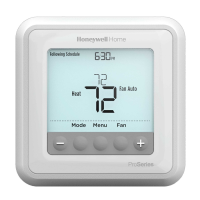
- System Status Display: The thermostat's display provides real-time information, including the current temperature, set temperature, system mode, fan mode, and whether the system is actively heating or cooling.
- Installer Setup (ISU): This advanced menu allows installers to configure the thermostat to match the specific HVAC system type and preferences, including heating system type, heating equipment type, reversing valve operation, cool stages, backup heat stages, fan control in heat, auxiliary/emergency terminal control, backup heat source, emergency heat source, external fossil fuel kit integration, system changeover, auto changeover differential, backup heat droop, upstage timer for backup heat, compressor lockout/balance point, outdoor lockout backup heat, and compressor/heating cycle rates.
- System Test: An installer system test function is available to verify the proper operation of all heating, cooling, and fan stages, ensuring the system is correctly wired and functioning.
Usage Features
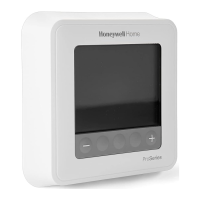
The Honeywell Pro Series Thermostat is designed for ease of use, with a clear digital display and intuitive button controls.
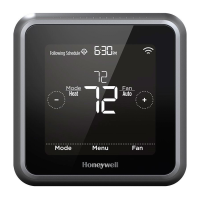
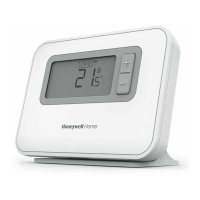
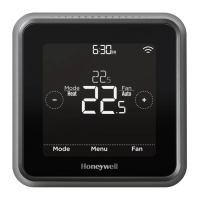
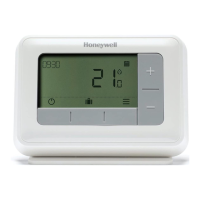
- Display: The thermostat features a backlit digital display that shows the current time, schedule status, current temperature, and set temperature. It also indicates the active system mode and fan mode.
- Navigation Buttons: The interface typically includes dedicated buttons for Mode, Menu, and Fan, along with "+" and "-" buttons for adjusting settings and temperatures. A "Center" button is often used in conjunction with other buttons to access advanced menus.
- Temperature Adjustment: Users can easily raise or lower the set temperature using the "+" and "-" buttons.
- Mode Selection: Pressing the "Mode" button cycles through the available system modes (Auto, Heat, Cool, Em Heat, Off).
- Fan Mode Selection: Pressing the "Fan" button cycles through the available fan modes (Auto, On, Circ).
- Scheduling: For programmable models, users can access the scheduling menu to set different temperatures for various times of the day and days of the week.
- Advanced Menu Access: The installer setup (ISU) and system test functions are accessed by pressing and holding specific button combinations (e.g., CENTER and + buttons for approximately 3 seconds), providing a secure way to prevent accidental changes to critical system settings.
- Security Code: A default security code (1234) is provided for accessing certain advanced functions, ensuring that only authorized personnel can make significant changes to the system configuration.
- Optional Cover Plate: An optional decorative cover plate is available for installation, which can be used to cover paint gaps from an old thermostat or when mounting the thermostat to an electrical junction box, providing a clean and finished look.
- R Slider Tab: A built-in jumper (R Slider Tab) allows the thermostat to be configured for one- or two-transformer systems, simplifying wiring for different HVAC setups.
- Battery Power: The thermostat can be powered by AA batteries, which can serve as primary or backup power, ensuring continuous operation even during power outages.
Maintenance Features
The Honeywell Pro Series Thermostat is designed for minimal maintenance, primarily focusing on power supply and proper installation.
- Battery Replacement: The thermostat uses AA batteries, which should be replaced periodically to ensure reliable operation, especially if the C-terminal (common wire) is not used for primary AC power. The manual recommends inserting AA batteries for primary or backup power.
- Wiring Terminal Designations: Clear wiring terminal designations are provided (S, Y, Y2, G, C, U, L/A-A, O/B, AUX-W2, E, W, K, R, Rc) to facilitate correct installation and troubleshooting. Shaded terminals indicate the most commonly used connections.
- Wire Specifications: The manual specifies using 18- to 22-gauge thermostat wire and notes that shielded cable is not required, simplifying wire selection for installers.
- Installation Instructions: Detailed steps are provided for both UWP (Universal Wiring Plate) mounting system installation and optional cover plate installation, ensuring a secure and correct setup. This includes instructions for separating components, mounting to the wall or electrical box, inserting wires, and snapping the thermostat into place.
- Troubleshooting (Implied): While not explicitly a "maintenance feature," the detailed wiring diagrams for conventional and heat pump systems, along with the ISU options, provide a comprehensive guide for installers to diagnose and resolve potential wiring or configuration issues.
- Customer Support: Honeywell provides customer assistance through their website and a toll-free number, offering support for product inquiries and troubleshooting.
- Mercury Notice: The manual includes an important caution regarding mercury, instructing users not to dispose of old controls containing mercury in the trash and to contact local waste management authorities for proper recycling and disposal. This highlights environmental responsibility.
- Electrical Hazard Caution: A caution about electrical hazard is included, advising users to disconnect power before beginning installation to prevent electrical shock or equipment damage.
- Equipment Damage Hazard Caution: Another caution warns against cycling the compressor quickly during testing, as compressor protection is bypassed, which could lead to equipment damage.
In summary, the Honeywell Pro Series Thermostat is a versatile and user-friendly device designed for efficient HVAC control, offering robust installation features, flexible programming options, and clear guidance for both users and installers.

 Need help?
 General

 To Next Page


