EasyManua.ls Logo

Honeywell T8112 - User Manual

Honeywell T8112
8 pages
Print Icon
To Next Page IconTo Next Page
Loading...
PRODUCT DATA
® U.S. Registered Trademark
Copyright © 1996 Honeywell Inc. • All Rights Reserved
T8112
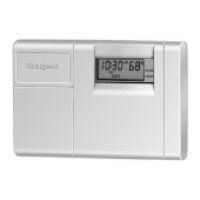
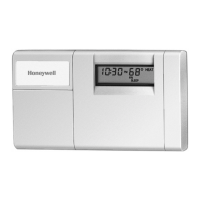
Programmable Thermostat
GENERAL
The T8112 Programmable Thermostat provides energy
savings for single-stage heating and cooling applications
while providing reliable, precise temperature control.
FEATURES
HEAT-OFF-COOL system switch.
AUTO-ON fan switch.
Separate programs for weekdays and weekends
(5 day/2 day).
Digital LCD display.
Easy to program and install.
Precise temperature control.
Four daily energy saving programs.
Compatible with most 24 Vac standing pilot, gas
electronic ignition, oil or central electric systems.
Requires two AA alkaline batteries.
LCD flashes
bAt Lo
indicating low battery power.
Isolated heating/cooling circuits.
Contents
General ............................................................................... 1
Features .............................................................................. 1
Specifications ...................................................................... 2
Ordering Information ........................................................... 2
Installation ........................................................................... 3
Programming the Thermostat ............................................. 6
Checkout and Settings ........................................................ 7
Troubleshooting .................................................................. 8
68-0170


Questions and Answers

  • S
    Stephanie KochJul 28, 2025
    What to do if cooling will not come on Honeywell Thermostat?
    • M
      Madison WalkerJul 28, 2025
      If your Honeywell Thermostat's cooling system isn't starting, even though the temperature setting is lower than the current room temperature and the SYSTEM ON indicator is lit, try setting the system switch to OFF for ten minutes. After ten minutes, return the switch to the COOL position. If the air conditioner comes on, the compressor could have reached its high limit temperature protection and shut down. If it still doesn’t come on, consult the air conditioner manufacturer's instructions.
  • M
    Mary LopezAug 1, 2025
    Why my Honeywell Thermostat heating will not come on?
    • E
      Ernest ReevesAug 1, 2025
      If the heating won't turn on for your Honeywell Thermostat and the display is blank or shows 'bAt Lo', try installing fresh batteries. Also, ensure the thermostat switch is set to HEAT and check the system fuse or circuit breaker, replacing or resetting it if needed. If the temperature setting is higher than the current temperature, and SYSTEM ON indicator is lit, see the furnace manufacturer instructions.
  • D
    Debbie WhiteAug 5, 2025
    Honeywell T8112 Thermostat SYSTEM ON indicator is lit, but no heat?
    • S
      Shannon RochaAug 6, 2025
      If the SYSTEM ON indicator is lit but no heat is coming from the registers with your Honeywell Thermostat, allow time for the furnace to heat up and the fan to come on before checking for heat at the register. Also, check to make sure the system on-time is set correctly according to the instructions in the Installation section.
  • E
    Elizabeth Andrews DDSAug 10, 2025
    How to fix Honeywell T8112 display will not come on?
    • C
      Christina WalkerAug 10, 2025
      If the display on your Honeywell Thermostat doesn't turn on, set the system switch to OFF, remove the batteries, and re-insert them backward for at least five seconds to reset the thermostat. Then, replace the batteries correctly. Also, make sure the batteries are fresh and properly installed.
  • D
    Debbie MoralesAug 14, 2025
    Why Honeywell Thermostat current setting does not match the display temperature?
    • C
      craig85Aug 14, 2025
      If the current setting on your Honeywell Thermostat doesn't match the display temperature, check that the wiring hole in the wall behind the wallplate is plugged with insulation to prevent drafts. Also, it is normal for the current setting and display temperature to differ occasionally.
  • D
    Daniel TravisAug 18, 2025
    Why Honeywell T8112 temperature display will not go lower than 45°F?
    • A
      Angela RichardAug 18, 2025
      The temperature setting limit has been reached. The setting range for your Honeywell Thermostat is 45°F to 88°F (7°C to 31°C).
  • C
    Corey EspinozaAug 22, 2025
    What to do if bAt Lo remains on Honeywell T8112 Thermostat display?
    • C
      cooperandrewAug 22, 2025
      If the 'bAt Lo' message remains on your Honeywell Thermostat display after installing new batteries, remove the batteries, wait one hour, and then install fresh alkaline batteries.

Summary

Key Features

System Switch

Controls the heating, cooling, or off state of the system.

Programmable Schedules

Allows different temperature programs for weekdays and weekends.

System Compatibility

Works with various heating and cooling system types.

Product Specifications

Model and Description

Identifies the T8112 model and its function for heating/cooling.

Setpoint Range

Defines the adjustable temperature range for heating and cooling.

Mounting Method

Describes how the thermostat is mounted onto a wall plate.

Installation Guide

Electrical Safety Warning

Crucial warning about disconnecting power to prevent electrocution.

Mounting Plate Installation

Step-by-step instructions for installing the mounting plate.

Wiring Guidelines

General rules and references for wiring the thermostat.

System Compatibility Chart

Lists compatible system types for the T8112 thermostat.

Wiring Installation Caution

Wiring Safety Precaution

Emphasizes disconnecting power before any wiring is done.

2-Wire Heat-Only Wiring

Wiring diagram for a 2-wire heat-only system.

3-Wire Cool-Only Wiring

Wiring diagram for a 3-wire cool-only system.

Thermostat Back Adjustments

Adjusting System On-Time

Guidance on adjusting system on-time for optimal performance.

High Efficiency Furnace Adjustment

Specific adjustment for high efficiency furnaces.

Programming the Thermostat

Setting Current Time and Day

Steps to set the current time and day on the thermostat.

Setting Heating Program

Instructions for programming the heating schedule.

Setting Cooling Program

Instructions for programming the cooling schedule.

Operating and Making Changes

Temporary and Hold Temperature Adjustments

How to temporarily adjust or indefinitely hold temperature settings.

Checkout and Settings

System Checkout Procedures

Procedures for testing heating and cooling system operations.

Troubleshooting Common Issues

Power and Display Issues

Resolving problems with the display not powering on or battery indicators.

Heating and Cooling Activation Failures

Diagnosing and fixing issues with heating or cooling system startup.

System Cycling and On-Time Problems

Addressing frequent cycling and incorrect system on-time durations.

Honeywell T8112 Specifications

General IconGeneral
DisplayDigital
Stages1 Heat / 1 Cool
MountingWall Mount
TypeProgrammable
Temperature Range40°F to 90°F
Power SourceBattery
Load TypeResistive
Maximum Current1.0A
Switch ActionSPST

Related product manuals