New Device
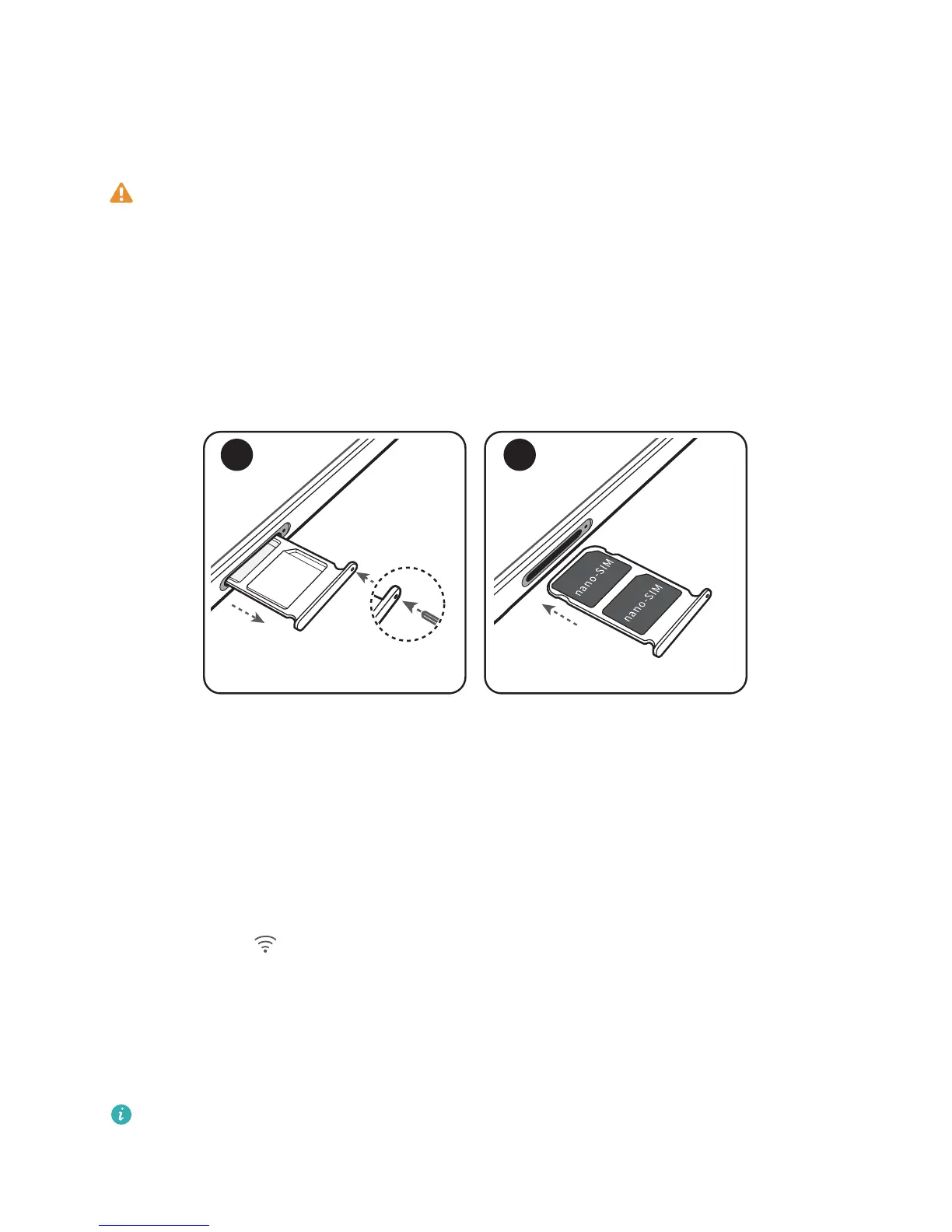
Card Insertion Guide
l Use a standard nano-SIM card and insert and remove the card tray in the horizontal direction
along the device body. Using non-standard SIM cards and inserting cards in an inappropriate
direction may damage the card tray and your Phone.
l Exercise caution when using the SIM card eject pin to avoid hurting your ngers or damaging
your Phone.
l Store the eject pin in a safe place out of the reach of children to prevent them from swallowing
it or injuring themselves by accident.
l Power off your phone before installing or removing a SIM card.
New Device Conguration
Connecting to the Internet
Connect to WLAN networks effortlessly with your device.
Connecting to a WLAN network
1 Swipe down from the status bar to open the
notication panel.
2 Touch and hold to open the WLAN settings screen.
3 Switch on WLAN. Your device will list all available WLAN networks at your location.
4 Select the WLAN network you want to connect to. If you select an encrypted network, you will
also need to enter the WLAN password.
Connecting using mobile data
Before using mobile data, ensure that you have a data plan with your carrier to avoid incurring
excessive data charges.
1 Swipe down from the status bar to open the notication panel.
9



 To Next Page