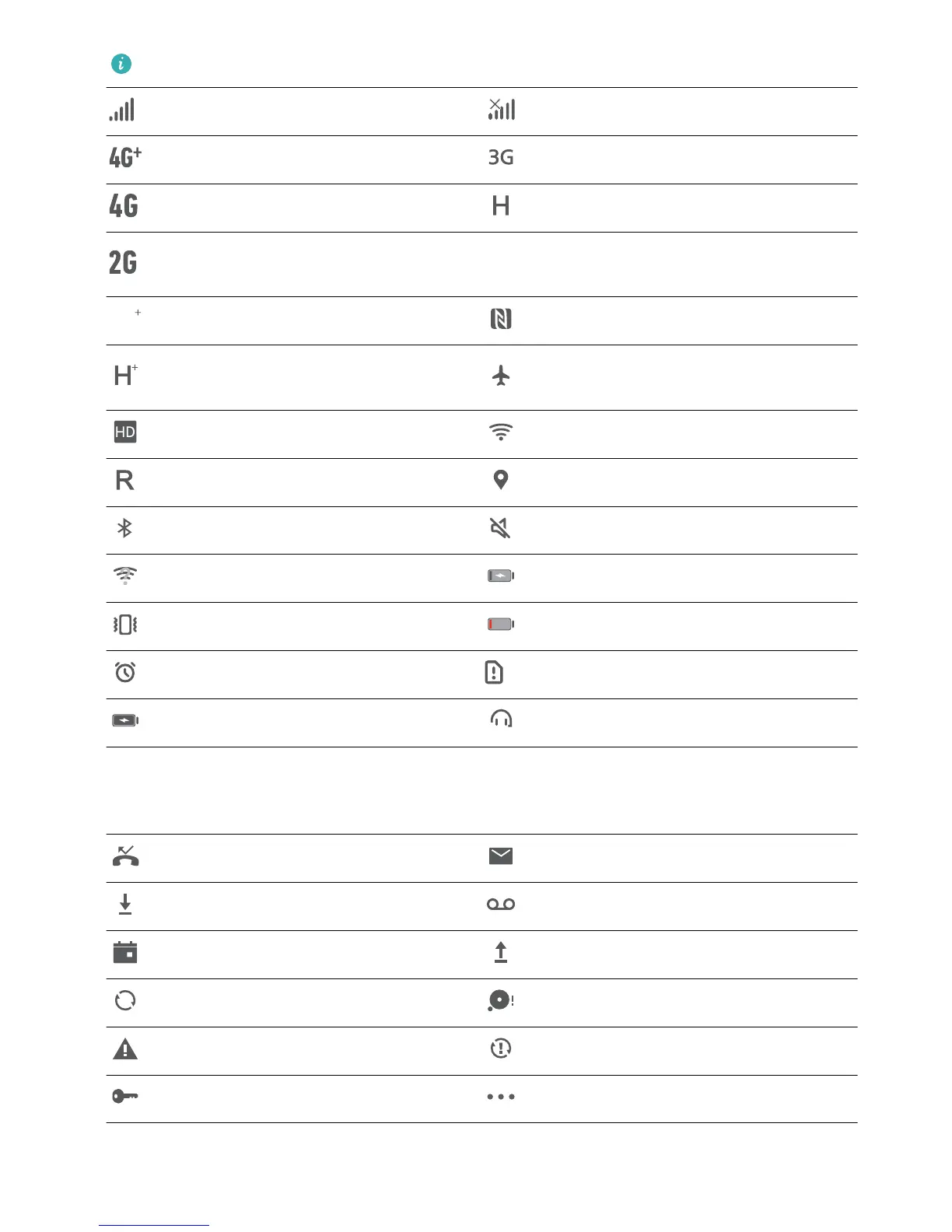
The network status icons may vary by regions and service providers.
Signal strength No signal.
4G+ network connected 3G network connected
4G network connected HSPA network connected
2G network connected
LTE+ network connected NFC enabled
Evolved High-Speed Packet Access
(HSPA+) network connected
Airplane mode enabled
VoLTE available Wi-Fi network connected
Roaming Receiving location data from GPS
Bluetooth enabled Silent mode enabled
Wi-Fi network detected Charging
Vibration mode enabled Battery level low
Alarm enabled No SIM card detected
Battery fully charged Headset plugged in
Notication icons: When there is a new message, notication or reminder on your Phone, the
relevant icon will be displayed in your status bar.
Missed call
New emails
Downloading data New voicemails
Event reminder Uploading data
Synchronizing data Phone memory full
Sign-in or synchronization problem Sync failed
VPN connected More notications
Home Screen
20



 To Next Page