Accessories and extensions
Bluetooth mouse (optional)
The Honor Bluetooth mouse connects to the computer wirelessly via Bluetooth. To start using
the Bluetooth mouse, you must first pair it with the computer.
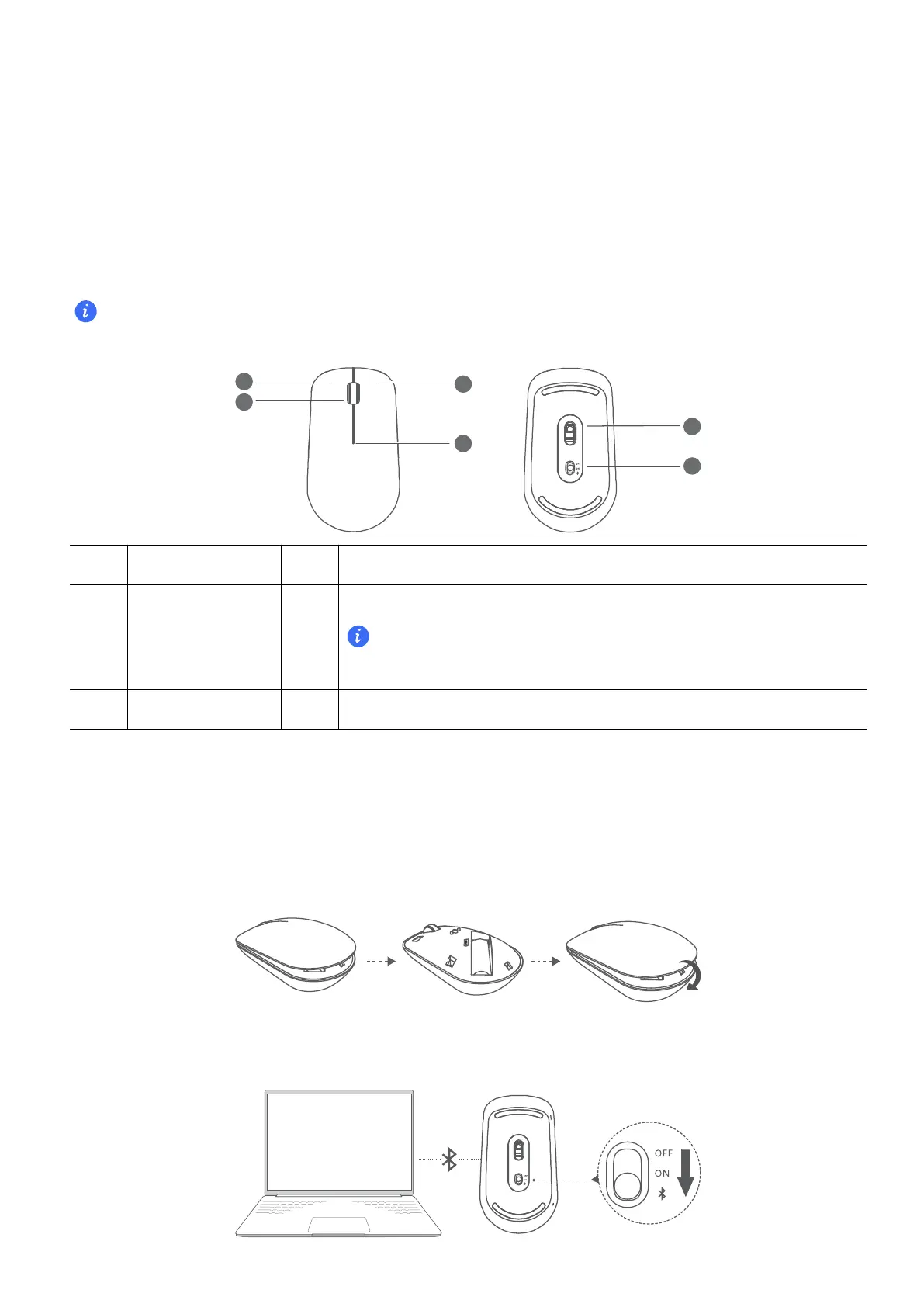
Getting to know the Bluetooth mouse
The Bluetooth mouse is an optional accessory and is sold separately.
1 Left button 2 Scroll wheel + Middle button
3 Right button 4
LED indicator
If the indicator blinks red, the battery is low on power and
should be replaced.
5 Sensor 6 Power/Bluetooth pairing switch
Install the battery
As illustrated below, remove the battery cover from the mark located at the bottom end of the
mouse. Insert one AA battery, making sure to match the + and - signs in the battery
compartment. Close the cover.
Pairing the Bluetooth mouse with the computer
17


 To Next Page