Security Solutions Partner
19
Figure 3.4
2.6 ActiveX Mode (For IE Browser)
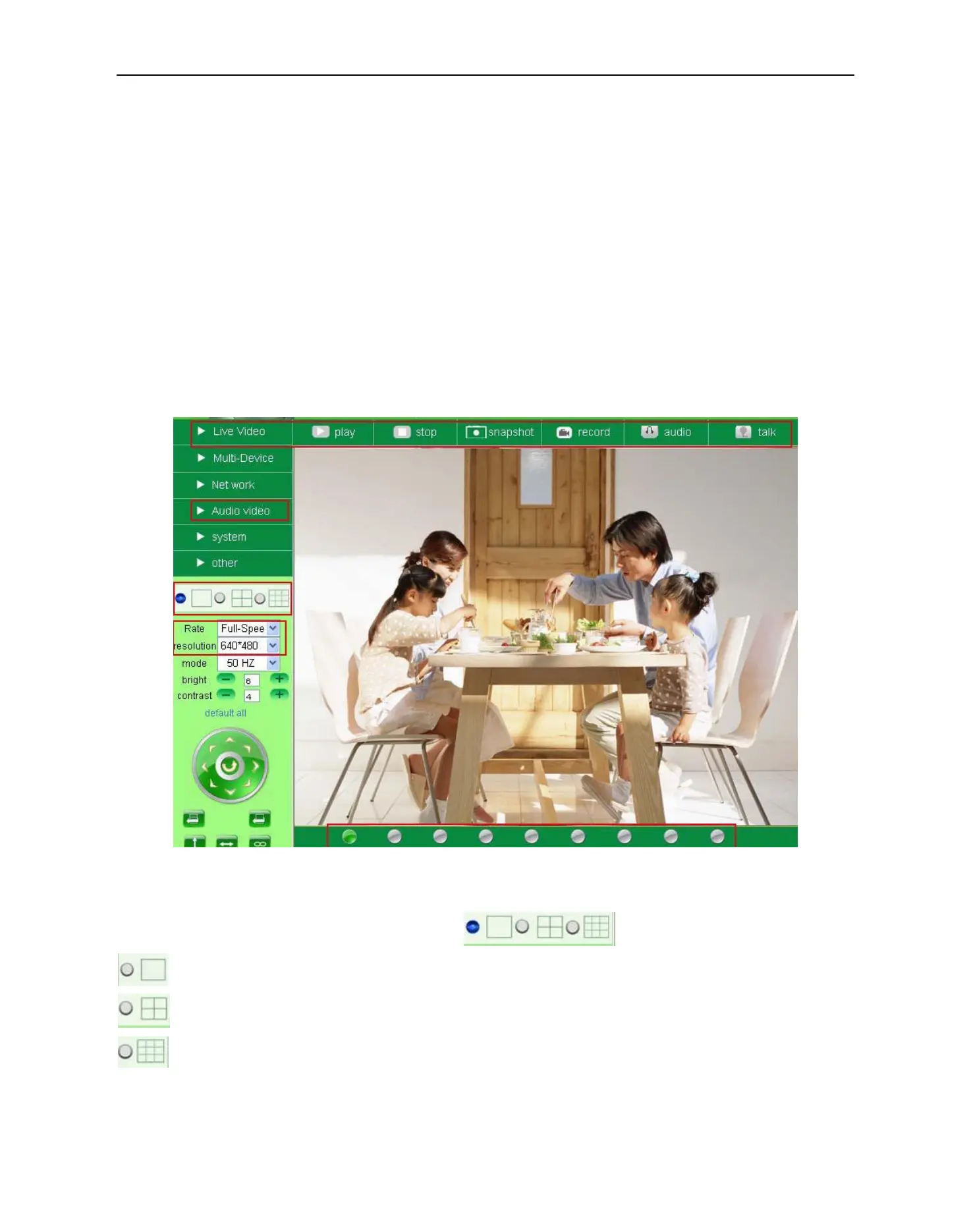
Login the camera in ActiveX mode, the main User Interface will be shown as below:
NOTE: There are 3 levels of users, Visitor, Operator, Administrator, if you login with different users, the
features/operations are different. (See 3.11 User Settings, Figure 8.5)
2.7 For Visitor
When logged in as Visitor, you can enter the IP Camera for visitor.
Visitor is the lowest level with only some operations available
Figure 3.5
Channels:
Our IE software supports 9 channels total. Clicking can get different windows.
: Click this one, you can view the main channel of the camera.
: Click this one; you can view 4 Channels of cameras that are connected, from CH1 to CH4.
: Click this one; you can view 9 Channels of cameras that are connected, from CH1 to CH9.
NOTE: If you want to view 4/9 channels, you should set the Multi-Device first (See 3.1 Multi-Device
Settings)


 To Next Page